
Inspiring
February 2, 2012
Question

Photoshop opening Javascript File as an Image

  • February 2, 2012
  • 1 reply
  • 1514 views

I have a series of Applescript droplets that perform a number of functions, then launch a javascript file in Photoshop

The codes looks like this:
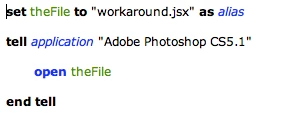
This has worked consistenlty for a year, but recently started throwing an error with certain javascript files.  Photoshop is trying to open the javascript file as an image.  The "do javascript" applescript command no longer works in Photoshop.  Does anybody have any idea what I might need to change to get Phootshop to run the javascript as a script?

Thank you

This topic has been closed for replies.

1 reply

Inspiring
February 2, 2012

Hum, I've NOT heard of any issues with AppleScript's do javascript command… From the snippet posted I would have expected Photoshop to try open the file thats what you asked it to do… Photoshop CS5 had an issue with AppleScript's alias file specifiers… It now prefers you pass a string then inside the tell app block state its a file… Im CS5 and this works just fine…

set jsFile to (path to desktop as text) & "AlertMe.jsx" -- text/string not alias

tell application "Adobe Photoshop CS5"

  activate

          tell current document

  do javascript file jsFile -- include the specifier file

          end tell

end tell

I only asked for the doc name in an alert but it worked…

alert( app.activeDocument.name );

Inspiring
February 3, 2012

Thank you! I just tried that and it sadly didn't work.  This is the error I get.  I've confirmed that it is not in the javascript file, but basically what happens when you righ click on a javascript file and go "open with Photoshop"

any other ideas?? thanks

Inspiring
February 3, 2012

I get alerted to the file name…