
Known Participant
January 15, 2024
Answered
Photoshop perplexation 2 ["Save As" on Windows not showing all file formats]
- January 15, 2024
- 2 replies
- 842 views
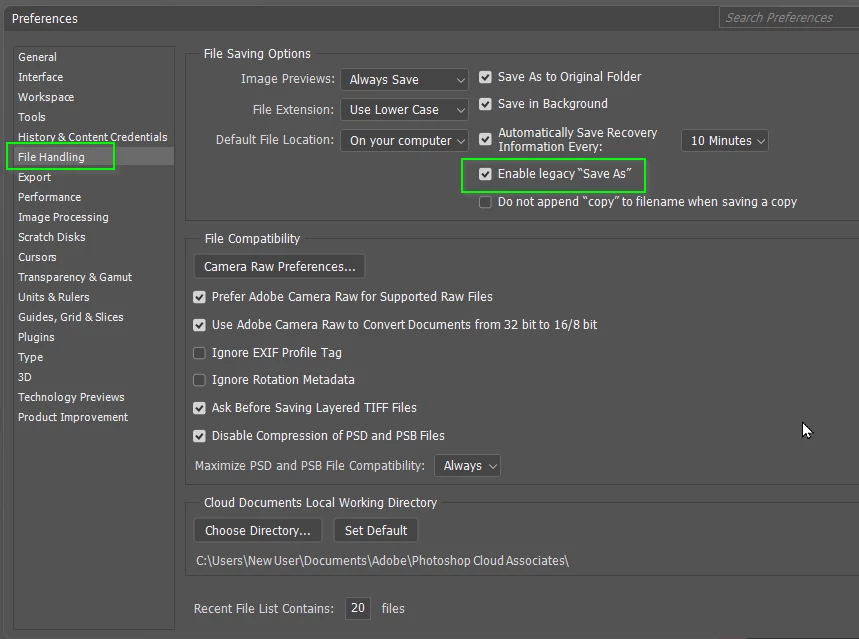
Ok, Photoshop on a PC is quite different from the Mac world. I Switched in 2020 and everything was peachy until about a year or so ago, Suddenly and with no warning, they changed the saving options and it's been killing me ever since. I thought at first that I did something wrong, but it was happening at home and now on my new work PC it's doing the same thing, It's the saving options! When saving a file on a mac you're given all the options as far as file format, on my PC it has 3 different sets and there is literally no rhyme or reason, trust me, I've been looking. Below are the various options I get. I want only ONE!! I want all the options and I choose; I HATE when they think they're helping but they are not I don't want to (Save a Copy) I want all my options. I move lots of files so when i go to save, Find my folder then I can't see all the options and have to click "save a copy" It's no longer on the folder I chose but somewhere else, if I don't catch this, I have to go find that file or create a new one. It's very time consuming. On a mac, no matter what you do, you have all file format options. Please tell me how to fix this.
 AdChoices