
Garry Bradley
Inspiring
March 16, 2017
Answered

Photoshop .psd files lose save location

  • March 16, 2017
  • 3 replies
  • 733 views

Hi

Ever since I've had Photoshop CC 2017 installed on my Mac to replace CS6 it won't remember where files have been saved.

To explain more, I open a file, say, off my desktop, do a change then save with Cmd S as normal. That's fine. Any subsequent work on the file then throws up the Save As dialogue because it's lost the route the file. This then happens on every save I do until I close the file and it's so annoying.

What I've established is that it only does it with .psd files and not .tif or .psb which is strange. The file can be tiny and nowhere near 2gb which forces it to use .psb format. Also if I Cmd click on the title bar which normally shows you the route to the file it loses it's .psd icon and can't find where it is.

Apart from totally reinstalling Photoshop, I can't figure out why this is happening. Creating new PS preferences doesn't work and the only third party utility I'm using is Default Folder, I turned that off and it still happens. CS6 doesn't suffer from this so I'm at a loss.

Just me or anyone else?
    This topic has been closed for replies.
    Correct answer gener7

    As a Mac owner, I have never seen this.

    If you disable a utility, Restart to make sure it takes effect.

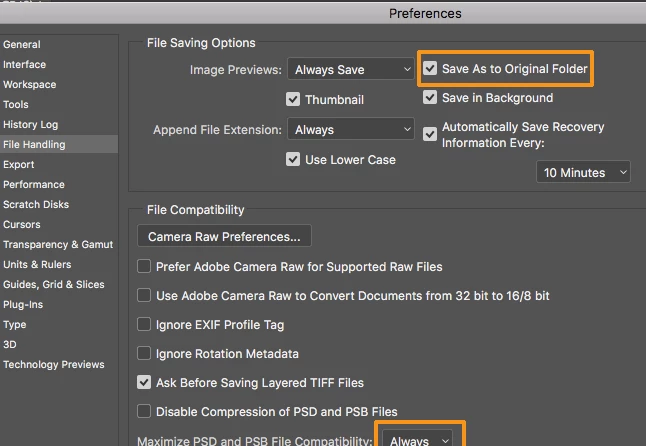
    You could check File handling preferences. See the circled boxes

    But if that does not help, uninstall and use the Use the Creative Cloud Cleaner Tool to solve installation problems

    then reinstall through the CC Desktop app.

    3 replies

    Garry Bradley
    Inspiring
    March 17, 2017

    No there's no illegal characters and just saving it as test.psd does the same thing. Nothing in the File Saving Options stopped it unfortunately. Strange it's just the .psd format that's affected.

    Like you say it needs cleaning off and reinstalling... if I can get past our IT department that is! Thanks.

    c.pfaffenbichler
    Community Expert
    Community Expert
    March 16, 2017

    What is the filename? Could there be any illegal characters involved?

    gener7
    Community Expert
    gener7Community ExpertCorrect answer
    Community Expert
    March 16, 2017

    As a Mac owner, I have never seen this.

    If you disable a utility, Restart to make sure it takes effect.

    You could check File handling preferences. See the circled boxes

    But if that does not help, uninstall and use the Use the Creative Cloud Cleaner Tool to solve installation problems

    then reinstall through the CC Desktop app.