
Participant
April 15, 2019
Answered

Photoshop requires windows 10 (version 1607) or later.

  • April 15, 2019
  • 3 replies
  • 30616 views

Photoshop does not start on my laptop. It works fine on my desktop, the laptop gets an error message like the following "Adobe Photoshop requires Windows 10 Anniversary update (version 1607) or latter. Upgrade for free to a newer version to run Photoshop". However, my windows update setting say that I already have the latest update installed and if I click "check for updates" the only response I get is "Your device is up to date".

I've tried reinstalling Photoshop, I've tried older versions like 19.1, and I deleted all the system preferences when reinstalling. I also tried updating.

Has anyone else ran into this problem? If so, what did you do to resolve it?

Any help is appropriated thank you
    This topic has been closed for replies.
    Correct answer

    Hi

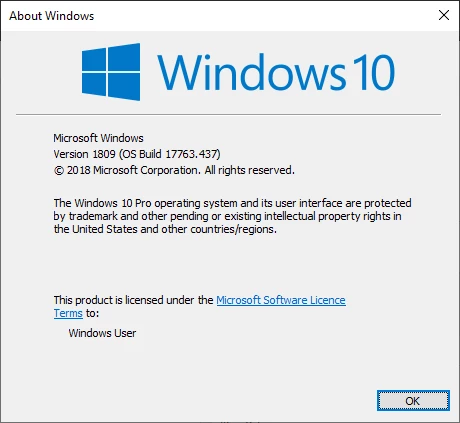
    What exact version of Windows 10 do you have on the Laptop, on the start button type winver and hit return you should get a dialog like this

    3 replies

    John Waller
    Community Expert
    Community Expert
    April 15, 2019

    However, my windows update setting say that I already have the latest update installed and if I click "check for updates" the only response I get is "Your device is up to date".

    I gave up relying on the Windows Update tool a long time ago. It's known to sometimes declare that you're up-to-date when you're not. The recent 1809 update debacle is a classic example.

    As Ged says, check your exact version using "winver". You may be able to download updates manually, without using the Windows Update tool.

    aron_mAuthor
    Participant
    April 15, 2019

    Yes just like Ged said, I did not have the latest version of windows, and just like you said the windows update tool is not reliable. Thank you for the help! If you have a tip for updating manually i'm all ears

    John Waller
    Community Expert
    Community Expert
    April 15, 2019

    You can manually update to the current version 1809 (assuming your hardware can handle it) via the Microsoft website

    https://support.microsoft.com/en-au/help/4028685/windows-10-get-the-update

    Correct answer
    April 15, 2019

    Hi

    What exact version of Windows 10 do you have on the Laptop, on the start button type winver and hit return you should get a dialog like this

    aron_mAuthor
    Participant
    April 15, 2019

    thank you! I looked up and you where indeed correct, the windows update tool is inaccurate!

    Appears I have quite and old version of windows. I will look up how to update the service manually thank you!

    Nancy OShea
    Community Expert
    Community Expert
    April 15, 2019

    A better question might be, does your laptop meet all the other requirements to run the latest version of Photoshop?

    Photoshop system requirements

    You probably just need to uninstall everything with the Cleaner Tools below

    Use the Creative Cloud Cleaner Tool to solve installation problems

    And then install an older version like CC 2017.   See screenshot from CC Desktop App.

    Nancy O'Shea— Product User & Community Expert