Participant
September 3, 2021
Answered

Photoshop Ruined I have been using Photoshop 5 for years and the recent update by Adobe makes it bad

  • September 3, 2021
  • 2 replies
  • 739 views

At 85 years old I don't like changes. When Adobe recently updated the version I have been using, it made it unusable for me. I want the old version 5 back.
    This topic has been closed for replies.
    Correct answer Jeff Arola

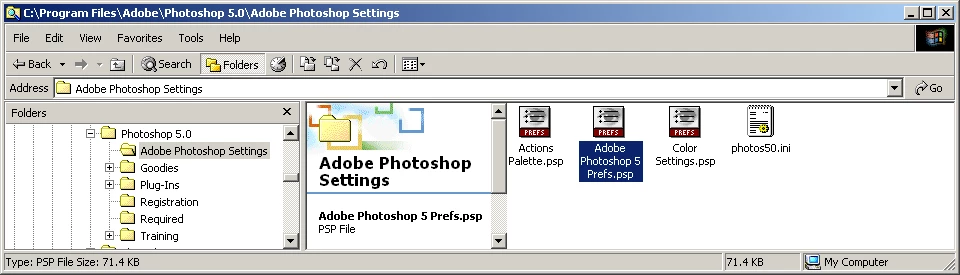
    To reset the photoshop 5 preferences go to


    either


    C:\Program Files\Adobe\Photoshop 5.0\Adobe Photoshop Settings

    (windows 10 32 bit system)


    or


    C:Program Files (x86\Adobe\Photoshop 5.0\Adobe Photoshop Settings

    (windows 10 64 bit system)


    and delete the


    Adobe Photoshop 5 Prefs.psp


    2 replies

    Legend
    September 4, 2021

    Adobe didn't update your version 5. There hasn't been an update in over 20 years.

    Participant
    September 4, 2021

    Thanks for your help. I really am not sure what happened, but I opened photoshop a few minutes ago and the problem was corrected.


    Jeff Arola
    Community Expert
    Community Expert
    September 3, 2021

    Do you have photoshop 5 (circa 1998), photoshop 5 LE (circa 1998), photoshop cs5 (circa 2010) or photoshop elements 5 (circa 2006)?


    What operating system are you using?


    Do you know what adobe update caused the issues?


    Have you tried resetting the photoshop preferences?

    Participant
    September 4, 2021
    yes I am using 1998 version with windows 10 the update was about a week ago. How do I reset the preferences? What changed was when you want to add layers to an image such as enhancement of a color they made it so small it is difficult to make the changes. Thank you   Gene urroughs
    Jeff Arola
    Community Expert
    Jeff ArolaCommunity ExpertCorrect answer
    Community Expert
    September 4, 2021

    To reset the photoshop 5 preferences go to


    either


    C:\Program Files\Adobe\Photoshop 5.0\Adobe Photoshop Settings

    (windows 10 32 bit system)


    or


    C:Program Files (x86\Adobe\Photoshop 5.0\Adobe Photoshop Settings

    (windows 10 64 bit system)


    and delete the


    Adobe Photoshop 5 Prefs.psp