Participant
November 20, 2010
Answered

Photoshop's JPEG Algorithm - from a website (Apache) environment

  • November 20, 2010
  • 2 replies
  • 1927 views

I'm not sure if this is the correct forum for this post, but none of the others seemed to fit either.  Here is my situation: I am the programmer for a website that maintains images.  I need to modify the images "on the fly", and I've done what needs to be done using a php module called GD2.  The problem is this: the saved JPEG images, even when saved at quality=100, are no match for the images as saved via photoshop. The website runs php code under Apache in a Linuz environment.

So, my question is this: what image manipulation tool is available to me in that environment (php, Apache, Linux) that uses photoshop's JPEG writing algorithm?

Original Image created by photoshop:
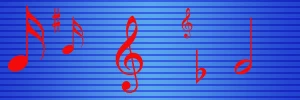
Image that results from simply read / save 100% in GD2.
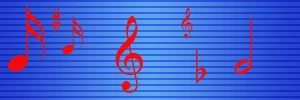
FYI, I also opened the image using IrfanView, and saved it at 100%, the results are a near match to what I got from GD2.

This topic has been closed for replies.
Correct answer Chris Cox

So, my question is this: what image manipulation tool is available to me in that environment (php, Apache, Linux) that uses photoshop's JPEG writing algorithm?

None.

You'd have to be running Photoshop to use Photoshop's JPEG code.

Photoshop is not using an open source JPEG library.

Though, you should be able to get a lot closer than that -- it looks like someone dialed the quality WAY down on the version you saved.

Most notably, your version has excessive chroma subsampling.

2 replies

Inspiring
November 20, 2010

What "modifications" do you need to make?

If they are limited to a small part of the image, you may be able arrange to leave most of the JPEG data unchanged, rather than fully decompressing and recompressing. It all depends on how much you can invest in the problem, I guess...

FubsterAuthor
Participant
November 21, 2010

I appreciate the idea qu1j0t3, but the changes are extensive enough that I believe a complete re-encode would be required.

Inspiring
November 21, 2010

Chris of course is right to finger chroma subsampling as the cause of most of the damage. I played with Save for Web and saw that serious subsampling kicks in at quality 50. I speculate you can probably fix this by tweaking parameters of jpeg compression (but I haven't verified this). Libjpeg is probably what gd's using under the hood. If gd doesn't directly give you access to the right parameters, then you can make some kind of wrapper to the library yourself. Might also be worth checking if there are other jpeg libraries out there (I haven't).

Chris Cox
Chris CoxCorrect answer
Legend
November 20, 2010

So, my question is this: what image manipulation tool is available to me in that environment (php, Apache, Linux) that uses photoshop's JPEG writing algorithm?

None.

You'd have to be running Photoshop to use Photoshop's JPEG code.

Photoshop is not using an open source JPEG library.

Though, you should be able to get a lot closer than that -- it looks like someone dialed the quality WAY down on the version you saved.

Most notably, your version has excessive chroma subsampling.

FubsterAuthor
Participant
November 20, 2010

Thanks for the reply....I marked it correct answer even though I am devastated by it.

Beleive it or not, that second JPG WAS saved at 100% quality.  In fact, here is the same starting JPG, using the popular free utility IrfanView, again saved with quality=100%.

Part of the reason this looks so bad is that I created an image with red details on a blue background, I guess the human eye is more sensitive to those colors.  So...follow up question - since you say "you should be able to get a lot closer than that", does anyone know what other alternatives ARE available for me?  Most of our images are NOT going to be this sensitive, but still, I don't think we will view this option as acceptible.

(and should I make that Q a separate thread since this one already has a "correct answer" flag attached to it?)

Chris Cox
Legend
November 20, 2010

Nah, we can keep discussing it here.

I can't believe a JPEG encoder would do that much damage at 100% quality.

The color channels have been downsampled pretty badly.