Inspiring
July 21, 2022
Answered

Photoshop's 'Save For Web' dialog box opens at the bottom left corner of screen (macOS)

  • July 21, 2022
  • 2 replies
  • 4634 views

When use the save to web, then choose setting, and do jpeg, the "Save optimized As box comes up,  and you save it to  desktop, I'd like it to remember to go under the save to web box, but it keep going to the lower left part of monitor, every time, and worse part is the  blue save button get cut off from scree. Photoshop cannot remember wehre to put this?
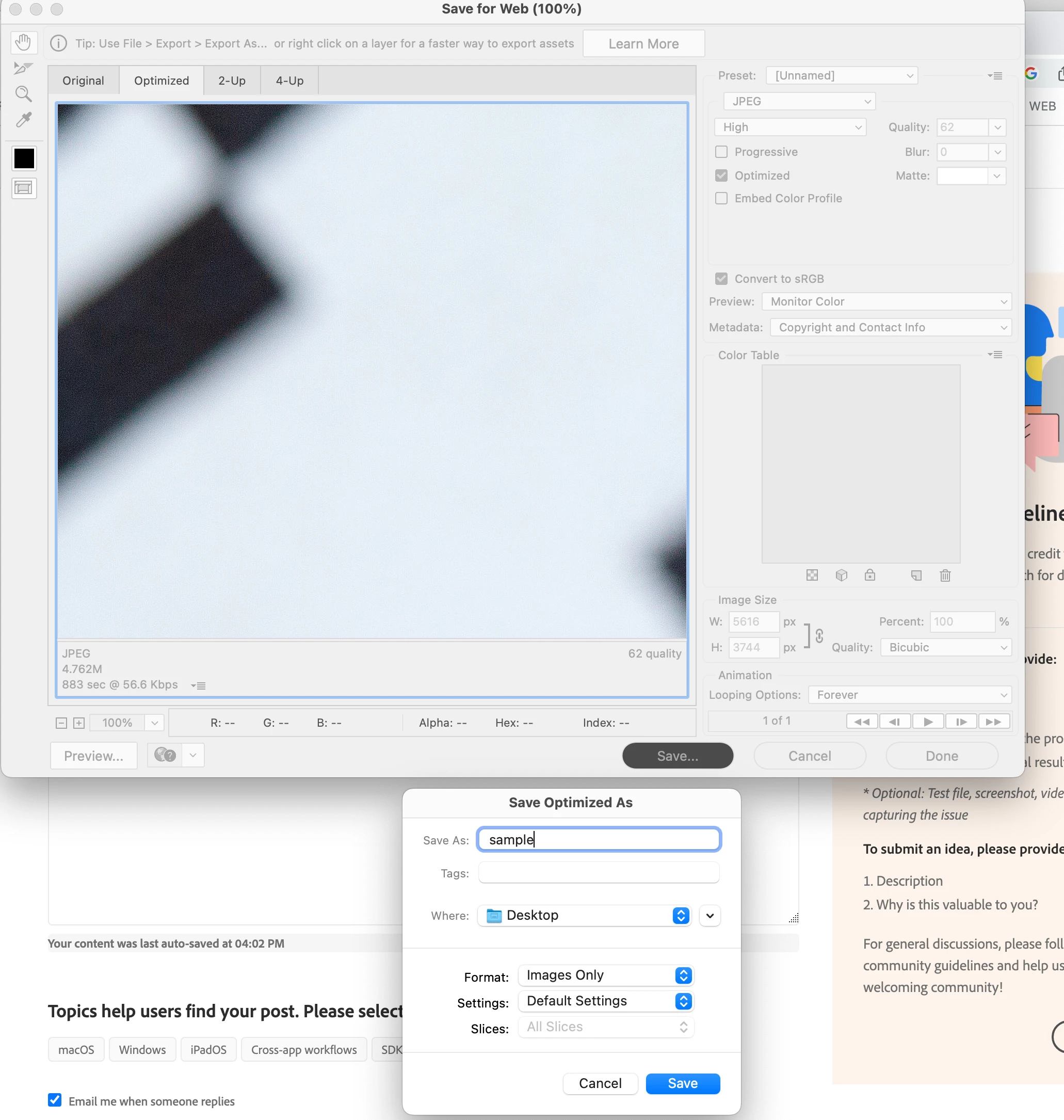
 

See here always comes up lower screen and blue save cut off, have drag it up to click save


{Title edited by Moderator}
This topic has been closed for replies.
Correct answer gener7

I notice my SFW Finder dialog does the same thing. It jumps to the lower left hand corner like yours does, but I notice you have the "compact" dialog. I use the expanded dialog and at least I can get to the Save/Cancel buttons that are clipped off.


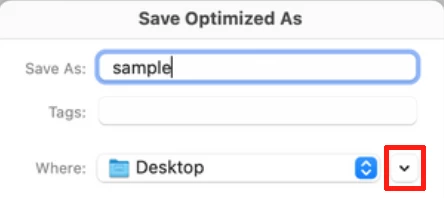
Here's how to get it:  Just click the down-pointing arrow outlined in red, it will change to an up-pointing arrow.

Cancel out (even if you have to move the dialog) or try the ESC key.  Then click the save button from the SFW dialog and you should be presented with a larger size dialog. It will still be on the lower left side, but you will have an easier time using it because it's not clipped off.

End result:


2 replies

gener7
Community Expert
gener7Community ExpertCorrect answer
Community Expert
February 10, 2023

I notice my SFW Finder dialog does the same thing. It jumps to the lower left hand corner like yours does, but I notice you have the "compact" dialog. I use the expanded dialog and at least I can get to the Save/Cancel buttons that are clipped off.


Here's how to get it:  Just click the down-pointing arrow outlined in red, it will change to an up-pointing arrow.

Cancel out (even if you have to move the dialog) or try the ESC key.  Then click the save button from the SFW dialog and you should be presented with a larger size dialog. It will still be on the lower left side, but you will have an easier time using it because it's not clipped off.

End result:


Participant
February 10, 2023
That's a great quick fix! Thank you very much. Hopefully, Adobe will continue to fix this bug so our save window can be placed anywhere on the screen.
gener7
Community Expert
Community Expert
February 11, 2023
quoteHopefully, Adobe will continue to fix this bug so our save window can be placed anywhere on the screen.

By @Jewels Cross


Unfortunately, no. SFW is a "deprecated" feature.

"Deprecated" means they don't recommend using it, and that it isn't undergoing further development.

All I'm able to do at least is to show you the expanded dialog which works better than the compact version.


That's my understanding unless an Adobe Employee knows more.


Gene

Ranjisha Sengupta
Legend
July 22, 2022

Hi there,


Sorry to hear about the trouble with Photoshop. We're here to help.

Could you please share the version of Photoshop (Help > About Photoshop) and macOS? Does this happen even after you have moved the dialogue to the center? How many monitors do you have connected? Does this happen on the primary monitor if you have more than two monitors?


Please ensure Photoshop has the required disk access & permissions: https://community.adobe.com/t5/photoshop-ecosystem-discussions/quick-tips-learn-how-to-give-full-dis...


Go to the location of the preference folder mentioned below and rename it to backup. 

https://helpx.adobe.com/photoshop/using/preferences.html


  • macOS: In the Finder, hold down the Option key when using the Go menu > Go to /Library/Preferences/Adobe Photoshop [version] Settings
  • Rename the Adobe Photoshop folder by adding a .old at the end. (Adobe Photoshop 2022 > Rename > Adobe Photoshop 2022. old)


These changes will give a fresh start to Photoshop as a fresh install.


Let us know how it goes.


Regards,

Ranjisha

Participant
September 18, 2022

Hi,

I'm having this exact problem. On Photoshop 2022 whether it's on a single display or on an extended it's the exact same problem. Even if you do move the pop up window (which you have to do to hit save) it will happen again everytime. I've included a screenshot of how it looks, and how random the location is. I assume the OP's issue is the exact same. Is there an option to have all popups appear in the center of the screen? Also, the Close Popup button doesnt work, i have to press Esc. on the keyboard.

Participant
October 21, 2022

Same thing happens to me to. Brand new Mac, Mac Studio display. All software & OS up to date. I hope there is a solution.