
ventzi.raikov
Participating Frequently
January 12, 2022
Answered

Photoshop save big file size of images

  • January 12, 2022
  • 3 replies
  • 1398 views

I have problem with Photoshop Save for web file size


For example - initial PSD file with layers is 14 MB, 400x400 px,

 save for web jpg file size of 400x400 px is 10 MB (screenshot),

Save as PDF file size is 13+MB (no layers, high quality print)

What is this?

PS version is 22* and 23*, windows 10


Correct answer J453

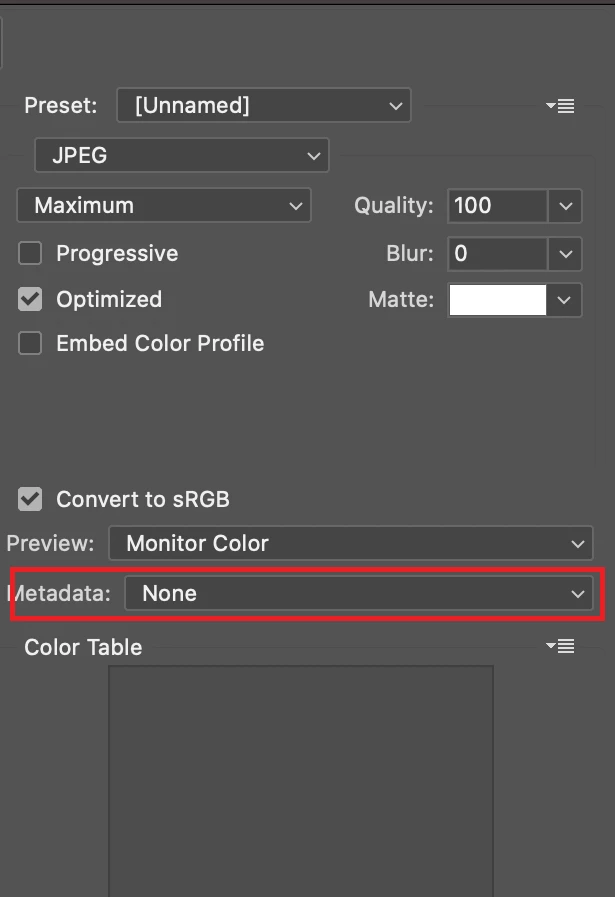
Change the pop-up for Metadata in the Save for Web dialog to "None" or "Copyright Only" and re-export:
 

3 replies

Stephen Marsh
Community Expert
Community Expert
January 12, 2022
ventzi.raikov
Participating Frequently
January 12, 2022

Ye, thanks for that, i knew it, but search for this for two days and I'm realy angry to Adobe for that and want they know users don't need to be bugfixers instead of designers.

Also, the PDF problem is here, so..

Legend
January 12, 2022

Retaining metadata based on your settings is not a bug.


The PDF is of similar size because it contans the same metadata.

ventzi.raikov
Participating Frequently
January 14, 2022

Showing one size but saving other - this is defenitely a bug. Messing users with this very large files saved for web is just a great UX failure.

J453Correct answer
Legend
January 12, 2022

Change the pop-up for Metadata in the Save for Web dialog to "None" or "Copyright Only" and re-export:


D Fosse
Community Expert
Community Expert
January 12, 2022

Generally, this is the result of a long history of copy/paste/place instances. This can accumulate in files that have been used as templates, for instance.
