Participant
March 11, 2020
Question

Photoshop Script to randomly select from Actions

  • March 11, 2020
  • 1 reply
  • 500 views

Hi friends,


I do not know coding at all. 

I have created a Set of Actions in Adobe Photoshop CC (2019), like so...
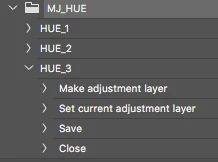
Im looking for some help in writing a piece of script/code (javascript Im guessing? But whatever will work is fine) which will RANDOMLY select and play one of the three Actions from the Set.


Set Name = "MJ_HUE"
Action Names = "HUE_1", "HUE_2", "HUE_3"


Ive been trying to figure this out using this thread, but Im having no luck so far. I imagine this is quite simple for someone who knows coding (I definitely do not). 
If you need further clarification, please dont hesitate to ask 🙂


Thanks
Chris

    This topic has been closed for replies.

    1 reply

    Chuck Uebele
    Community Expert
    Community Expert
    March 12, 2020

    Try this:

    #target photoshop
    var doc = activeDocument
    
    actionArray = ["HUE_1", "HUE_2", "HUE_3"];//put your action names here.
    
    var randomNum = Math.floor(Math.random()*actionArray.length);
    
    playAction (actionArray[randomNum]);
    
    function playAction(action){
        var idPly = charIDToTypeID( "Ply " );
            var desc11 = new ActionDescriptor();
            var idnull = charIDToTypeID( "null" );
                var ref2 = new ActionReference();
                var idActn = charIDToTypeID( "Actn" );
                ref2.putName( idActn, action );
                var idASet = charIDToTypeID( "ASet" );
                ref2.putName( idASet, "MJ_HUE" );//Change this to whatever your action set is called
            desc11.putReference( idnull, ref2 );
        executeAction( idPly, desc11, DialogModes.NO );    
        }