
Inspiring
November 23, 2023
Answered

Photoshop Scripting - Assign color to layerSets

  • November 23, 2023
  • 2 replies
  • 496 views

Hi,

I've just started down the road of coding with Javascript and would love some help.

I've been searching all over and I can't seem to find a simple way to change the color of layerSets.


//Create OLD Folder
var grpOld = app.activeDocument.layerSets.add();
grpOld.name = "OLD";
grpOld.visible = 0;


In my code I'll like to add a line that just assigns the layerSet to the colors available i.e. no color, red, orange, yellow, green, blue, violet & gray.
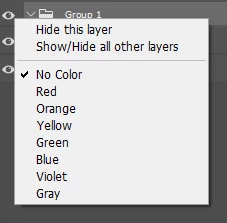


Any help on this would be great,

Thanks.


This topic has been closed for replies.
Correct answer c.pfaffenbichler


// 2023, use it at your own risk;
colorLayer ("violet");
////// change color //////
function colorLayer(theColor){ 
try {
var desc33 = new ActionDescriptor();
var ref10 = new ActionReference();
var idLyr = charIDToTypeID("Lyr ");
ref10.putEnumerated(idLyr, charIDToTypeID("Ordn"), charIDToTypeID("Trgt"));
desc33.putReference(charIDToTypeID("null"), ref10 );
var desc34 = new ActionDescriptor();
var idClr = charIDToTypeID("Clr ");
desc34.putEnumerated(idClr, idClr, stringIDToTypeID(theColor));
desc33.putObject(charIDToTypeID("T   "), idLyr, desc34);
executeAction(charIDToTypeID("setd"), desc33, DialogModes.NO);
}catch(e){
alert(e.message); 
}
};


2 replies

Stephen Marsh
Community Expert
Community Expert
November 23, 2023
/*
No Color = "none"
Red = "red"
Orange = "orange"
Yellow = "yellowColor"
Green = "green"
Blue = "blue"
Violet = "violet"
Gray = "gray"
*/
Inspiring
November 23, 2023

Hi Stephen,


Thanks for that. How would I implement that in the code I put in at the top?


Thanks.

Stephen Marsh
Community Expert
Community Expert
November 23, 2023

The function provided by @c.pfaffenbichler has a parameter for "violet" in the function call. Just swap that for one of the other named colours. The reason that I posted the list is that yellowColor isn't obvious.

c.pfaffenbichler
Community Expert
c.pfaffenbichlerCommunity ExpertCorrect answer
Community Expert
November 23, 2023


// 2023, use it at your own risk;
colorLayer ("violet");
////// change color //////
function colorLayer(theColor){ 
try {
var desc33 = new ActionDescriptor();
var ref10 = new ActionReference();
var idLyr = charIDToTypeID("Lyr ");
ref10.putEnumerated(idLyr, charIDToTypeID("Ordn"), charIDToTypeID("Trgt"));
desc33.putReference(charIDToTypeID("null"), ref10 );
var desc34 = new ActionDescriptor();
var idClr = charIDToTypeID("Clr ");
desc34.putEnumerated(idClr, idClr, stringIDToTypeID(theColor));
desc33.putObject(charIDToTypeID("T   "), idLyr, desc34);
executeAction(charIDToTypeID("setd"), desc33, DialogModes.NO);
}catch(e){
alert(e.message); 
}
};


Inspiring
November 23, 2023

Appriciate it.


Is this taken from the javascript listener? It just seems so bloated.


Is there no simplier way? I know I'm being picky it just seems an excessive amount of code for what seems like such a simple task.


Thanks.

c.pfaffenbichler
Community Expert
Community Expert
November 23, 2023

That’s Action Manager code, so essentially what you would get with ScriptingListener.plugin (although it is slightly »cleaned up«). 


Not all of Photoshop’s features are available via DOM code, so AM code it »has to be« sometimes. 

The advantage being that AM code usually runs faster.