
Known Participant
June 8, 2017
Question

photoshop scroll bar mac os sierra issue

  • June 8, 2017
  • 8 replies
  • 2204 views

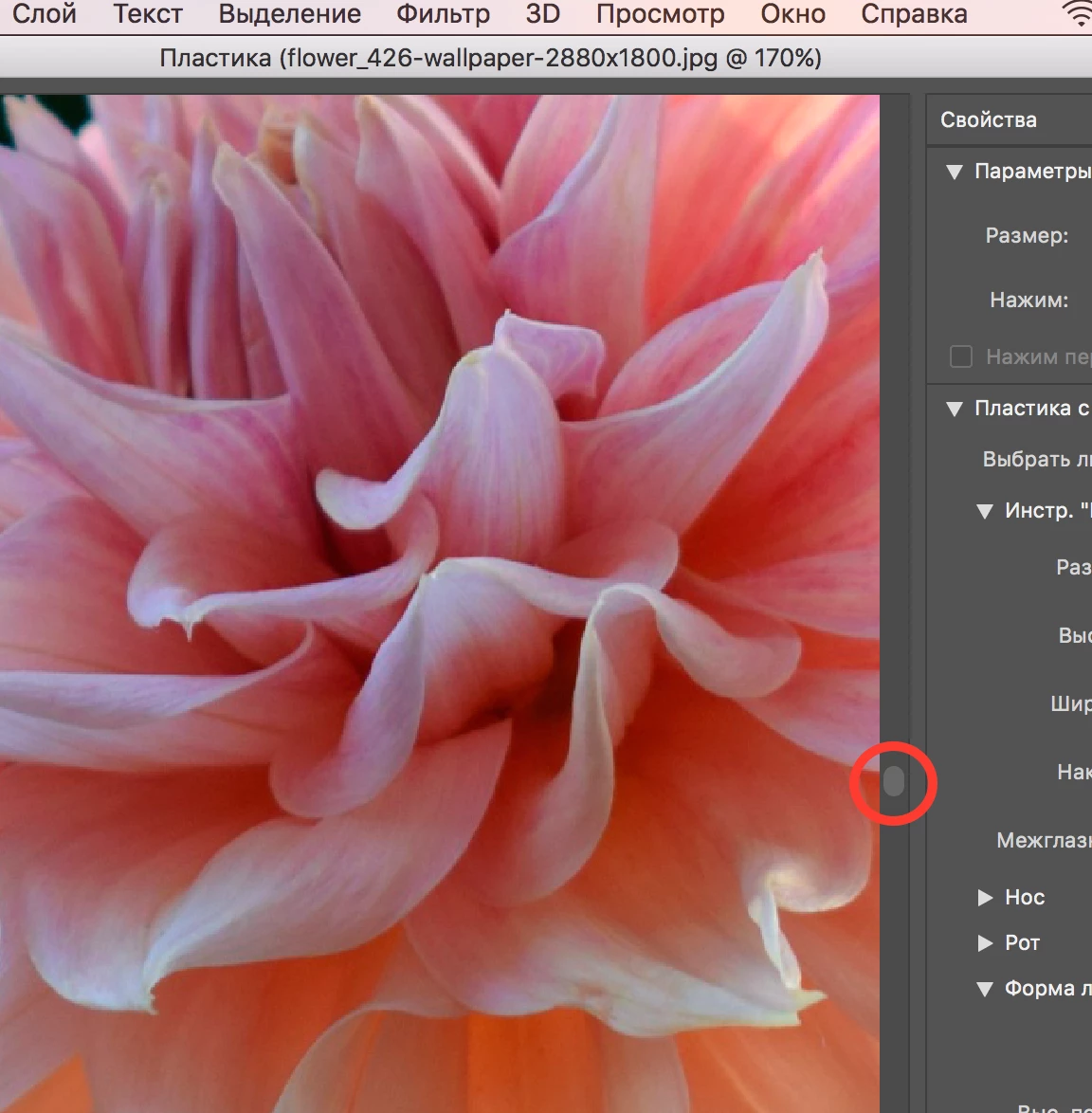
when scroll bar is used photoshop freezes/crashes. liquify filter was used for test. i am running latest version of ps 2017.1.1 and mac os sierra 10.12.5

MacBook Pro (Retina, 15-inch, Mid 2015)

2,2 GHz Intel Core i7

16 ГБ 1600 MHz DDR3

Intel Iris Pro 1536 МБ

please fix this issue or recommend how to bypass it

video and screenshot added
 

8 replies

Known Participant
November 6, 2017

it was fixed in recent update

Known Participant
October 4, 2017

it is already 4 month passed since i have informed you regarding this issue. you promised to fix it in the future updates. still now did not received any updates from you for a long period of time. so what is the status - did you solved the issue raised in ticket 0189012423?

Known Participant
June 28, 2017

update 4. just got the same issue on macbook pro 13 early 2015 (2,7 core i5, 8gb, Intel Iris Graphics 6100)! it was new macbook from one of a retail shops around

so now it is clear that the problem for sure is NOT ONLY in my macbook - it is present on all other macbooks also! (at least tested by me so far)

Known Participant
June 21, 2017

update 3. just completely reinstalled mac os to Yosemite 10.10 (this version was Initially pre-installed on this macbook mid 2015 from factory). after setup the first thing I did was install it latest version of photoshop 2017 (i did not installed any other apps, did not plugged in any mouse or wacom tablet - just virgin unspoiled mac os). anyway got the same issue again!

so now it is clear that the problem for sure is NOT ONLY in mac os Sierra

Known Participant
June 21, 2017

update 1. just tried to reconstruct the issue using remote access teamviewer app (from my other notebook via teamviewer to my macbook) - but i failed. via remote access everything works fine - no issues. as soon as i disconnected from teamviewer and returned back to normal work - got the issue again

update 2. completely reinstalled mac os (from macOS Recovery - https://support.apple.com/en-us/HT204904) to the latest sierra. after setup the first thing i made - was installing latest version of photoshop (did not installed any other apps, did not plugged in any mouse or wacom tablet - just virgin unspoiled mac os). anyway got the issue again! so now it is clear that the problem for sure is NOT in mouse or other apps/drivers/periphery

S_Gans
Community Expert
Community Expert
June 10, 2017

I can attest to there being weird crashes that happen with Photoshop, and weird behaviors that're near impossible to explain (eg: I had a couple of versions of PS on my machine a ways back - still do. When I opened CC2015.1, I'd also get CC2014 opening at the same time - for no apparent reason. Nobody could help, until I tracked it down to a Safari plugin that'd been installed by one of Adobe's things! I don't remember what - but as soon as I disabled it, all worked as it should!)

So - this seems to happen almost exclusively when you access filters - in this case, Liquify. From what you say, it seems to affect what I call the "fancy" ones at the top of the filters menu. How's about the ones that don't use a dedicated window - I mean, something simple like, Noise? Blur (without the Gallery)? I'm trying to determine if it has to do with just the opening of special windows to do the job.

Do you have any third party plugins or extensions installed? Have you tried disabling those? IF you have any third party plugins, and they open their own special windows to do their job, does anything weird happen?

Sorry to put you through all these questions, but there're so many things to consider here. The errors you get on top have been previously attributed to lots of other apps, particularly when there isn't enough RAM. You have the max RAM you can have in there... is your hard drive very full though? I see some VM use, but the only way that'd affect things is if your HD is tight on space.

So - trying to find out what's not playing nicely with your PS Preference file like this.

BTW - have you started into the Recovery drive and checked the drive and also Permissions? If this is trying to access something in a Library folder where the permissions are messed up, things like this can happen too.

My answers here are kind of "stream of consciousness", since I'm kinda running through what I'd be troubleshooting if it was my machine.....

Weirdly - DO check the Acrobat plugin in Safari and make sure it's Sierra's version... I know, sounds weird, but after my own experience, I don't consider anything weird anymore!

Adobe Community Expert / Adobe Certified Instructor
Known Participant
June 12, 2017

thanks for the reply again

just tested with noise filter - it does not have scroll bar button so there is no issue could be with it, everything works fine. but, for example, blur filter do have scroll bar and this issues is present here again

no, i do not have any third party plugins or extensions installed. this is new just installed mac os with new root user and ps an lt on it. so there is no other things that could conflict with it

my ssd have free space of 225gb from 256gb

i checked the drive and permissions - everything is fine with it

there is only one plugin installed in safari - Creative Cloud Desktop Plugin.v_3_0_0_0. tried to disable it but the issue was again

S_Gans
Community Expert
Community Expert
June 8, 2017

Hi. I just tested the same test as you did. I was wondering, since I only recently upgraded to Sierra 10.12.5 (also newest Photoshop). I tried scrolling in Liquify (on both a regular object and a smart object), and scrolling an open window. I had no problems. I'm even using an older Mac Pro  tower - in which I have a non-standard GPU (upgraded, using a GPU made for Windows and flashed to work with Mac), and it still worked for me. So, I kind of feel maybe the issue isn't with Photoshop at all, but maybe your system.

One thing that's worked for me for other problems in the past was that even when disabling/re-enabling the GPU made no difference, the setting under "Advanced Graphics Processor Settings" did help. When I had some problems before, changing the setting from Advanced to Normal seemed to help. Might be worth a shot.

Otherwise, I might suggest talking to someone at the Genius bar... I hate to say that, but after all you've been through with Adobe on this, there may be a Mac-based incompatibility you're experiencing? LUCK!

Adobe Community Expert / Adobe Certified Instructor
Known Participant
June 9, 2017

hi. thanks for the reply. just tested with normal mode - did not helped. and i am almost sure it is not mac-based incompatibility because all other apps it is running good and passed all stress tests like geekbench 4 and native MacBook selftest also fine

just now figure out that the problem actually is not in liquify filter only! i get the same issue using all other filters like adaptive wide angle, lens correction and vanishing point etc.. the only one place where the scroll bar is working fine is the main menu of ps (without no filters)

and this issue is only seen when the scroll bar is used (as shown in attachments). but when it is used mouse scroll wheel or trackpad gestures everything  works fine. so this fact makes me think again that the reason is in PS incompatibility but not in gpu or other hardware/drivers

Akash Sharma
Legend
June 8, 2017

Hi ivan.gusyev,

Please post the crash report here, Reproduce the crash and post the report here so that we may identify the root cause,

The freeze/crashes with Photoshop liquify normally occurs due to outdated/buggy GPU drivers.

Thanks,

Akash

Known Participant
June 8, 2017

how can i post crash report if actually it is not crashes, it is just freezes, loads my cpu up to 100% and does not respond for any actions? please check the video in attachments. i have just spent more than 2 hours with your friend Inderjeet Singh from customer support trying to find out the reason via remote desktop access (ticket #0189012423). but we had no luck. as i have already said the reason is not in outdated/buggy GPU drivers because i use the latest versions of mac os and ps. btw we also tried to disable gpu in ps settings - and again got no luck

Akash Sharma
Legend
June 8, 2017

We're sorry you still having trouble after contacting customer support team. Please try creating a new root user account on your computer and check if it makes a difference. See Install or run Adobe applications in new user account | Mac OS X for instructions.

Thanks,

Akash