davidc1815
Legend
January 10, 2018
Answered

Photoshop slower loading since Windows 10 update KB4056892

  • January 10, 2018
  • 13 replies
  • 5811 views

Has anyone else found Photoshop CC 19 with its update slower to load since the Windows 10 Update KB4056892?  It's taking 46 seconds now compared to about 20 seconds before.  Is it worth me resetting prefs or reinstalling CC, do you think? Browsing seems to be unaffected.

Grateful for any advice.

I have a Dell XPS 15 (9550) laptop with 32Gb ram and i7-6700HQ cpu.  An Nvidia 960M does the heavy lifting for Photoshop and an Intel card does the rest. Windows 10 Pro.

Data and programs are on SSDs.

Thanks

David
    This topic has been closed for replies.
    Correct answer davidc1815

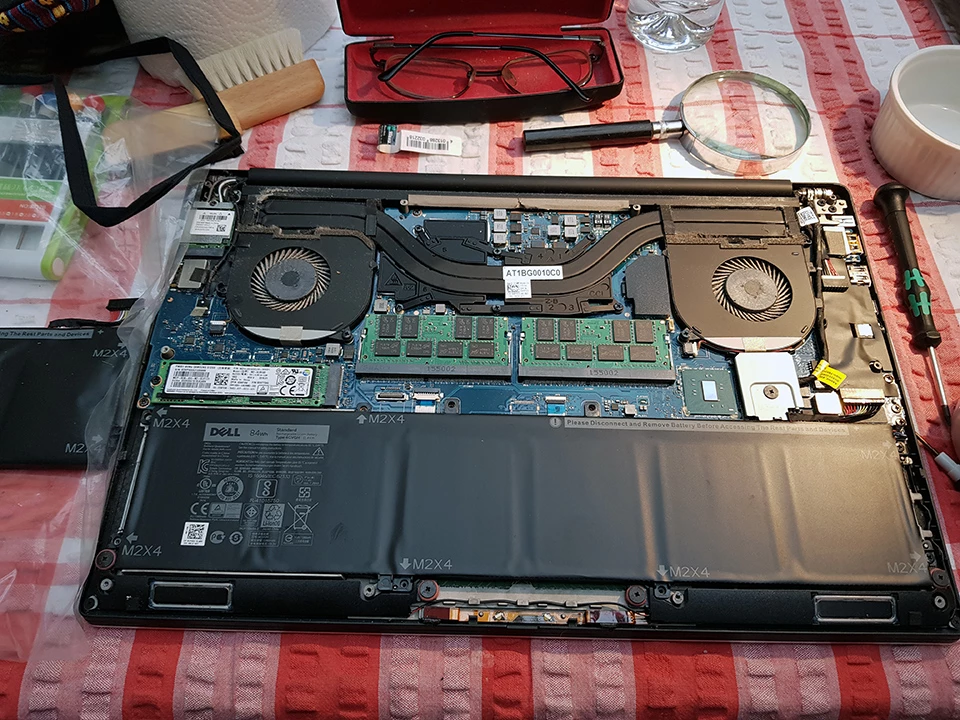
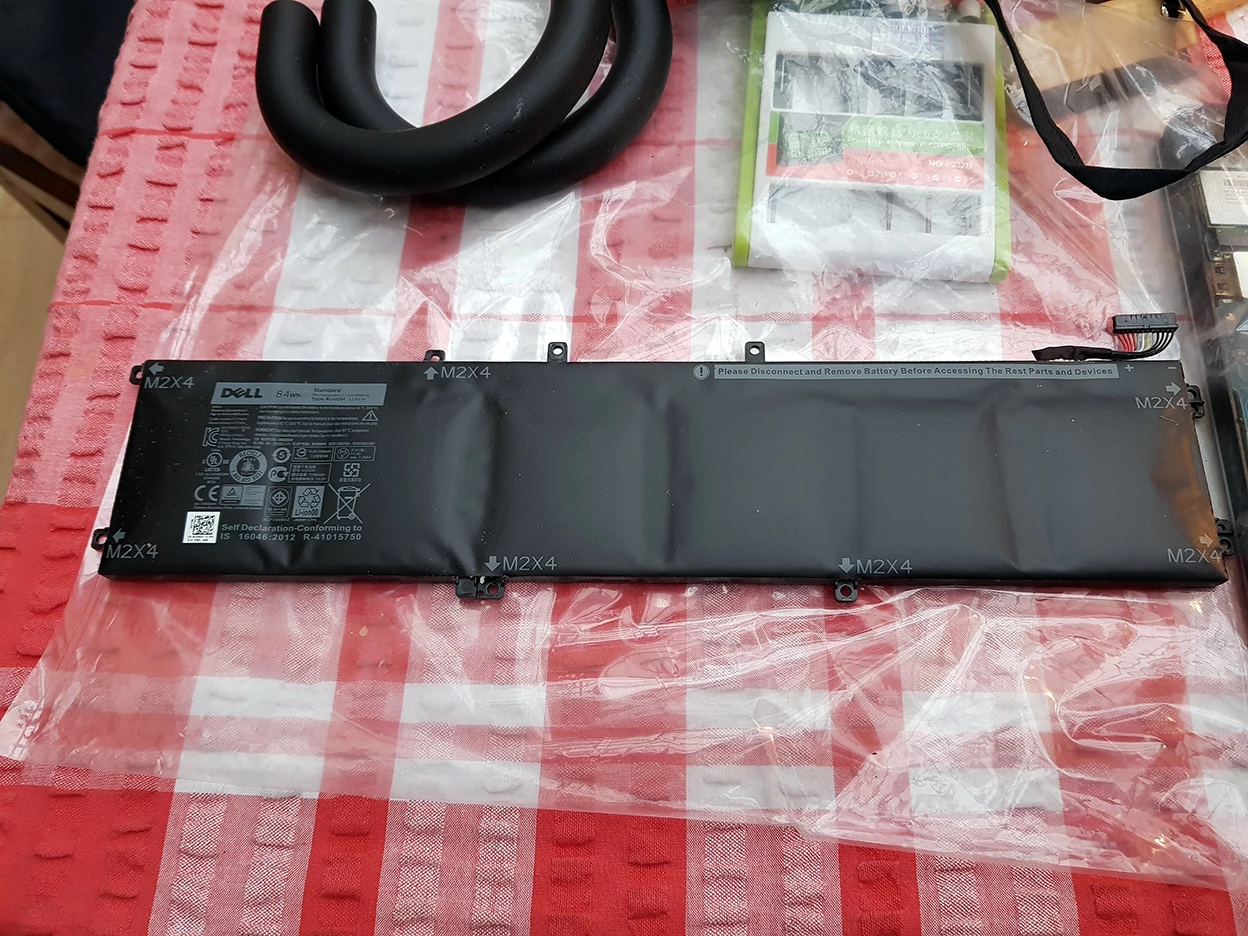
    The answer turned out to be the battery in my laptop. Replacing the original one sped up my CC 2018 loading time from 40 secs to 12 secs. See below pix of swollen original, and flat new, batteries:

    The whole system is snappier.  Don't know why exactly as I always work with the power cord plugged in.  Very happy conclusion, anyway.

    David

    13 replies

    Participant
    February 3, 2018

    I believe I have isolated the cause of the slowdown.  I run PS on 2 machines. One does not have most recent Windows 10 update applied (keeps rolling back without reason - but thats another story).  This machine loads PS in 12 - 15 seconds running off an SSD and 8gb RAM.  The 2nd machine, recently built with all Windows 10 updates applied, loads PS in 30-40 seconds.  Clicked on 'Reset Preferences after Quit' - Exited and reloaded PS.  Total load time dropped to 8-10 seconds.  Noticeable difference during initialization while 'Reading Preferences'.  Repeated test multiple times invoking PS directly from executable, from Bridge, and launched when clicking on .PSD file.  All with identical results.  For whats it worth, the default preferences file is adequate for me and I can set the 2 preference changes I want after load.  So going forward I will simply click on 'Reset Preferences after Quit' when I end a PS session.  Next invocation will again load in 8 - 10 seconds.  If your running off an SSD and have minimum 4gb RAM, all other preference changes to improve performance are marginal.

    Try it, you'll like it!

    davidc1815
    davidc1815AuthorCorrect answer
    Legend
    February 3, 2018

    The answer turned out to be the battery in my laptop. Replacing the original one sped up my CC 2018 loading time from 40 secs to 12 secs. See below pix of swollen original, and flat new, batteries:

    The whole system is snappier.  Don't know why exactly as I always work with the power cord plugged in.  Very happy conclusion, anyway.

    David

    nichole120
    Participant
    January 24, 2018

    I am so glad I found this thread because I thought I was crazy when it was taking forever to switch from Lightroom to Photoshop to edit a RAW file and then back.  I will not mess with uninstalling or preferences and hopefully a patch will fix it in the near future.

    davidc1815
    Legend
    January 24, 2018

    I tried to update my desktop (3770K vintage) with KB4056892 and it went into an endless cycle of trying to install and failing, and then serving the update again as needing a restart. I tried everything I could think of and eventually gave up.  There are some long threads on the web about this issue and about the update looping or making machines unbootable. Eventually, I bought a new copy of W10 Pro and loaded it.  KB4056892 installed fine. CC loads very quickly on this old desktop - admittedly without any custom tools, patterns, brushes or plugins loaded. The old machine seems fine and snappy.

    So, the problem is now with the newer (6700K) laptop which makes programs (not just CC2018) load much slower and runs them in treacle.  It does make me wonder if a new copy of W10 Pro on my laptop would solve the problem - but that's a load of hassle and expense.  I think I will wait and see if MS and Dell (my laptop manufacturer) come up with update software answers.

    davidc1815
    Legend
    January 11, 2018

    Thanks to all responders for their advice.  I wonder what has made my system susceptible to a slowdown when others are not affected? Incidentally, I tried resetting preferences but it made no difference to load speed. I guess I will just have to live with it.

    Legend
    January 11, 2018

    It slows every switch between system and app. we can’t know how many of these there are, but disk I/O of course switches. However I think this isn’t important because the I/O overhead was already large.

    davidc1815
    Legend
    January 11, 2018

    I see that when opening, CC spends a lot of time reading the preferences.  Seems much longer than before.  Can anyone tell me, please, what the software is looking at in Preferences that might slow the loading?

    Thanks.

    davescm
    Community Expert
    Community Expert
    January 11, 2018

    Hi

    I am sorry I can't help with the preferences question.

    However, I mentioned earlier that I had carried out a couple of brush lag tests in the past. Thanks to Trevor.Dennis who found the old thread, I can compare then and now.

    1. I made a square document 30,000 pixels x 30,000 pixels (8bit RGB) and filled with white

    2. In the info panel I went to the square at the top right and in Panel options check "Timing"

    3. I selected the round brush and set it to 5000 px size and 100% hardness. Also set spacing to 1% and color to black *

    4. I zoomed out so I could see the whole image

    4. I clicked one corner and shift clicked on the opposite diagonal.

    The brush drew slowly  from corner to corner

    Once finished the time it took was shown in the info panel.

    To ensure the results were comparable I turned the new brush smoothing option down to zero%

    On my i7 -3930K with 64 GB ram and AMD7970 card it took an average 26 seconds in May 2017. I have just repeated the test three times with an average 24.8 seconds. That is slightly faster than in May !

    Dave

    Legend
    January 11, 2018

    Good point. While the Spectre fix is a catastrophe, we shouldn’t assume it’s to blame for everything. Especially when video drivers have such an established pattern of Unwanted behaviour.

    Legend
    January 10, 2018

    Unlikely the warranty would cover that. If it does, it will put many computer manufacturers out of business. I think we are entering a period where compulsory hardware upgrades are going to be needed. Very frequently. Until something pops.

    Legend
    January 10, 2018

    This is unlikely to be something Adobe can fix. The patch is designed to make systems slower, for security reasons. How much slower it makes them depends on your type of work, the exact  CPU chip and other factors. Chips older than 2010 are particularly likely to be bad. A lot of people will need new computers, but they aren't available yet. This is a very serious issue, and likely to be what the future holds in spades.

    davidc1815
    Legend
    January 10, 2018

    Thanks.  I see my chip was launched Q3/2015.  I guess it's beyond the bounds of hope that Dell (who made my laptop which I bought in 2016) might send a service person to my home to replace the chip when a new one becomes available.  Using CC is no fun at the moment.

    D Fosse
    Community Expert
    Community Expert
    January 11, 2018

    This is most likely a video driver update bundled with the OS update.

    I haven't noticed any slowdowns on a new i7-7700K system with Win10; nor on an older i7-3820 system with Win7.

    Known Participant
    January 10, 2018

    yep.  I've noticed a HUGE downgrade in performance since the windows update for all CC products....because I reinstalled many older versions to test them.  CS6 is actually fine, but any CC version is just slow, laggy, unresponsive and generally not fun to use.  It's extremely frustrating.  I tried rolling back the update but windows insists on installing it on every reboot.  Perhaps adobe can issue a patch to address the CC issues.  BTW I have tried all the normal PS troubleshooting things....it is definitely this windows update. 

    davescm
    Community Expert
    Community Expert
    January 10, 2018

    Interesting. I have not noticed a slowdown here - Photoshop CC loads in approx 10-12 seconds and I have not noticed any slowdown with brushes etc.

    I'll be doing some 3D rendering later, which hits the CPU fairly hard, so will watch for any impact there.

    Dave

    davidc1815
    Legend
    January 10, 2018

    "Interesting" is not the word I would use!!

    David