Participant
April 14, 2023
Answered

Photoshop stop working

  • April 14, 2023
  • 3 replies
  • 705 views

Hi all!!

Recently I am having a problem while opening photoshop. After opening it starts blinking continuously. Is there any solution to this problem? I have uninstall and reinstalled the software once but that could not eliminate the problem.


Partha P Chaudhuri
This topic has been closed for replies.
Correct answer Ged_Traynor

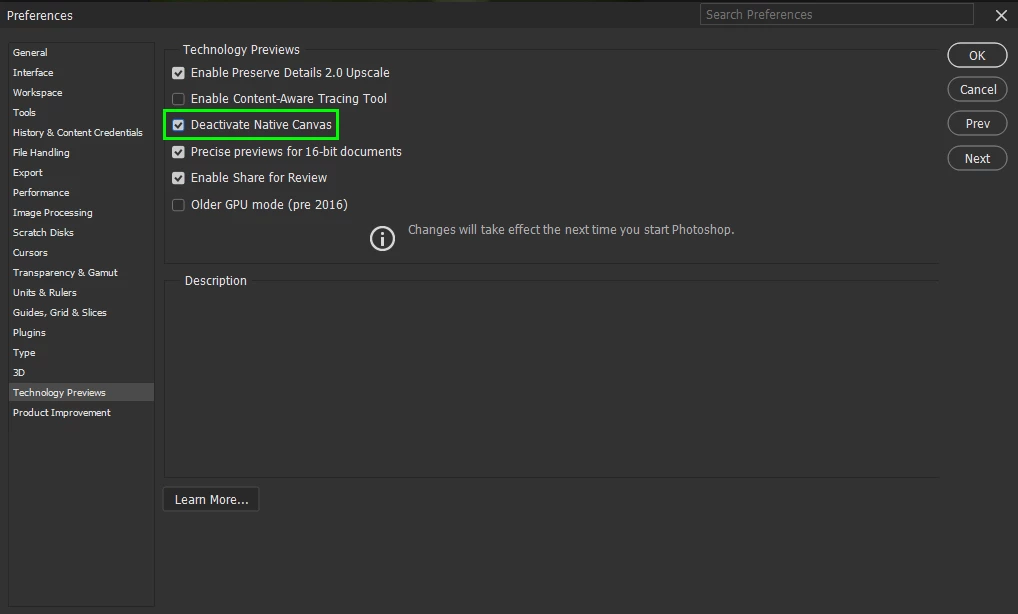
@Partha Pratim17668702yaar @geoffrey29406679aqyr @Tushar3000p go to Edit > Preferences > Technology Previews and enable this option, then restart Photoshop

3 replies

Ged_Traynor
Community Expert
Ged_TraynorCommunity ExpertCorrect answer
Community Expert
April 14, 2023

@Partha Pratim17668702yaar @geoffrey29406679aqyr @Tushar3000p go to Edit > Preferences > Technology Previews and enable this option, then restart Photoshop

Baramjik Art
Participant
April 2, 2024

Can't open Preferences . because Photoshop not open at all. I do everything .Restarted / Uninstall / Reinstall. Nothing is working

Ged_Traynor
Community Expert
Community Expert
April 3, 2024

@Baramjik Art try manually resetting your Photoshop preferences
https://helpx.adobe.com/ie/photoshop/using/preferences.html#Manually
Remember to back up your settings before doing the preference reset
https://helpx.adobe.com/ie/photoshop/using/preset-migration.html

Participant
April 14, 2023

Same here! 
Restarted / Uninstall / Reinstall. Nothing is working

Participating Frequently
April 14, 2023

The same thing is happening with my photoshop too?!?!?!