
Photoshop/ tablet pen pressue issue
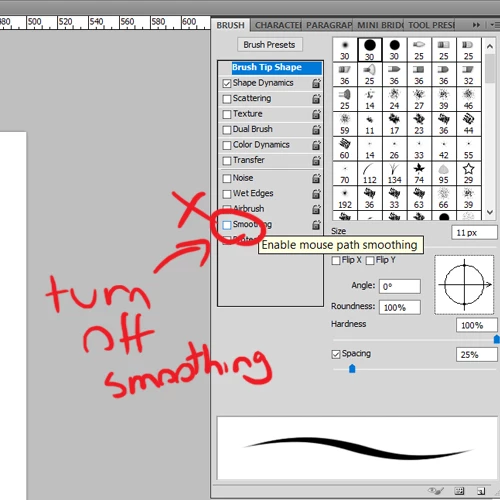
Update: Solved!
Thank you for your help!
I eventually found a solution that seems to have fixed the issue
(Had to turn off smoothing, which I must have accidently turned on)
Hello!
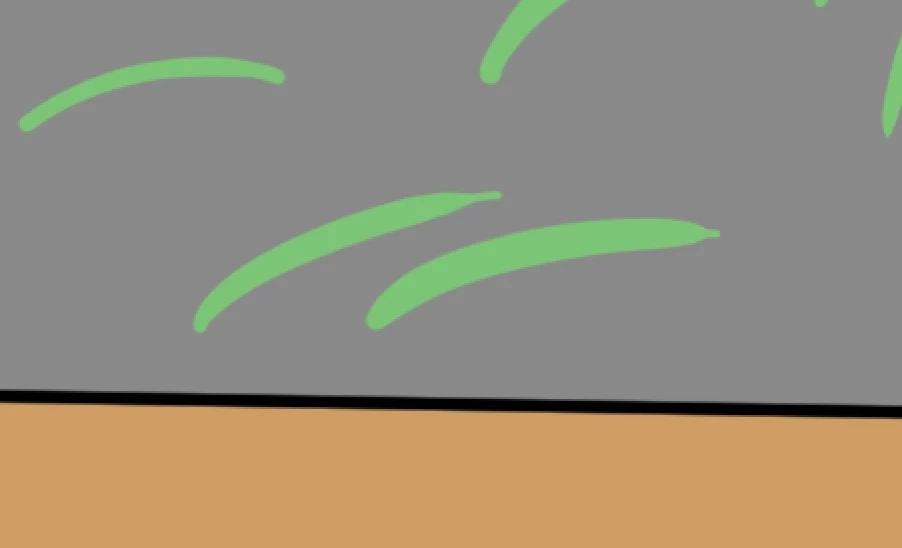
Do any of you amazing tablet/ Photoshop using folks ever had/ know how to fix this weird pen pressure issue? I have been playing with settings for an hour and nothing is working. I do quick strokes (to do grass) and like at the end of the stroke instead of tapering smooth it just drops off dramatically/ugly.
Thanks
Sarah
Photoshop version: CS5
Tablet: Wacom Introus Pro Medium (Drivers all updated)
Operating system: Windows 10
Update: Sai2 works fine so I belive it is more of a photoshop issue then the tablet issue. But the project needs to be done in photoshop so I have to try and work out what is going on.
 AdChoices