
Participant
April 2, 2017
Answered

Photoshop Text Tool only makes vertical lines, how do I fix it?

  • April 2, 2017
  • 1 reply
  • 3156 views

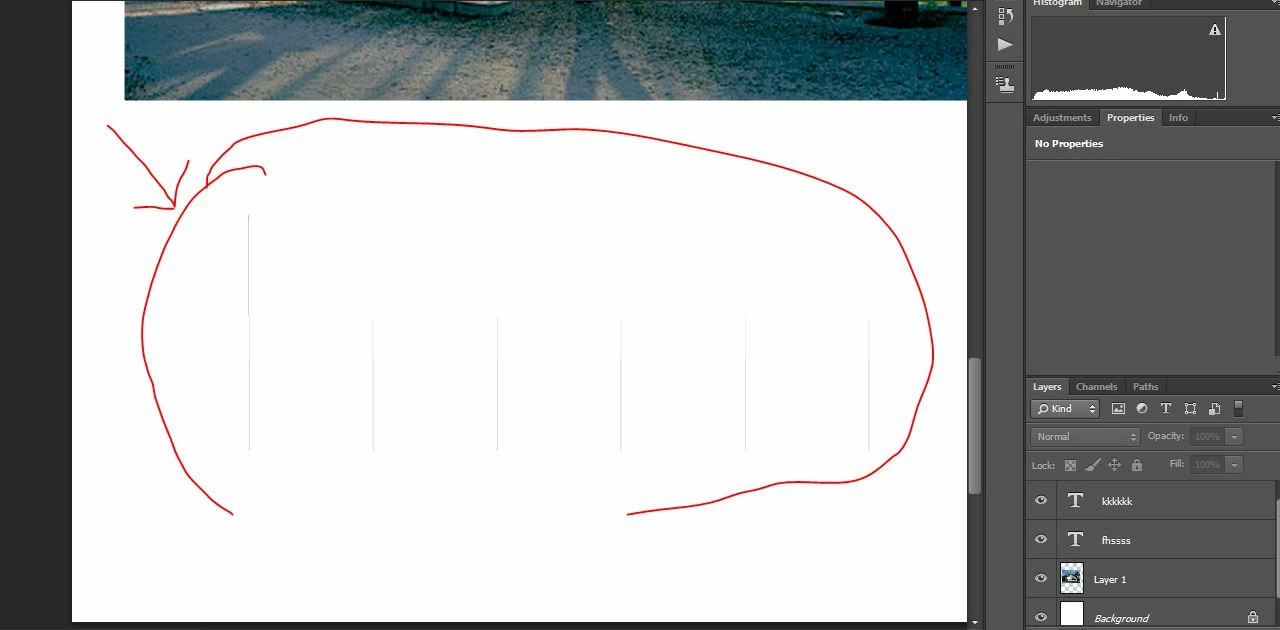
So for a while now my Text Tool simply won't work and I already read all the other forums and I couldn't find anything like what I am having. When I write it doesn't do anything and then the cursor just jumps to the other side of the text box and leaves this pattern of vertical lines. I leave a picture.
    This topic has been closed for replies.
    Correct answer gener7

    Try resetting the Text tool and also be sure the font color in the Option bar is not white.

    1 reply

    gener7
    Community Expert
    gener7Community ExpertCorrect answer
    Community Expert
    April 2, 2017

    Try resetting the Text tool and also be sure the font color in the Option bar is not white.

    Participant
    April 5, 2017

    Resetting the Text tool fixed it! Thank you very much
