
Participant
November 16, 2020
Question

Photoshop thinks green is blue

  • November 16, 2020
  • 3 replies
  • 621 views

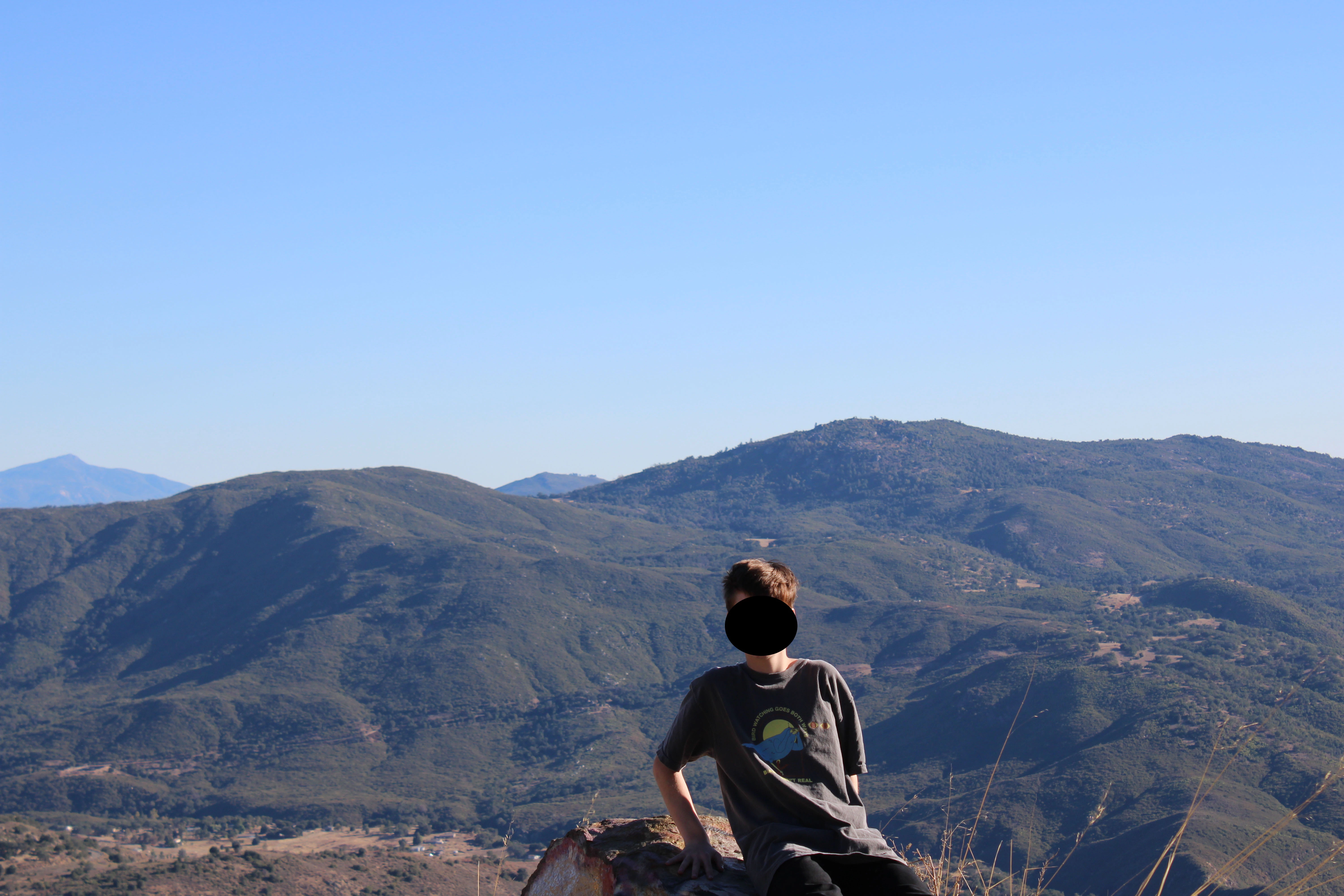
I took a photo of some green hills, but the shot turned out sort of vague and hazy.  As a result, the hue/saturation tool thinks that the green is blue, and will only let me increase the blues of the hills not the greens. I'd like to make this photo pop a bit more. It wasn't a very good shot, but I can't drive all the way back, so I trying to see if I can make it look atleast decent. Thanks.
 

This topic has been closed for replies.

3 replies

NB, colourmanagement
Community Expert
Community Expert
November 16, 2020

You're looking at 'aerial perspective' here, [https://en.wikipedia.org/wiki/Aerial_perspective] the atmosphere is what causes those 'blue' and distant hills and gives an image depth. 

That's a pretty natural looking image.

In my days as a pro photographer we used to use a 1A or a UV filter on the lens to cut that haze a little.


Whilst you could select those hills and make the blue tinted foliage more green (and perhaps add sharpness) the result would lose it's "depth" of perspective. 

IF you can get Photoshop's Hue/Saturation adjustment tool to select only the hills you'll be able to swing the hue a bit, it's probably that the colour need shifting as much as being increased in saturation.

Why not try this tutorial: removing distance haze in photoshop


I hope this helps

thanks
neil barstow, colourmanagement.net :: adobe forum volunteer
[please do not use the reply button on a message within the thread, only use the blue reply button at the top of the page, this maintains the original thread title and chronological order of posts]

Participant
November 16, 2020
You learn something new every day! I'll try this along with the ACR filter
thing. I appreciate it! 🏔️
D Fosse
Community Expert
Community Expert
November 16, 2020

It's not that Photoshop thinks green is blue. It's that you think blue is green. You need to work with that.


If you select/mask the background you can do anything you want with it. For a quick "magic button" solution, there is the dehaze slider in the ACR filter. You will probably still have to mask.

Participant
November 16, 2020
Thank you, so far no luck with the previous suggestions, as I didn't
understand (I'm new), so I will try this. 📷
lambiloon
Community Expert
Community Expert
November 16, 2020

Hi use curve and image adjustments there are many helping options....regards....this is know as color correction

Ali Sajjad / Graphic Design Trainer / Freelancer / Adobe Certified Professional
Participant
November 16, 2020

I will look into it. Much appreciated. 🙂