kareinv18601785
Participant
June 29, 2018
Answered

Photoshop tool curser display

  • June 29, 2018
  • 1 reply
  • 464 views

HI All,

i hope i will make sense with the below and hope someone can help.

i Have Photoshop cc

When you use any tools in Photoshop the curser icon will display different icons when caps lock is on and when it is off. Now my problem is that i am used to the icons looking they way they do when caps is off. This past week the curser only displays the caps on icon when caps is off too?

Ie: when i use my brush tool there is a circular hairline around the area and when you switch caps lock off that circle disappears.But now even when caps lock os off it is also not visible.

i hope this makes sense and that someone can help as i am very confused and frustrated.

Thanks

Karein
    This topic has been closed for replies.
    Correct answer

    OK three things to try

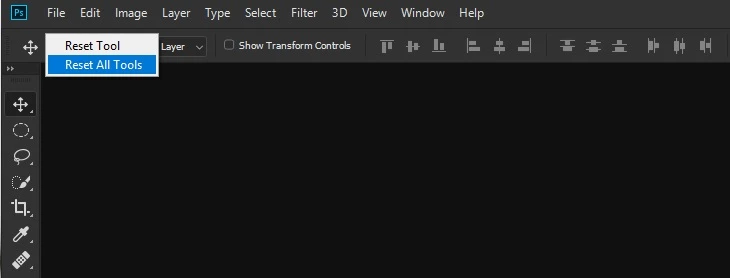
    1 Reset all tools, right click on the Tool icon and select Reset All Tools

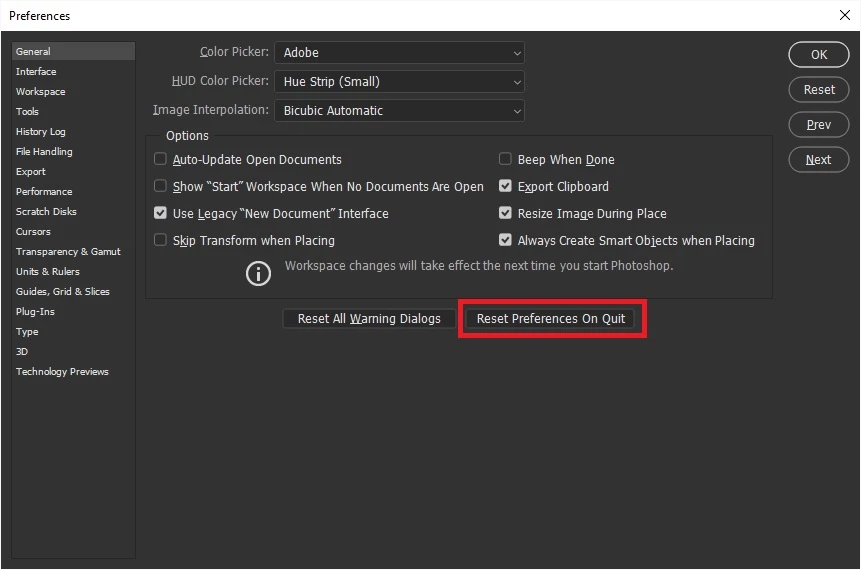
    2 Reset Photoshop preferences

    3 If all else fails try using the Adobe cleaner tool

    Use the Creative Cloud Cleaner Tool to solve installation problems

    1 reply

    June 29, 2018

    Hi

    Check your setting in Preferences

    Go to Edit > Preferences > Cursors and make sure the Painting Cursors is set to Normal

    kareinv18601785
    Participant
    June 29, 2018

    HI There,

    it is set like this and still no luck.

    it only shows a cross with a dot in the middle? and its like this with all my tools not just brush

    Correct answer
    June 29, 2018

    OK three things to try

    1 Reset all tools, right click on the Tool icon and select Reset All Tools

    2 Reset Photoshop preferences

    3 If all else fails try using the Adobe cleaner tool

    Use the Creative Cloud Cleaner Tool to solve installation problems