


Participant
October 24, 2025
Question

Photoshop Toolbar Not Working After Reactivating Adobe Plan – How to Fix It

  • October 24, 2025
  • 1 reply
  • 114 views

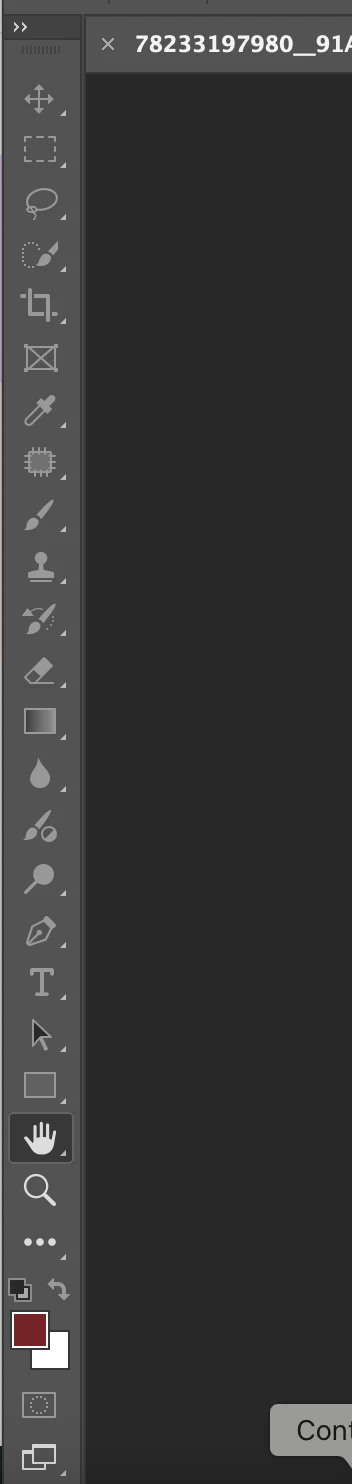
I had previously canceled my adobe plan and since i've gotten it back, the tool bar on photoshop does not light up and I am unable to use it. I tried turning the tools on and off, and I also tried resetting my workspace. 


any ideas? 
1 reply

Participating Frequently
October 24, 2025

Hey! 👋 This usually happens when Photoshop can’t detect an active document — the toolbar stays greyed out until a file is open and active. Try these steps:

Open a new document: Go to File → New (or open any image). If the toolbar lights up, it’s working fine.

Reset Photoshop preferences:
Go to Edit → Preferences → General → Reset Preferences on Quit, then restart Photoshop.

Check GPU settings:
Go to Preferences → Performance, and make sure “Use Graphics Processor” is checked. Then relaunch Photoshop.

Update Photoshop & GPU drivers: Outdated versions sometimes cause interface bugs. Update both from Creative Cloud and your GPU manufacturer.

If none of this helps, try temporarily creating a new workspace (Window → Workspace → New Workspace). This usually resets any hidden UI glitch.

Hopefully one of these gets your toolbar working again brother.

rao
CMass
Community Manager
Community Manager
October 24, 2025

@Thepaint_3d3310, 

Thank you for sharing great troubleshooting steps! I just wanted to remind you to back up your preferences. @
Aly23926031ebof follow the steps in this article: https://adobe.ly/4npR1pw


^CM

Participating Frequently
October 25, 2025

Thanks for the kind words and the reminder! Really appreciate the support from the Adobe team — always good to learn something new from the pros 👏

rao