Participant
May 7, 2017
Answered

Photoshop tools reset on every click since new update

  • May 7, 2017
  • 2 replies
  • 2141 views

Example:

- Shift+B-Keys to switch from brush to pen (since I do pixel art)

- V-Key to move layer, or L for the lasse

- B-Key to go back to the pen reloads the initial brush!

Same for polyfon lasso vs standard lasso, gradient vs bucket etc and all other tools.

It never returns to what you were just using, but always to some sort of factory default.

What I have done:

- Followed the instructions from someone with the same bug a while back (Tools keep resetting after update last night )

- Reset Photoshop settings (shift/ctrl/alt) on start-up

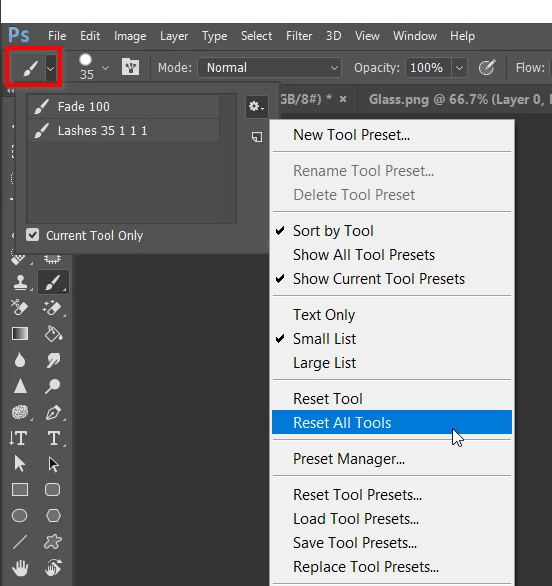
- Reset all tools

Nothing solved the problem.

Photoshop is no longer usable under these circumstances. A workaround is urgent, thanks.
    This topic has been closed for replies.
    Correct answer Trevor.Dennis

    When you say Pen, do you mean Pencil?  Or have you change the Pen Tool shortcut to B?

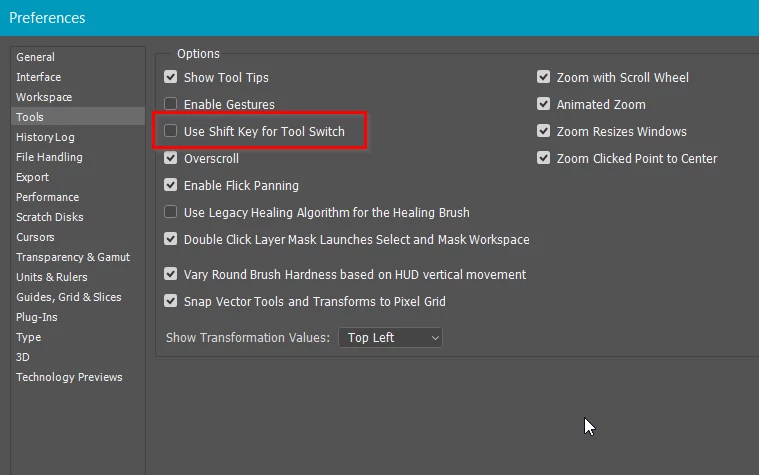
    I'm wondering if Use Shift Key for Tool Switch has been turned off and hitting the B key toggles between Brush and Pencil?  What that might result in is you switching to the other tool and whatever brush it was set to use.

    Anyway, steps to take in order are

    Reset All tools

    And if still stuck, Reset Preferences.

    If that doesn't fix it look at this Trouble Shooting guide and specifically Permissions.

    http://blogs.adobe.com/crawlspace/2012/07/photoshop-basic-troubleshooting-steps-to-fix-most-issues.html

    It would help if we knew what operating system you are using.

    2 replies

    Trevor.Dennis
    Community Expert
    Trevor.DennisCommunity ExpertCorrect answer
    Community Expert
    May 7, 2017

    When you say Pen, do you mean Pencil?  Or have you change the Pen Tool shortcut to B?

    I'm wondering if Use Shift Key for Tool Switch has been turned off and hitting the B key toggles between Brush and Pencil?  What that might result in is you switching to the other tool and whatever brush it was set to use.

    Anyway, steps to take in order are

    Reset All tools

    And if still stuck, Reset Preferences.

    If that doesn't fix it look at this Trouble Shooting guide and specifically Permissions.

    http://blogs.adobe.com/crawlspace/2012/07/photoshop-basic-troubleshooting-steps-to-fix-most-issues.html

    It would help if we knew what operating system you are using.

    zapposhAuthor
    Participant
    May 7, 2017

    Many thanks for your kind help.

    I'm not sure what solved it, but I updated again (now sys info shows Adobe Photoshop Version: 2017.1.1 20170425.r.252 2017/04/25:23:00:00 CL 1113967  x64), plus did the changes you mentioned, and behaviour is now as expected.

    I can carry on working now, thank you very much.

    Jeff Arola
    Community Expert
    Community Expert
    May 7, 2017

    What version of photoshop and operating system are you using?

    You can find the exact photoshop version by going to Help>System Info in photoshop and reading the top line.

    zapposhAuthor
    Participant
    May 7, 2017

    I'm running PS on a Windows 10 machine.

    System Info returns the following (copied the first few lines):

    Adobe Photoshop Version: 2017.1.0 20170309.r.207 2017/03/09:23:00:00 CL 1107877  x64

    Number of Launches: 1

    Version: 10 or greater

    System architecture: Intel CPU Family:6, Model:12, Stepping:3 with MMX, SSE Integer, SSE FP, SSE2, SSE3, SSE4.1, SSE4.2, AVX, AVX2, HyperThreading

    Physical processor count: 4

    Logical processor count: 8

    Processor speed: 2394 MHz

    Built-in memory: 12205 MB

    Free memory: 5542 MB

    Memory available to Photoshop: 10687 MB

    Memory used by Photoshop: 70 %

    History Thumbnails: Enabled.

    Touch Bar: Enabled.

    Alias Layers: Disabled.

    Modifier Palette: Enabled.

    Highbeam: Enabled.

    Image tile size: 1024K

    Image cache levels: 4

    davescm
    Community Expert
    Community Expert
    May 7, 2017

    Hi

    That is not the latest update. Latest version is 2017.1.1 r252.

    I would try updating.

    Dave