Participant
October 18, 2018
Answered

Photoshop (updated for 2019) keeps crashing.

  • October 18, 2018
  • 1 reply
  • 2334 views

Photoshop CC(updated for 2019)......every time I try to re-size an image, either in size or in resolution, Photoshop crashes.

When I restart Photoshop, the same image, in the same laptop configuration, the resizing works fine.

Also in some instances, when Oil Filter is used, Photoshop crashes.

The same Oil Filter on the same project works, when I re-start Photoshop CC.

So obviously the issue has nothing to do with my Graphics card or available memory of any device configuration.

Help, Gurus.....because due to crashes I have lost hours of work, because I was not saving the project in the intermediate stages.
    This topic has been closed for replies.
    Correct answer

    Hi

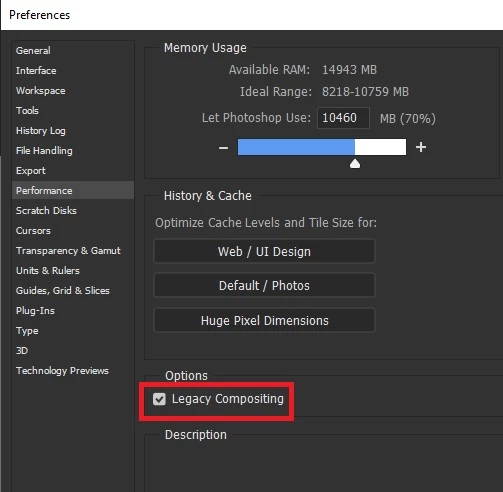
    Try enabling this option in preferences and restart Photoshop

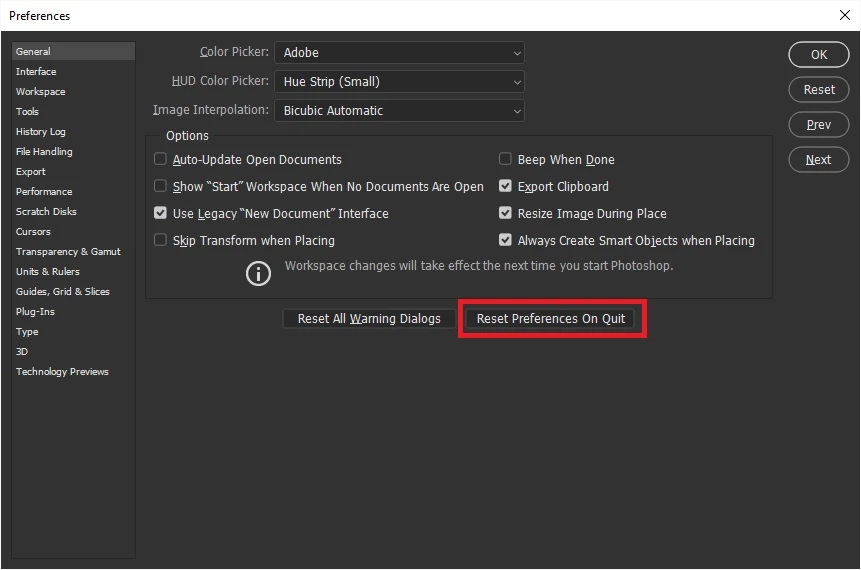
    If that doesn't try resetting Photoshop preferences

    If neither of those help try using this tool to uninstall/reinstall Photoshop

    Use the Creative Cloud Cleaner Tool to solve installation problems

    1 reply

    Correct answer
    October 18, 2018

    Hi

    Try enabling this option in preferences and restart Photoshop

    If that doesn't try resetting Photoshop preferences

    If neither of those help try using this tool to uninstall/reinstall Photoshop

    Use the Creative Cloud Cleaner Tool to solve installation problems

    San-DeepAuthor
    Participant
    October 18, 2018

    Thank you Ged.

    I will try what you advised.