Participant
April 18, 2020
Question

Photoshop user interface font is too small

  • April 18, 2020
  • 2 replies
  • 1375 views

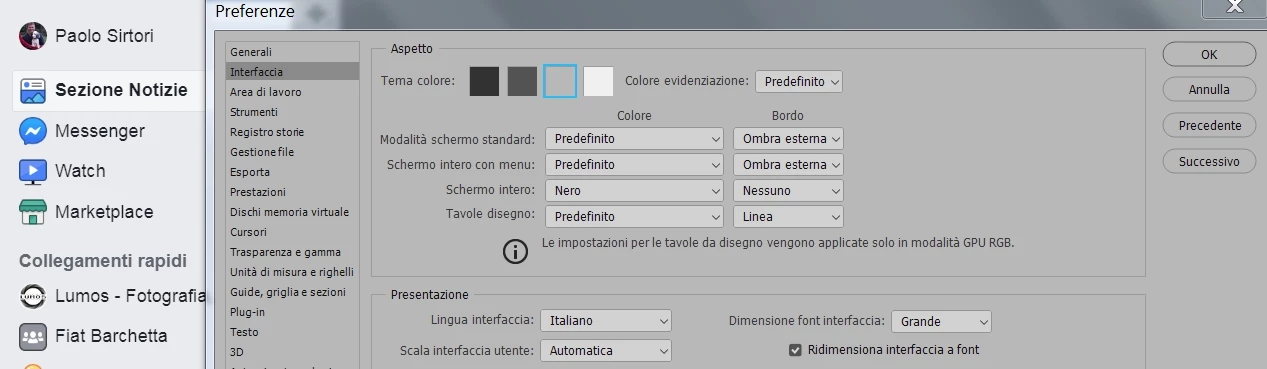
As you can see from the enclosed picture comparing Facebook/Photoshop UI, the font is too small, I cant't work with it.
Changing settings from small to large has absolutely no effect. Win 7, PS 21.1.2, screen 1920x1080.
What can I do?
Thanks, Paolo

This topic has been closed for replies.

2 replies

Jeff Arola
Community Expert
Community Expert
April 27, 2020

The only other thing you can try is return the UI Scaling to 100% and change your screen

resolution to lower numbers.


The UI Font Size only affects some of the text such as in the tool options bar.


If your able to upgrade to Windows 10, the scaling is much better because of changes in the operating system and since windows 7 is no longer supported by Microsoft, it's doubtful adobe will invest anymore resources in fixing any issues that are present in win 7 and not win 10.

Jeff Arola
Community Expert
Community Expert
April 18, 2020

Go to Edit>Preferences>Interface, change the UI Scaling to 200% and then restart photoshop.


Participant
April 26, 2020

Tryied, but it gets too big, I can't see all the tools and have a decent working area. Againg, setting UI font size to minimum doesn't change a thing.
How could this be possible?