Answered
Photoshop version 25.0.0.
Hi
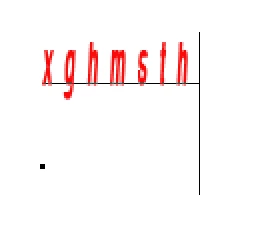
I am having an issue with the "Text Tool" in Photoshop 2023. The text is st the top of the curser, and is not matching the size of the actual text.
See attached !
Kind Regards
ND
Hi
I am having an issue with the "Text Tool" in Photoshop 2023. The text is st the top of the curser, and is not matching the size of the actual text.
See attached !
Kind Regards
ND
Can you select the text and show the Character panel (Window menu)?
It might have a baseline shift, be superscript, or have an odd leading. This is a character setting, so the text has to be selected.
Jane
Already have an account? Login
Enter your E-mail address. We'll send you an e-mail with instructions to reset your password.
 AdChoices