user2022
Participating Frequently
October 8, 2021
Answered

Photoshop vs Indesign Resolution differences

  • October 8, 2021
  • 5 replies
  • 1359 views

To the Adobe Forum / experts


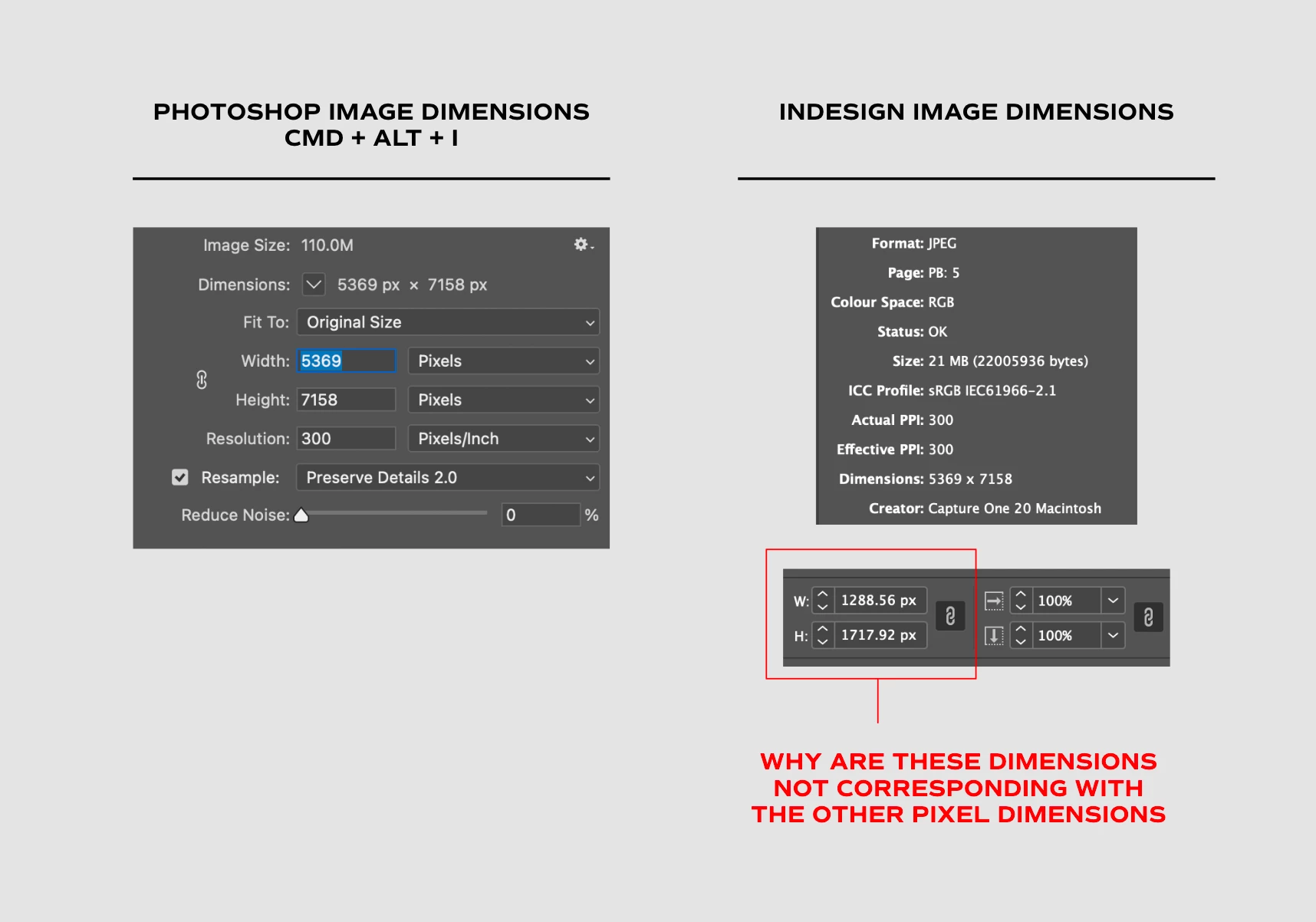
My agency have found a discrepancy that we can't understand or explain, where the resolution / dimenstions for certain images in Photoshop differ to Indesign. Our understanding is that they should match. 


Further info - we were provided with this image by the client who received it from a photographer. We have compared this to other images and have found this discrepancy to be present in some, but not the majority.


This has raised questions and we would like to understand why there is a difference if anyone can please explain it would be much appreciated!!


Dimensions provided below. For client confidentiality we cannot share the image in question. 
 

This topic has been closed for replies.
Correct answer rob day

Why is there a difference in the pixels in Indesign for this image?


Hi @user2022, InDesign has a Pixel Ruler unit that measures as a static 1/72" and has nothing to do with image resolution—an InDesign page is a vector object and has no resolution.


The Pixel Ruler unit is only useful when you are designing for screens and need to easily export a page or selecton to an image format at a specified pixel dimension. For example a document page setup as 1024px x 768px (14.2222 in x 10.6667 in) can be easily exported as a matching 1024 x 768 pixel JPEG image by setting the JPEG Export Resolution to 72ppi.


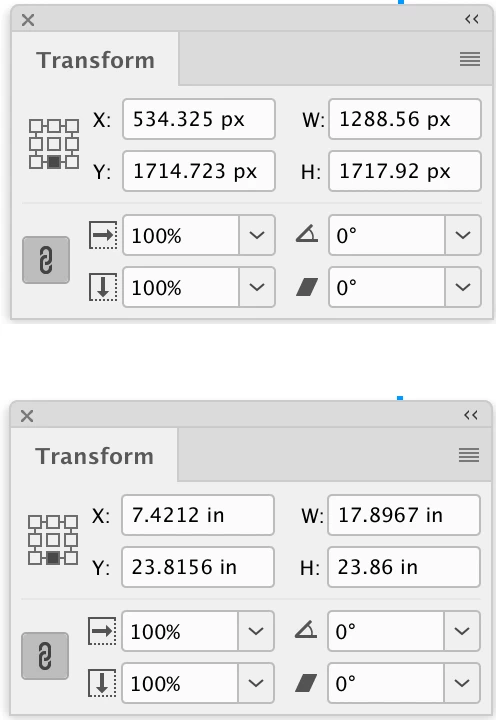
In your example the selected frame is measuring 1288.56 x 1717.92 px because you have your ruler units set to Pixels—if you set them to Inches the selection would measure as 17.8967 in x 23.86 in. An image contained in that frame can have any print output resolution, which is listed as the Effective Res in the Links panel.


5 replies

rob day
Community Expert
rob dayCommunity ExpertCorrect answer
Community Expert
October 9, 2021

Why is there a difference in the pixels in Indesign for this image?


Hi @user2022, InDesign has a Pixel Ruler unit that measures as a static 1/72" and has nothing to do with image resolution—an InDesign page is a vector object and has no resolution.


The Pixel Ruler unit is only useful when you are designing for screens and need to easily export a page or selecton to an image format at a specified pixel dimension. For example a document page setup as 1024px x 768px (14.2222 in x 10.6667 in) can be easily exported as a matching 1024 x 768 pixel JPEG image by setting the JPEG Export Resolution to 72ppi.


In your example the selected frame is measuring 1288.56 x 1717.92 px because you have your ruler units set to Pixels—if you set them to Inches the selection would measure as 17.8967 in x 23.86 in. An image contained in that frame can have any print output resolution, which is listed as the Effective Res in the Links panel.


Legend
October 9, 2021

To emphasise, everything looks exactly right and correct. The only error is using the width/height measuring tool - the one you highlighted in red - since it doesn't actually give you an image size in pixels. Yes, this is very confusing, and I would like to see it removed, but no doubt people would complain! But the correct size is given in the image dimensions (without any unit, just 5369 x 7158).

user2022
user2022Author
Participating Frequently
October 11, 2021

Thank you, this is very helpful!

jane-e
Community Expert
Community Expert
October 8, 2021

@user2022 wrote:

My agency have found a discrepancy that we can't understand or explain,


It appears you have the Frame selected and not the image. Click the "doughnut" or double-click the image to select the image and not the frame. What do you see here now?


~ Jane


user2022
user2022Author
Participating Frequently
October 8, 2021

Thank you Jane-e - but it's the same result regardless of frame / internal image. 

c.pfaffenbichler
Community Expert
Community Expert
October 8, 2021

posting overlap 

c.pfaffenbichler
Community Expert
Community Expert
October 8, 2021

In any case: What matters is an image’s Effective Resolution. 

Check that in the Info Panel or the Links Panel or via Preflight. 


In this case the image has 5369px width and 300ppi Resolution. 

So when placed with 100% scaling in Indesign that results in the meaningless display of 1288,56px width – 5369 * 72 / 300  

user2022
user2022Author
Participating Frequently
October 8, 2021

Can you explain why other images return the exact same pixel dimensions between the two programs when shown at 100% in indesign?


Why is there a difference in the pixels in Indesign for this image?

c.pfaffenbichler
Community Expert
Community Expert
October 8, 2021

Again: Resolution. 

c.pfaffenbichler
Community Expert
Community Expert
October 8, 2021

You seem to be overlooking the Resolution. 

Also using px as unit of width in Indesign does not seem sensible (when working for print at least). 

user2022
user2022Author
Participating Frequently
October 8, 2021

We switched from mm to pixels in order to showcase the number differences. 

c.pfaffenbichler
Community Expert
Community Expert
October 8, 2021

@user2022 wrote:

We switched from mm to pixels in order to showcase the number differences. 


But that is irrelevant. 

The important thing is whether a pixel image’s effective resolution meets the ultimate output requirements.