Inspiring
January 28, 2024
Answered

Photoshop won't open

  • January 28, 2024
  • 2 replies
  • 696 views

Of a sudden photoshop would not open, although I can access Bridge and ACR.  So I first reloaded the Adobe CC app, nothing changed.  I went back to the recovery and reloaded the system for 2 days ago.  Not Pshop starts to open but then I get "unrecoverable error, pshop will exit."


Help!
This topic has been closed for replies.
Correct answer Derek Cross

Which OS version do you have and how much RAM and spare hard disk capacity do you have on your system?

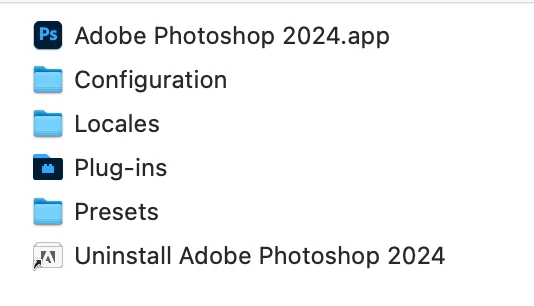
I suggest you uninstall Photoshop using the uninstaller (see screen shot) and then reinstall Photoshop again.

(Please don't post personal contact information on this public forum.)


2 replies

yanqujohnson
Participant
August 10, 2024

I have updated the new PS 2024, however it can't be lauched, plese advise. thank you

Derek Cross
Community Expert
Community Expert
January 28, 2024

The first thing to try is resetting the Photoshop preferences back to the factory desfaults to see if that sorts out the issue.

1) Close Photoshop
2) Double click on the Photoshop icon to launch it
3) QUICKLY hold down Ctrl+Alt+Shift. (for Windows) or CTL+OPT+CMD+Shift (for Mac OS X)
4) When a dialogue appears, asking you “Delete the Photoshop Preference Files?” Click Yes.
If you don't see the question repeat the procedure again

Inspiring
January 28, 2024

Thank you, but all I get is "an unrecoverable error has occurred." I
downloaded the last update, which mentioned Macs. Any problem there?

--
Bruce Bartrug
Nobleboro, Maine, USA


[personal information removed by moderator}


•The world is a dangerous place, not because of those who do evil, but
because of those who look on and do nothing. - Albert Einstein
•In the end, we will remember not the words of our enemies, but the silence
of our friends. -Martin Luther King
•Political language is designed to make lies sound truthful and murder
respectable, and give the appearance of solidity to pure wind. -Orson Welles

Derek Cross
Community Expert
Derek CrossCommunity ExpertCorrect answer
Community Expert
January 28, 2024

Which OS version do you have and how much RAM and spare hard disk capacity do you have on your system?

I suggest you uninstall Photoshop using the uninstaller (see screen shot) and then reinstall Photoshop again.

(Please don't post personal contact information on this public forum.)