
Inspiring
July 26, 2019
Question

Photoshop workspace layout bug?

  • July 26, 2019
  • 1 reply
  • 5341 views

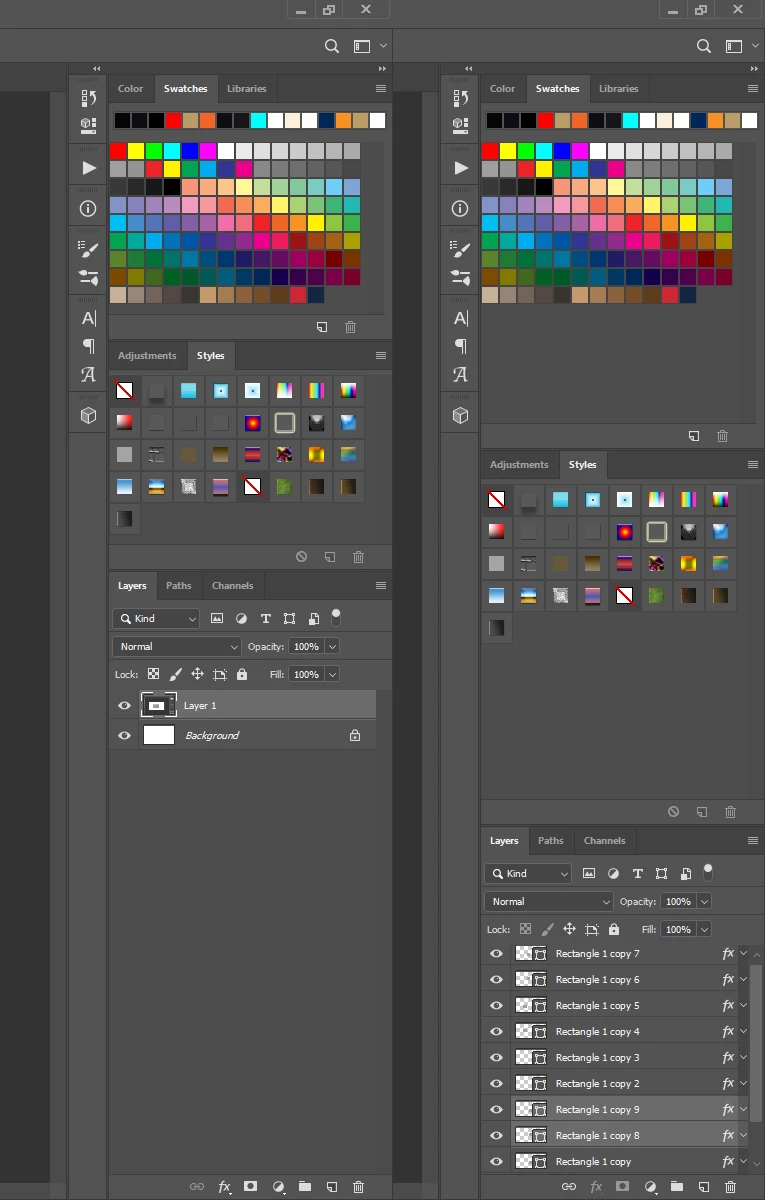
See attached image. I adjust my panels on the right side of my workspace in my layout to allow maximum height for my layers panel. The panels shown on the left in my image are my ideal layout/spacing/height. But if I take Photoshop out of fullscreen (Maximize window) to Restore Down size and then make it fullscreen again, my panels reset -- panels on the right in my image -- so each panel is equal in height (making layer panels shorter again). I have to keep resizing my panels so I can get the taller layers panel.  Can this be fixed?

Related to this issue, everytime I copy something within Photoshop to my clipboard (say a mask/clip of an image) and paste it elsewhere (say Word or Outlook), Photoshop will automatically go out of "Maximize" and into "Restore Down" size.... and I lose my panel layout again. Frustrating for the past few photoshop updated versions.

Thanks for any input.
    This topic has been closed for replies.

    1 reply

    JJMack
    Community Expert
    Community Expert
    July 26, 2019

    Save you workspace the way you want it laid out.   When your workspaces gets messed up reset you workspace.  I mess my workspace up all the time.  I have an action I use to reset my workspace and a Fn shortcut to play the action.  Anytime my workspace gets messes up I simply tap the function key.

    I have never seen Photoshop change its displayed layout when I use Ctrl+C in photoshop and Ctrl+V is some other application. On Windows are you using a Mac? CMD+C CMD+V

    The image above was created Crt+A Ctrl+C  in Photoshop and Ctrl+V in chrome.  What Photoshop was displaying on my displays did   not change.

    JJMack
    Inspiring
    July 26, 2019

    Here is my 3 step process. Step 1, I start with ideal workspace I have saved over a year ago (notice how it is still checked under workspace menu). I then flatten image to copy.

    Step 2, I copy and paste highlighted flattened image into a new email in Outlook.  Notice that the Photoshop window is now NOT maximized/fullscreen, it is now in Restore Down size/mode. This happens automatically after pasting. Even in smaller size now, Photoshop STILL has my correct panel sizes in my workspace.

    Step 3, when I Maximize my Photoshop window to make it full screen again, I loose my panel sizes - they automatically revert to equal sized height (3 panels, each 33% of total height).  This makes my Layers panel crammed which I prefer it not to be.  I have to reset this EVERY time I copy and paste OR if I simply Restore my Photoshop window (without copy pasting) and Maximize it - SAME thing happens to my panels.  Frustrating for over a year now.

    Inspiring
    July 26, 2019

    From what I can gather, saving my workspace does NOT save panel sizes, only where they are located.