masktao
Known Participant
June 1, 2018
Answered

Photoshop workspace panel can be lock save layout?

  • June 1, 2018
  • 2 replies
  • 1105 views

no1 my panel set.. no2 auto panel set

i like max photoshop windows and free more layer space

but every time restore photoshop windows and max photoshop windows again. the panel auto adjust

why phtoshop can save lock my panel set?
    This topic has been closed for replies.
    Correct answer Trevor.Dennis

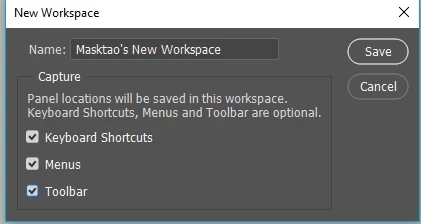
    Have you tried saving as a New Workspace?   Otherwise, resetting will take you back to the default for the current workspace.  Don't forget that saving a new workspace lets you also save keyboard shortcuts

    2 replies

    JJMack
    Community Expert
    Community Expert
    June 1, 2018

    When you save your workspace by name what state were the panels in.  Also panels that have multiple tabs may adjust their size when you switch between tabs and some tabs may change the panel size when you load different presets. When you reset you workspace do you panels change. Workspaces can be modified in use.  Photoshop maintains two folders for your workspaces in your preferences.

    JJMack
    Trevor.Dennis
    Community Expert
    Trevor.DennisCommunity ExpertCorrect answer
    Community Expert
    June 1, 2018

    Have you tried saving as a New Workspace?   Otherwise, resetting will take you back to the default for the current workspace.  Don't forget that saving a new workspace lets you also save keyboard shortcuts

    masktao
    masktaoAuthor
    Known Participant
    June 3, 2018

    thanks  for relay

    i use ur way. save my workspace . but when photoshop windows retore and maximize again . the panel size also auto change again

    i hope lock panel size when photoshop maximize. not change any time
