aliö53393316
Participant
May 9, 2018
Answered

Photoshop "Yazım Aracı" Önerisi

  • May 9, 2018
  • 2 replies
  • 382 views

Merhabalar,

Yaklaşık 5 yıldır Photoshop kullanıcısıyım ve şu sıralar bir özelliği arıyorum. Sizin için Photoshop'a eklemesi çok kolay bir iş aslında, eminim ki çoğu grafik tasarımcının da işini kolaylaştıracaktır. Örnek vererek ilerleyeyim çünkü nasıl anlatacağımı ben de tam olarak bilmiyorum

Mesela uzun bir yazı yazdınız ve yazıya Kontur, Eğim Ver ve Kabart, Dış Işıma gibi özellikler eklemek istiyorsunuz. Fakat bu özelliği yazının tamamına değil de ordaki bir cümleye eklemek istiyorsunuz. Bunu yapabilmek için tekrardan Yazım Aracı'nı açıp aynı boyutta ve fontta bir yazı yazıp aynı yere denk getirmemiz gerekiyor, fakat şöyle bir özellik olduğunu varsayarsak işimiz çok kolaylaşacak.

İstediğimiz kısmı seçiyoruz ve sağ tık yapıyoruz daha sonrasında o kısmın ayrı bir katmanda YAZI KATMANI olarak kalmasını sağlıyoruz. Konumu ve özellikleri değişmeden yeni bir YAZI KATMANI açılıyor ve sadece seçtiğimiz kısım içinde oluyor. Bu önerimi dikkate alıp Photoshop ve diğer Adobe uygulamalarına eklerseniz çoğu kişinin işini kolaylaştıracağınıza eminim.

Not:Eğer böyle bir özellik varsa affola, nasıl yapılabildiğini söylerseniz çok memnun kalırım.

Teşekkür eder, iyi çalışmalar dilerim.
This topic has been closed for replies.
Correct answer davescm

Hi

If I understand your question correctly, you want to be able to apply a layer effect to just certain parts of text.

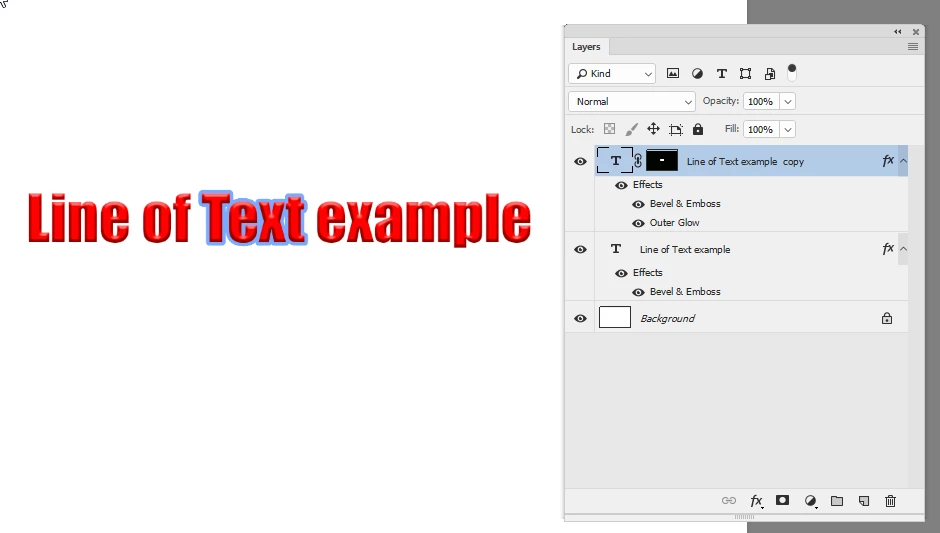
If so you could duplicate the text layer - add the layer effect and use a mask so that it only shows on that text

Dave

2 replies

davescm
Community Expert
davescmCommunity ExpertCorrect answer
Community Expert
May 9, 2018

Hi

If I understand your question correctly, you want to be able to apply a layer effect to just certain parts of text.

If so you could duplicate the text layer - add the layer effect and use a mask so that it only shows on that text

Dave

c.pfaffenbichler
Community Expert
Community Expert
May 9, 2018

Hi all,

Approximately 5 years Photoshop user and I'm looking for a feature right now. Insert into Photoshop for you is a very easy job, actually, I'm sure most of them will facilitate the work of a graphic designer. Let me proceed by giving an example because I don't know exactly how to tell you

For example, you and post long wrote a stroke, bevel and Emboss, you want to add features such as Outer Glow. But not to all of the article this property also would like to add a sentence there. B to be able to open the spelling tool, again the same size and in the same place we need to bring equivalent writes a post, but here's a property assuming that what we do is easy.

We select and right click the part we want we do after that TYPE LAYER that part to remain a separate layer. Location and features opens a new TYPE LAYER unchanged and only in selected parts. This took into account my suggestion if you add Photoshop and other Adobe applications, I am sure you will make it easier for most people.

Note: If such a property exists if you tell me how can be done very satisfied fascination #.

Thank you, good work.

This is a user Forum, so you are not really addressing Adobe here, even though some Adobe employees thankfully have been dropping by.

Pleas post Feature Request over at

Photoshop Family Customer Community

I for one don’t quite understand your request.

Maybe you could post screenshots or mock-ups to illustrate your point