
mikaels71195823
Inspiring
December 21, 2021
Answered

Photostacking

  • December 21, 2021
  • 2 replies
  • 370 views

I have photographed 4 photos that I want to stack, they are originally RAW files, I have saved them as Jpg files. When I in PS choose: files> scripts> Load in to scripts, I run Browse and download the images. When I click OK, I get an error message that says the following:
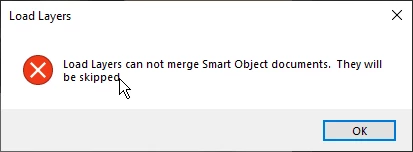


How should I do? Have PS version 22 because my graphics card can not handle newer.

This topic has been closed for replies.
Correct answer mikaels71195823

Solved it self, I had set the image to be a smart object when I selected Done in ACR

2 replies

Stephen Marsh
Community Expert
Community Expert
December 22, 2021

Best to avoid stacking or working with JPEG files as intermediate files if you can.

mikaels71195823
mikaels71195823AuthorCorrect answer
Inspiring
December 21, 2021

Solved it self, I had set the image to be a smart object when I selected Done in ACR

Best regards: Micke Seise
JJMack
Community Expert
Community Expert
December 22, 2021

You also did not try to stack your saved jpeg files. Jpeg file format does not support layers there are no smart object in Jpeg files. 

JJMack