

xsjlai
Participant
July 21, 2020
Question

phtotshop 2020 v21.2.1  Information panel bug

  • July 21, 2020
  • 3 replies
  • 373 views

phtotshop 2020 v21.2.1  Information panel bug
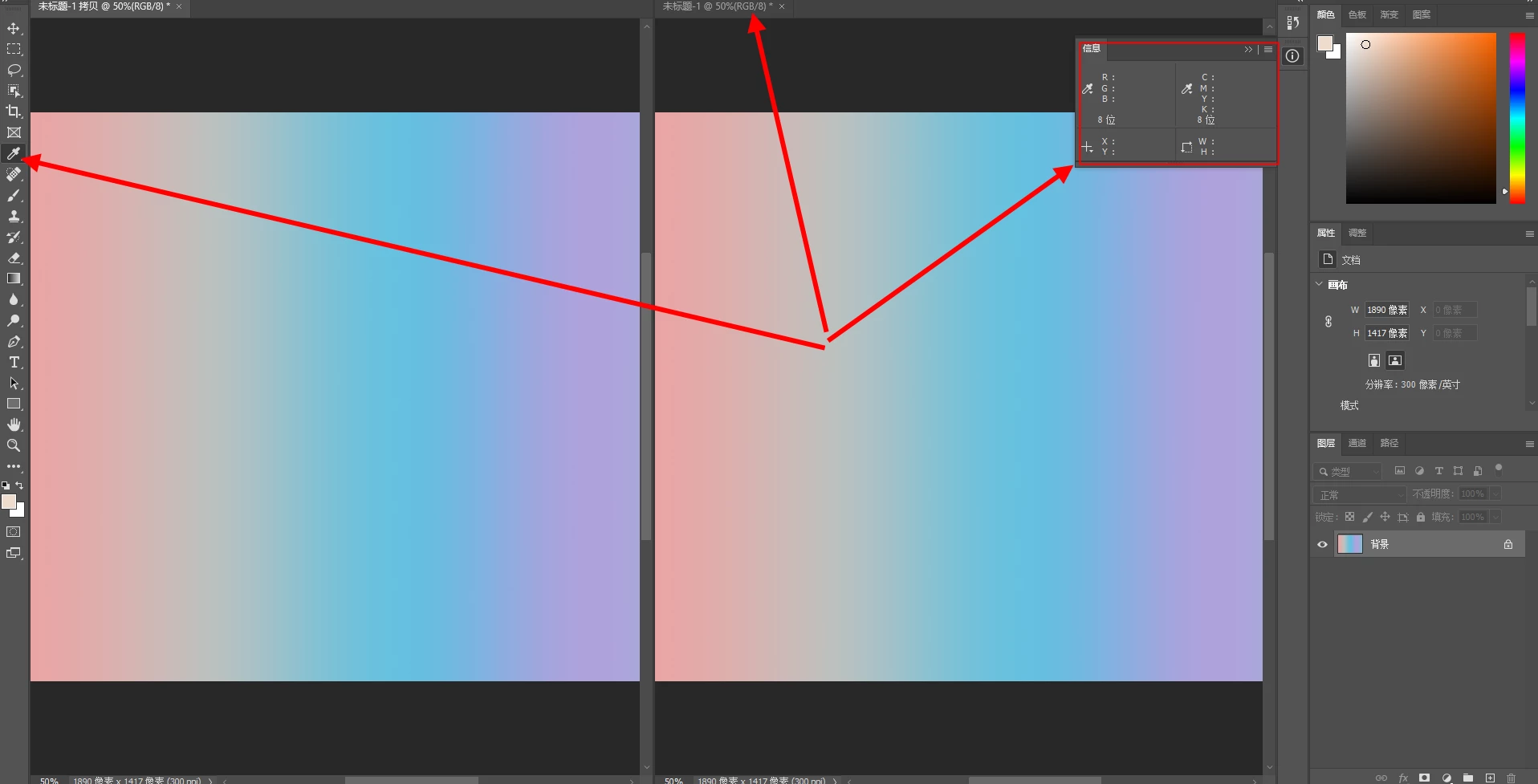
When photoshop opens the dual window, the eyedropper tool clicks the inactive window to pick the color, and the information panel has no color value display
 

This topic has been closed for replies.

3 replies

gener7
Community Expert
Community Expert
July 21, 2020

deleted


gener7
Community Expert
Community Expert
July 21, 2020

21.2.1 just got released, but if a window is inactive, the info panel will be blank. You can tell if a window is inactive if the title tab is dimmed. The Info panel only shows the values of the active window. You have to click the tab to make it active.


Off topic: 21.2.1 fixed the "ghost" bug, where dragging type or rotating items caused multiple copies.

JJMack
Community Expert
Community Expert
July 21, 2020

Are you a Photoshop tester where did you get 21.2.1? It should not matter what tool is active the cursor needs to be over the image for Photoshop to know which pixel information it should display.

JJMack
xsjlai
xsjlaiAuthor
Participant
July 21, 2020

Sorry, it's version 21.2. Of course, you want to put the cursor on the top of the picture. The single window is normal, but the double-window information panel has no color value display.