Participant
December 23, 2017
Answered

Pip [Unable to find the Red Eye Remover]

  • December 23, 2017
  • 3 replies
  • 598 views

How do I find the red eye remover when I go to the healing tool there is no drop down option

    This topic has been closed for replies.
    Correct answer davescm

    If you click and hold on the healing brush tool do the other tools appear?
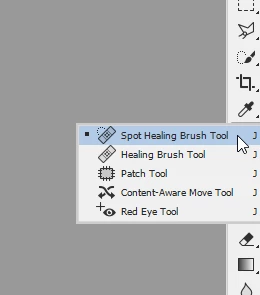
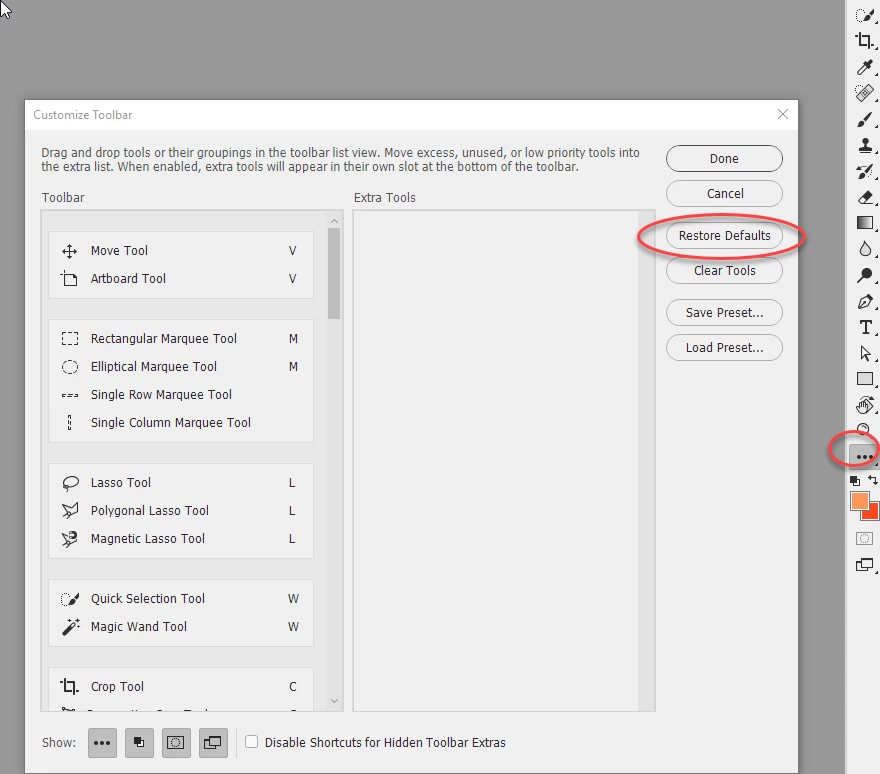
    If the answer is no , and you are using the current version of Photoshop go to the three dots and choose edit toolbar. Then choose restore defaults
    Dave

    3 replies

    Participant
    December 24, 2017

    Sorted thank you for your imput merry Christmas Pip

    barbara_a7746676
    Community Expert
    Community Expert
    December 23, 2017

    Oher ways to try accessing the red eye tool:

    • Right click on the healing tool.
    • Hold down Alt or Option and click on the healing tool.
    • Hold down Shift and press J on the keyboard.

    However, it shouldn't be necessary to do any of the suggestions above. There may be something wrong with the Photoshop installation. It could also be the video card -- go to Preferences > Performance.

    If the video card doesn't solve it, you could try resetting Preferences, and if that doesn't work, the CC Cleaner Tool.

    davescm
    Community Expert
    davescmCommunity ExpertCorrect answer
    Community Expert
    December 23, 2017

    If you click and hold on the healing brush tool do the other tools appear?

    If the answer is no , and you are using the current version of Photoshop go to the three dots and choose edit toolbar. Then choose restore defaults

    Dave

    Participant
    December 23, 2017

    Thanks Dave il try that later had to pop out

    Trevor.Dennis
    Community Expert
    Community Expert
    December 23, 2017

    philipa6999632  wrote

    Thanks Dave il try that later had to pop out

    Dave's suggestion should do the trick.  Several people reported missing tools when the Custom Toolbar feature was released (CC2017 I think).  I suspect it had something to do with their Preference settings that would have been imported from the previous version, or possibly even a corrupt Preference file.  Restoring the Toolbar default fixed it every time.

    Good luck and let us know how you get on.