Participant
February 8, 2020
質問

Pixelated "X" icon on the top left of the canvas on some paths

  • February 8, 2020
  • 返信数 1.
  • 1457 ビュー

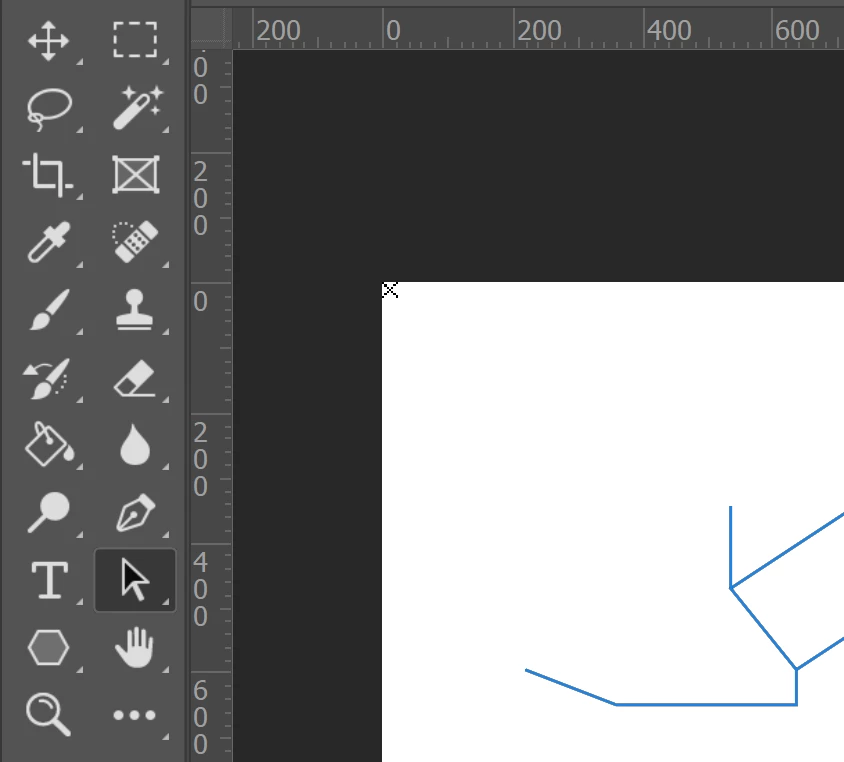
I'm seeing a pixelated "X" at the top left of the canvas when I select one of the paths in my psd. What does this mean and how do I get rid of it? Deleting some path segments makes it disappear but it's not consistent.
このトピックへの返信は締め切られました。

返信数 1

davescm
Community Expert
Community Expert
February 8, 2020

It indicates that there is a stray path point on the canvas i.e. a path has been started with a point but taken no further as might happen if you press Esc immediately after.

If you use the path selection tool (black arrow) to drag out from the top left corner to the bottom right corner of the canvas (i.e. select all the sub-paths) , any stray points should then be highlighted.

Dave

olsen2作成者
Participant
February 8, 2020

Ok, thanks very much! I must have one on top of another point somewhere.