Participant
July 17, 2020
Question

Pixelation when adjusting opacity

  • July 17, 2020
  • 1 reply
  • 1699 views

Hello,

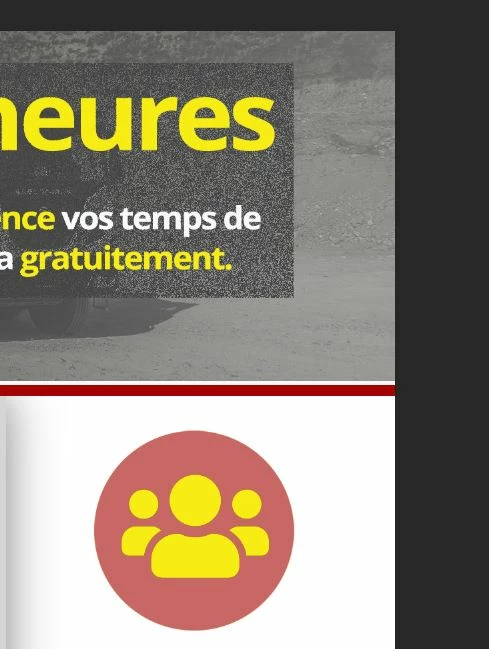
I'm using PS 21.2, and I'm having an issue with a layer: when I try to set opacity to let's say 64%, the layer is all pixelated.

Picture 1 shows my gray layer over the image, which is totaly pixelated (it is just a #444444 gray rectangle, the one I'm trying to set at 64% opacity)

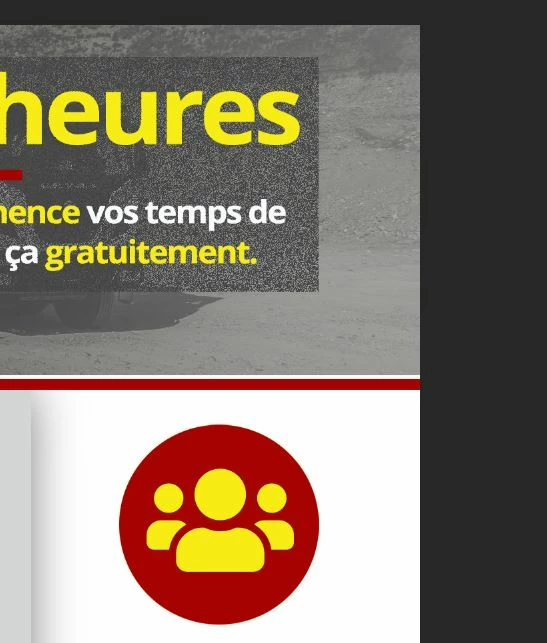
Picture 2 shows another layer (the red disc with the iconwhich can correctly be set to another transparency level without any issue.

What am I doing wrong?

Thanks in advance!
This topic has been closed for replies.

1 reply

Bojan Živković11378569
Community Expert
Community Expert
July 17, 2020

What is blend mode set for that #444444 gray layer? Blend mode or advanced blending options what is less believable comes to my mind. Blend mode Dissolve can produce similar effect.

W.goninAuthor
Participant
July 21, 2020

Hello,

Bend mode was normal, I tried them all to see if it was that ^^

I could solve the problem : the layers (background image and gray444444) were inside a folder ; I just moved the gray444444 layer outside of the folder and it was good.

Thanks for your reply 🙂