
Participating Frequently
December 13, 2016
Question

Pixels are much smaller when exported

  • December 13, 2016
  • 10 replies
  • 1391 views

I am quite confused with the export for web process.

I am trying to export images to use on my website. my screen is 1440x900. When I export my photo at 1600 using export for web, the picture ends up being much smaller than my screen size which is at 1440... And when i upload the image to my site which requires 1200, the picture is extremely pixelated.

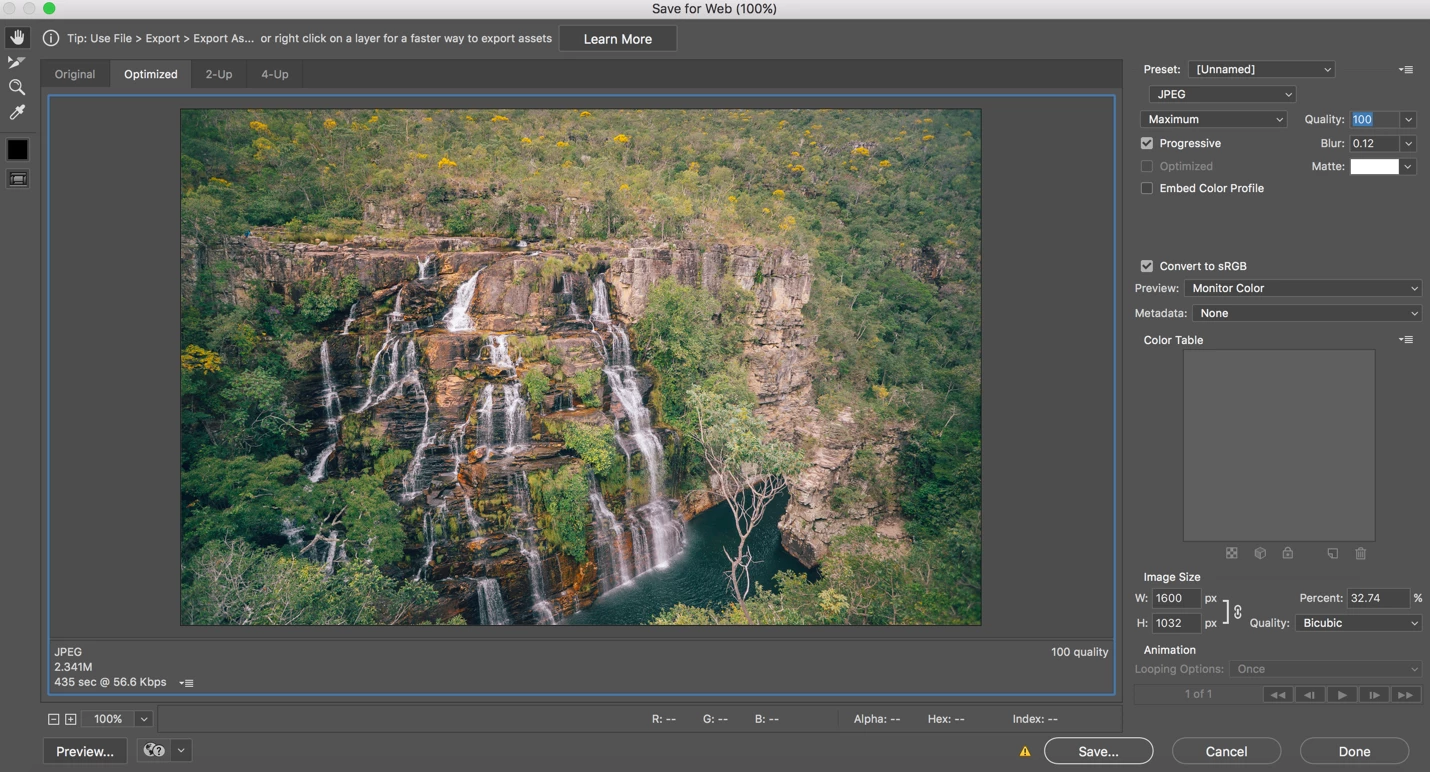
So am I misunderstanding the theory of pixel dimensions here? I thought that if I was to export an image at 1440px, it would appear full screen on a 1440px screen. why is this not the case? Here you can see the preview I am getting at 100% in the export for web screen. I figure 100% should be as wide as my 1440px screen. But if i zoom in more than that, then it's immediately pixelated.

Any help would be greatly appreciated!
This topic has been closed for replies.

10 replies

Legend
December 18, 2016

Thanks for sharing the 1600 pixel wide file. This is the sort of problem where it can be almost impossible to follow the discussion, because it leads in all sorts of ways. The problem is, I think, that you've asked what seem to be two different questions, and in some ways what you are saying seems to us to be impossible. That's not unusual, it's all about exactly how things are said, we often eventually find we were "agreeing noisly".

Also, this is partly about quality. Quality is a very personal thing, and people often disagree on it. For example some people value sharpness over smoothness, while others are the exact opposite. You have a complex image too, combining stillness and movement (waterfalls are a difficult thing to photograph, as I'm sure you know more than I).

Let's focus on one specific question. You have an original image over 4000 pixels wide. You aren't happy with the quality when Photoshop exports a 1600 pixel wide version of it. Is that a fair summary of a single question? If so, I suggest you share the original image that you are working with before you do anything to it. This will allow the Photoshop experts to try different things on it.

But I'd also like to know from you: the exact details of your monitor and system; and exactly HOW you are viewing the final file; what specific app you are using. Please focus carefully on answering questions, as it's easy to end up restating the problem instead.

Todd Shaner
Legend
December 18, 2016

In addition to what mentioned I noticed in the 'Save for Web' screenshot you're using 'Bicubic' Quality setting. When an image is resized (i.e. made smaller) Output Sharpening needs to be applied. You can do this using the 'Bicubic Sharper' Quality setting, but it applies a small "fixed amount" of sharpening that may be insufficient for some images. You can apply Output Sharpening to the 'Save for Web' JPEG file as an extra step using Unsharp Mask in PS or simply use the LR Export module to create your Web images. It has Output Sharpening settings Screen Low, Standard, High and you could even use the Glossy or Matte settings, which apply even higher sharpening.

Image Resizing for the Web and Email

Participating Frequently
December 18, 2016

The image has the same issue on all computers, retina and non-retina. I have tested from multiple. Also, all the images on my retina screen look good at their respective full pixel sizes, but just the images i export from photoshop look low quality when viewed at full size.

I just want a 1600 pixel image to look high quality when viewed at full size (1600px).

Participating Frequently
December 17, 2016

OK I am confused about the consequences from this. Because what I want, is a 1600px image that is crisp and high quality, not one that is as low quality as what I am getting.

This image here is crisp and sharp at 1280px wide... But I cannot get this kind of quality at this size unless I export an image in photoshop at around 2400px and then view it as 1280px. So how can I get the image to look good at its exported pixel dimensions.

Trevor.Dennis
Community Expert
Community Expert
December 17, 2016

alexanderw39301566 wrote:

So how can I get the image to look good at its exported pixel dimensions.

You can't.  It's that simple.  Upresing a raster object/image will lose quality. 

As Scotty used to say"

Participating Frequently
December 17, 2016

I am not upresing. my original is 4500+px.

Participating Frequently
December 17, 2016

Okay here is the 1600px file. Dropbox - almecegas-1600px.jpg You can see that when you view this at actual size the quality is down quite a bit, even though I exported at 100% quality, and the original image has crisp and sharp clarity at 4500px.

Here are the screenshots of the save for web screen. In this screen you can see that it says it is 100%, but this is far smaller than even some 1200px images I have.

D Fosse
Community Expert
Community Expert
December 17, 2016

Same old story.

Photoshop displays at true 100% on your high resolution retina display. That means one image pixel is represented by exactly one screen pixel. This is the correct way to display the file!

Other apps without Photoshop's requirements for accurate display, scale the image up, so that it has the physical size on screen that people are used to from traditional displays. This is a workaround, a hack, and not accurate.

Legend
December 14, 2016

We may need more screenshots now. The thing to beware of is that the forum software can recompress, resample and generally mess with stuff. I suggest the following two screen shots.

1. The entire save for web screen FROM REOPENING THE SAVED JPEG.

2. A large detail of the file being viewed at 100% in Preview or whatever, so we can see the effect you are talking about. If it is subtle please point us at a clear example. May need another screen shot to compare.

Participating Frequently
December 14, 2016

Hey thanks,

No my screen is not retina.

And the apps aren't showing it poorly because it makes no difference what computer I am using the image on.

Opened it in photoshop and it still looks bad when viewed at 100%.  So the image file definitely has bad quality.

When I export the file on photoshop and view in the preview screen it says it's 100%, but it sizewise it is definitley not the size of 1600px... The quality looks fine, but sizewise it appears more like 1000px. Then when I hit export I get a file that has 1600 dimension but it looks like a 1000px image stretched to fit 1600px.

Todd Shaner
Legend
December 14, 2016

alexanderw39301566 wrote:

When I export the file on photoshop and view in the preview screen it says it's 100%, but it sizewise it is definitley not the size of 1600px... The quality looks fine, but sizewise it appears more like 1000px. Then when I hit export I get a file that has 1600 dimension but it looks like a 1000px image stretched to fit 1600px.

Please upload the actual Export file to Dropbox and place the share link in a reply here. That way we can evaluate the actual file and determine what's happening.

Legend
December 14, 2016

There seem two possibilities here:

1. Photoshop is exporting a good file at the required dimensions, but the apps you are using are showing it poorly.

2. Photoshop is exporting a poor file.

My money is on "1". But you can easily test this. Just reopen the PNG in Photoshop. Is it good or bad?

Legend
December 14, 2016

AND - is it a retina screen? May not be important to you but makes a world of difference.

Participating Frequently
December 14, 2016

Well reallly I just tested it by throwing it into the Chrome browser and viewing it in actual size in Preview on apple. And I am seeing that the file is in 1600px actual dimensions.

So it is exporting in 1600px, but it just is not high quality unless viewed at like 1000px size. So for some reason photoshop is not exporting 1600px as high quality, but instead it feels like its taking a 1000px image and stretching it to 1600px and then exporting as that.

Todd Shaner
Legend
December 14, 2016

Yep, it's probably this Retina display issue: https://designm.ag/photoshop-2/pixel-design-issue-photoshop-retina/

Legend
December 14, 2016

You're presumably testing this image in different ways, with different apps. But what apps, in what way?

Legend
December 13, 2016

Your browser may not be showing one pixel in image Adobe pixel on screen. Depends on the browser, settings, and whether it is a retina screen.

Participating Frequently
December 14, 2016

Well I checked my display settings, and it is definitely scaled for 1440. So it should be showing 1440 pixels.

Also When I load any other image at a certain pixel size, it looks clear in its actual pixel size. So with other images there's no issue.

But what I saw now is that when I click "view in actual size" on preview, the image does enlarge to fit my display (so it actually is in 1600px)... But the quality is horrible and pixelated, which should not be the case since the image which is supposed to be at 1600px is wider than my screen, so there should be no stretching required.

So photoshop seems to be saving a file with 1600px dimensions, but they only look ok when viewed at around 1000 pixels....

Also just a side note, the original image is 5000+ pixels wide, so the resolution is there.