
Inspiring
October 16, 2023
Answered

"Place in Photoshop" missing in Bridge 2024

  • October 16, 2023
  • 4 replies
  • 506 views

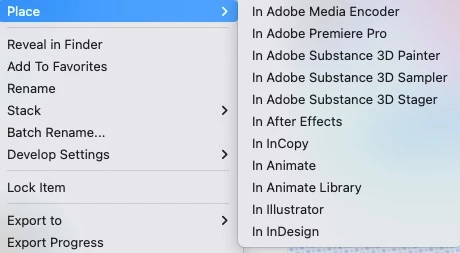
Since upgrading CC apps to 2024, the option to Place > In Photoshop is missing from Bridge. See screenshot. Anyone know how to fix this? I'm running Mac Ventura 13.6 on an M1 Macbook Pro 13". I seem to recall this issue happening a few versions back but I don't recall the solution and couldn't locate it anywhere. Thanks in advance.
 

This topic has been closed for replies.
Correct answer Bojan Živković11378569

Beside reinstalling Photoshop I do not know other option to recommend.

4 replies

Inspiring
October 17, 2023

That did the trick! Thank you!

Bojan Živković11378569
Community Expert
Community Expert
October 17, 2023

Beside reinstalling Photoshop I do not know other option to recommend.

Inspiring
October 17, 2023

Ah yes, that is the solution I remember! However, there is no option to select Photoshop in Bridge 2024. See screen shot.


Bojan Živković11378569
Community Expert
Community Expert
October 17, 2023

In Bridge go to Preferences > Startup Scripts, do you see Adobe Photoshop 2024? Is that script checked? Restart Bridge after enabling it.