
Inspiring
May 4, 2025
Question

Placed Photo (smart object) pixel dimensions are incorrect

  • May 4, 2025
  • 1 reply
  • 391 views

When I place a photo (default as a smart object) into a master file 800px wide, it is showing the wrong dimensions when I try to transform it (it's showing 242px wide).  


If I rasterize the smart object it will show the correct dimensions at 800px wide.  The smart object and rasterized images are exactly the same size.


NOTE:  the dimensions that show up when you drag the transform boundaries are showing the correct dimensions (on both the smart object and rasterized image)
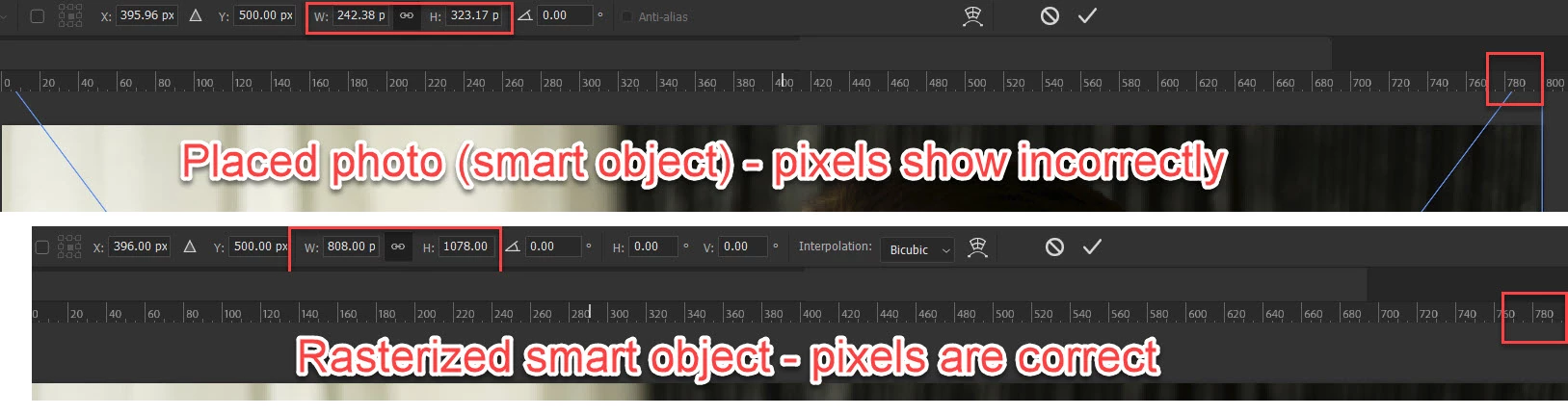
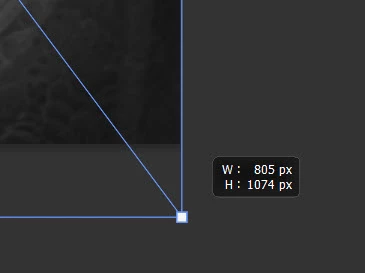
I've never seen this until today (and I do this dozens of times a day).  


What am I missing?  

1 reply

D Fosse
Community Expert
Community Expert
May 4, 2025

The thing that always trips people up with smart objects, is that they honor the physical size, not the pixel size.


And the physical size, of course, is determined by the pixels per inch-number.


So when there are inconsistencies, it's because the ppi numbers are different. Make sure ppi is the same, and the pixel size will be correct.


(The reason smart objects honor physical sizes, is for compatibility with PDF and vector).

Inspiring
May 4, 2025

The placed image is 3888px x 5184px.  But that has nothing to do with the px dimensions in the new document.  The pixel dimensions the show when you transform something should be the actual pixel dimensions (or whatever unit you choose).  If I make a shape, hit ctrl+T, it will show the exact same thing.


My typical process is to drop a bunch of images into a master TIF file and resize to width/height.  For example, I take a bunch of hi res images, drop them into a 800px x 800px file to resize them for a website.  Hit ctrl+T and entire the shorter dimension in the transform dimensions, which would be 800px in this case.  This sizes it for exactly the correct dimensions for the website.  

I can't do that now.  If I enter 800px it makes it like 3x larger than 800px (or whatever seemingly random size).  It has to be a smart object because I don't want to jeopardize the quality if I scale up/down.


I've been doing this for decades. This is the first time I have ever seen this.  I resized dozens of images this way almost every day.  I feel like I must have inadvertently changed some setting (nothing I can find in preferences, etc., though).