
Participant
December 2, 2021
Question

PLEASE HELP!!!

  • December 2, 2021
  • 1 reply
  • 155 views

Forgive me for asking what may be obvious questions, but this topic has been bothering me for the longest time and I'd rather get it out of me and risk looking dumb than forever wonder if I'm doing it wrong.


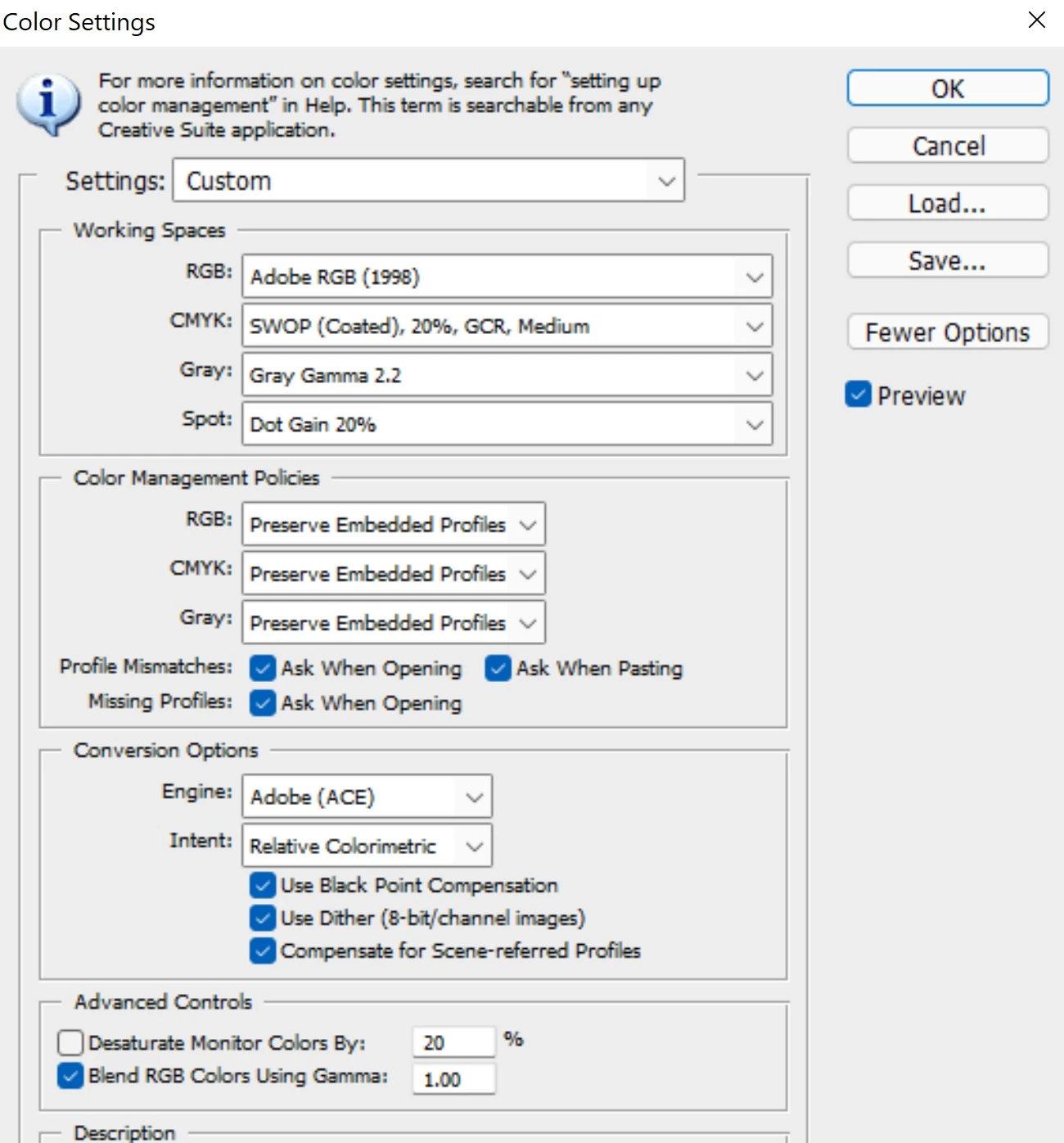
I'm still using Photoshop CS5. That's the only photo editing software I use. Here is a screenshot of my current color settings:
 

I do all my post-processing on a Dell XPS 15 9510 laptop with 3.5K OLED screen. I specifically bought this laptop because it supports 100% sRGB, close to 100% Adobe RGB, and 100% DCI-P3. I calibrated my monitor with a Spyder and set my laptop to the custom calibrated color profile. I've seen different sources say to never pick monitor profile as your RGB working space in photoshop. I've seen some people say use Adobe RGB (1998) as the working space and other others say sRGB all the way if you mostly publish images on the web. I decided to uninstall the Dell PremiereColor app today so that it won't undo or interfere with my custom calibrated monitor profile.


I really don't know if I should keep Adobe RGB (1998) as my working space in photoshop or change it to DCI-P3. I don’t even know which profile on the list is the right DCI-P3 option to pick.


If I leave sRGB as my working space in photoshop like what most people recommend, does that mean I wasted my money buying an expensive color accurate laptop? Should I edit in the color gamut my laptop supports in order to get the most out of it?  


I edit photos taken with my android smartphone camera more frequently than I do with photos from my Nikon dSLR camera. Therefore, most of the photos I post on my social media were already in sRGB to begin with. Whenever I open my smartphone photos in photoshop, I get the Embedded Profile Mismatch pop up message asking if I want to use the embedded sRGB profile or convert to the working space (Adobe RGB 1998).
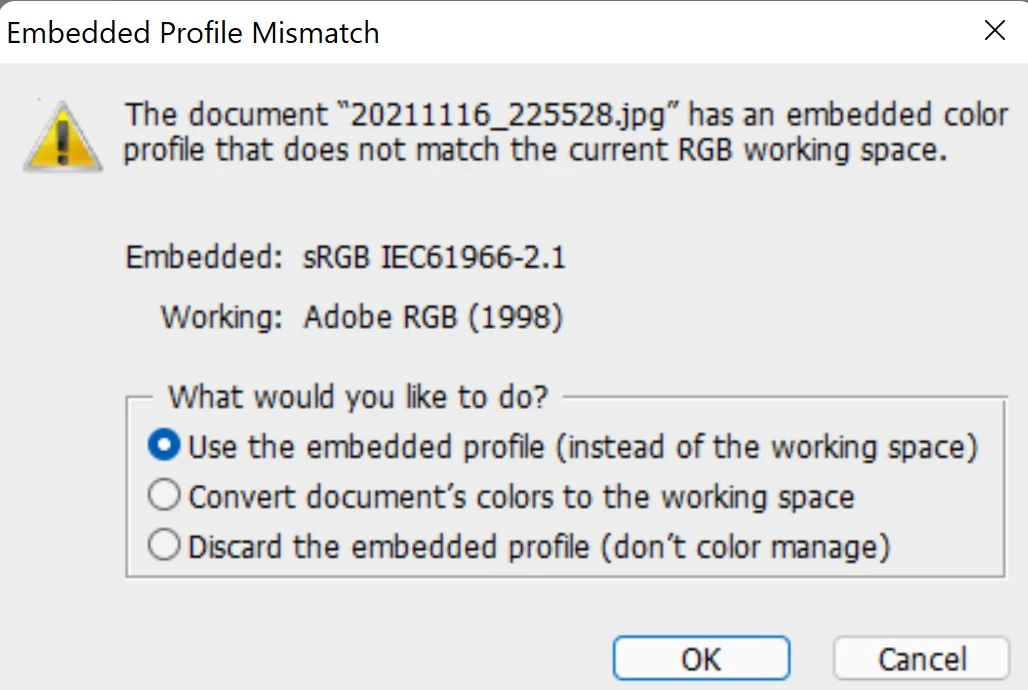
 

I’ve always chosen to keep the embedded sRGB profile. I don’t know if I’ve been making the wrong choice this whole time. Does my laptop screen calibration take precedence over the embedded color profile of the images I shot in sRGB?


When I finish editing my smartphone photos, I’ve been going through the steps of saving them for web publishing by doing Save for Web & Devices in photoshop. The screenshot below shows the settings I’ve been using:
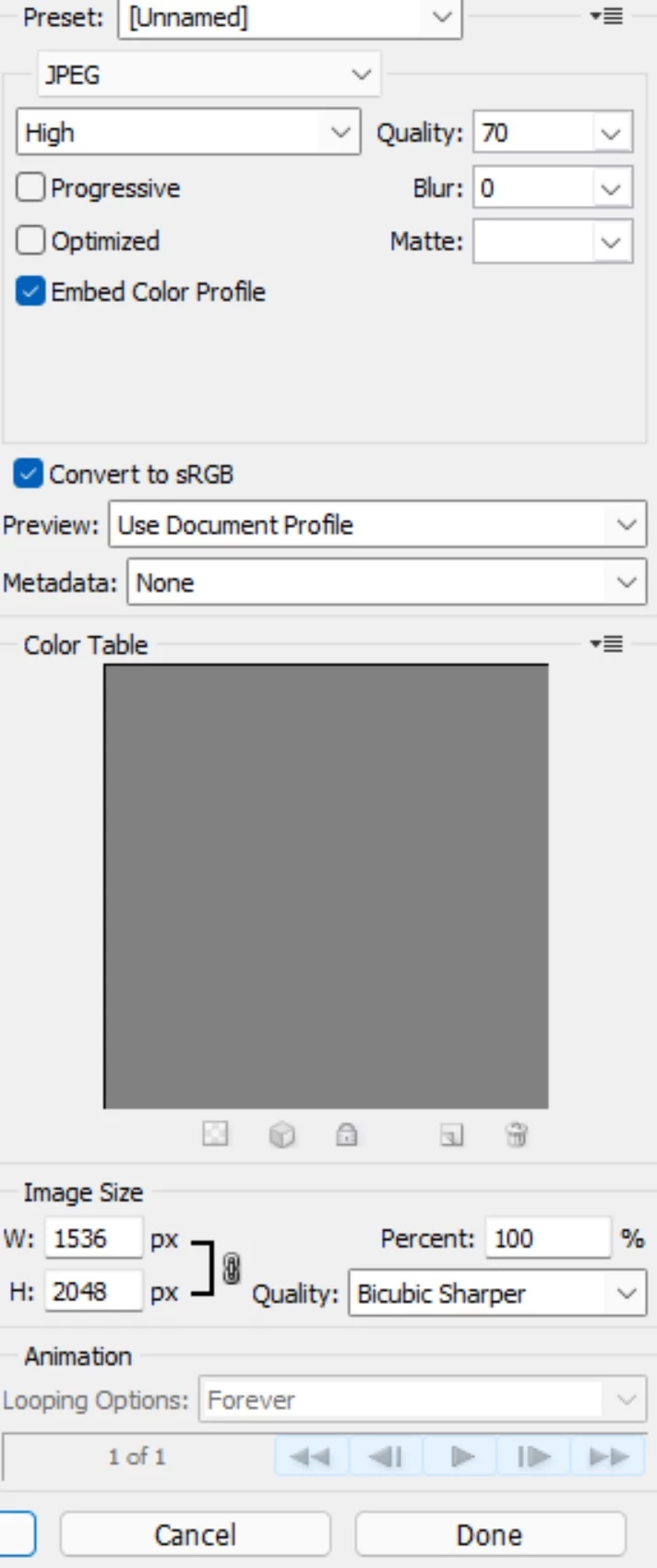
 

Does it even make sense to convert an image to sRGB that I just got done editing with its embedded sRGB profile and have “embed color profile” checked before posting them on the web?


Which of these 2 workflows should I be using?

  1. Open sRGB photo and keep embedded profile à ASSIGN TO and switch file to working space of Adobe RGB (1998) à edit photo in Adobe RGB à CONVERT TO PROFILE to switch file back to sRGB à resize photo à Save for Web & Devices à leave “convert to sRGB” and “keep embedded sRGB profile” checked


2. Open sRGB photo and convert to working space aka Adobe RGB (1998) à edit photo in Adobe RGB à resize photo à Save for Web & Devices à leave “convert to sRGB” and “keep embedded sRGB profile” checked


PLEASE HELP ME UNDERSTAND!

This topic has been closed for replies.

1 reply

Conrad_C
Community Expert
Community Expert
December 2, 2021

This can be a complicated topic. It’s hard to just give quick answers, because understanding why a certain answer is correct requires some study of how color management with color profiles works.


@Lani22014318rhvp wrote:

Here is a screenshot of my current color settings:


The Color Settings are defaults, which means they apply mostly when you create or open a document that does not already have an embedded color profile. Today, many more images already have a color profile applied, where the best thing to do is select the “Use the embedded profile” option. In today’s Photoshop, most people never see that Embedded Profile Mismatch alert because the current Color Settings default is to have Ask When Opening disabled. You might want to do that, because then the alert would stop bothering you; Photoshop would simply preserve an image’s existing embedded profile without asking. Most of the time, that’s the right thing to do.


@Lani22014318rhvp wrote:

I do all my post-processing on a Dell XPS 15 9510 laptop with 3.5K OLED screen. I specifically bought this laptop because it supports 100% sRGB, close to 100% Adobe RGB, and 100% DCI-P3. I calibrated my monitor with a Spyder and set my laptop to the custom calibrated color profile. I've seen different sources say to never pick monitor profile as your RGB working space in photoshop.


That is correct. As a default color space for high quality editing, the working space works best if it’s device-independent. That means it must not be specific to any device, so a custom display profile (very device-specific) must not be selected as the working space. (Color scientists have other reasons why a standard like sRGB or Adobe RGB should be picked instead a display profile, such as the need for the working space to be “perceptually uniform,” but that’s getting too technical.)


It sounds like your Dell has a much better than average, wide gamut laptop display. You probably should be glad you have it.


@Lani22014318rhvp wrote:

If I leave sRGB as my working space in photoshop like what most people recommend, does that mean I wasted my money buying an expensive color accurate laptop? Should I edit in the color gamut my laptop supports in order to get the most out of it?  


I edit photos taken with my android smartphone camera more frequently than I do with photos from my Nikon dSLR camera. Therefore, most of the photos I post on my social media were already in sRGB to begin with.


If you think long term, that could change in the future. Already, anyone using recent Apple devices like iPhones and MacBook Pro laptops have displays that are wide gamut Display P3, so the trend to using color spaces much larger than sRGB is already happening. Are the sRGB images from you Android smartphone in JPEG format? If so, then that might be the reason they are sRGB. Because if you used the camera in an application that can shoot raw on an Android phone, such as Adobe Lightroom, then it would produce a raw file, which as you know can be converted into a wide gamut image, depending on how you process it. Which means there is actually a way for your smartphone camera to make use of your wide gamut Dell display.


It is still true that sRGB is the least risky color space for posting on the web. But what changed is that in the 11 years since Photoshop CS5 was released, web browsers are now much more likely to understand and use color profiles. So if you did post an image on the web in wide gamut Adobe RGB with an embedded profile, the chances are much higher today that the colors would display properly on various current web browsers.


@Lani22014318rhvp wrote:

Which of these 2 workflows should I be using?


Neither, because both include an unnecessary step to convert to Adobe RGB. The workflow should simply be to preserve the embedded profile (which these days is almost always sRGB anyway), and edit in that. You usually gain nothing from converting to a larger color space. In Save for Web, it’s OK to leave Convert to sRGB on with Embed Color Profile enabled, in case one day you are editing an image that is not sRGB.


Your wide gamut laptop display is still important for your Nikon DSLR photos. It may not be as useful for sRGB smartphone photos now, but again, that is changing and you should be open to the idea that a smartphone you have in the future might capture non-raw images in wide gamut color the way iPhones already do, or the way you could right now if you used a raw camera application on your Android smartphone. If you decide to start shooting wide gamut color on your smartphone, then your profiled wide gamut laptop display will already be set up for it. It will then be the same color workflow as for your DSLR.