


Participant
July 28, 2021
Question

Please help! Actions are not working anymore

  • July 28, 2021
  • 2 replies
  • 1484 views

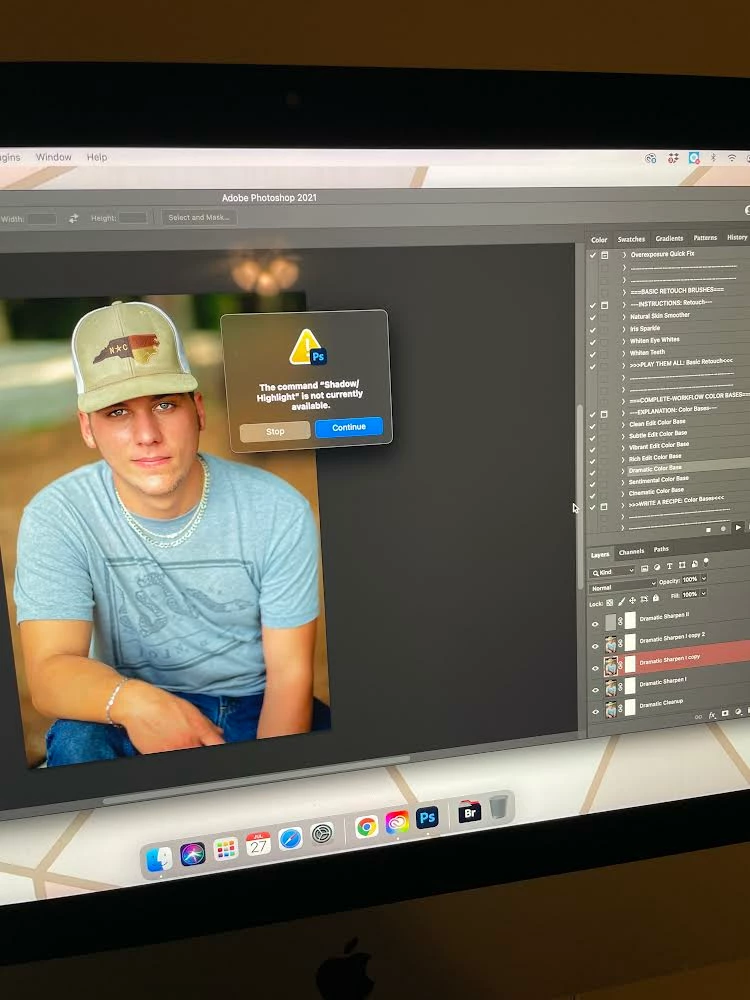
My greater than Gatsby actions are not working anymore since Photoshop updated. I have not cropped any pictures and even if I start with a fresh picture I still get errors. The command "" is not currently available.  It's doing it with set, make everything really. Morning is available. I have tried reading forums on here but nothing is helping. I have spent three nights trying to figure this out. I have deleted all the actions and reloaded them. That did not work. I have tried to download an older version of Photoshop but apparently I didn't upload an old enough for them because it's still doing it. I have clothes for the shop completely restarted my computer completely . I've done everything I know to do.  I even unchecked some thing in the layers panel That someone mentioned and that didn't work either. How can I fix this? I've spent hundreds of dollars on these actions. I've reached out to Greater than Gatsby and they seem to think it's a Photoshop problem. Please help. 
This topic has been closed for replies.

2 replies

Legend
August 1, 2021

Judging by your picture (red color of the selected layer), your document is in Quick Mask mode. Press Q to cancel and try running Action.

melissapiccone
Community Expert
Community Expert
July 28, 2021

So many variables of why your actions are no longer working, it's impossible to tell what the problem is or how to fix it without looking at the action step by step. It could be you aren't starting out correctly or somewhere along the line something isn't happening correctly negating the rest of the steps. I'm sorry the people you purchased the actions from are not helping you. My suggestion is that you build your own actions to do what you need done and save your money on any further action purchases. If you learn to build your own, you will also learn to trouble shoot existing actions. 

Melissa Piccone | Adobe Trainer | Online Courses Author | Fine Artist
aahudginsAuthor
Participant
July 29, 2021

I have not done anything different than how I've always done it. These actions worked just fine with older versions of Photoshop. I pushed play and it ran the action with no problem. I have not done anything to it, so I'm not sure why it doesn't work now.

JJMack
Community Expert
Community Expert
July 29, 2021

Command not available is a typical messages when some document condition the command depends on is not present. When you get that message you need to look at the highlighted failing step in the action and look at Photoshop UI state the current document has.   The step has some dependency that does not currently exists so the step is not currently;y available for execution..

JJMack