
Participant
August 6, 2020
Answered

Please help!! Trying to edit an image and cannot find text layer

  • August 6, 2020
  • 2 replies
  • 396 views

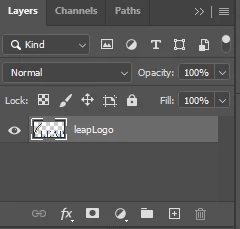
I have an image it includes one word that I need to adjust and it has two icons that I need to change color. When I open the file all that is there is one layer and nothing that I can adjust. I am new to photoshop but thought that when anything was added it created a layer that could be adjusted. Ive added an image of my layers panel and there is no drop down box or anything.


This topic has been closed for replies.
Correct answer D Fosse

If there were layers here at one time, they are merged and gone forever. There is only one layer here.


It will still be editable with selection tools and masking, but how easily that can be accomplished isn't possible to say from this layer thumbnail. Any text will be rasterized and no longer editable as text.


Note that only PSD and TIFF actually support layers. Anything saved as jpeg or PNG will be a single layer.

2 replies

Participant
August 7, 2020

Thanks for your help. I've figured out how to change the text but there are two lines that I need to change the colors. I've tried a number of techniques but can't figure it out. What tool would you suggest to change them

D Fosse
Community Expert
D FosseCommunity ExpertCorrect answer
Community Expert
August 6, 2020

If there were layers here at one time, they are merged and gone forever. There is only one layer here.


It will still be editable with selection tools and masking, but how easily that can be accomplished isn't possible to say from this layer thumbnail. Any text will be rasterized and no longer editable as text.


Note that only PSD and TIFF actually support layers. Anything saved as jpeg or PNG will be a single layer.