

Please let me know how to use the size of the split screen(Tile)to be fixed. (Not Floating window)
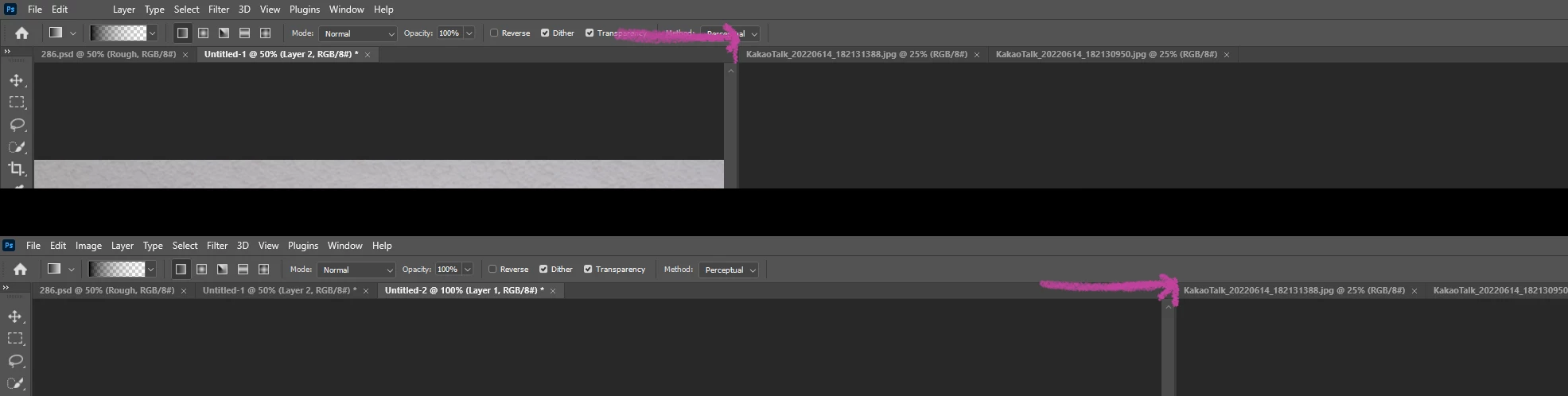
Photoshop's workspace split size adjustment (canvas window resize)
I use 'Windows > Arrange > 2-up, 3-up....' window menu workspace (not floating windows)
Opening an image file adjusts the width of the window to match the image size.
In the 'Preferences' option, the Resize Image check applies only to floating windows.
It does not apply when using a screen in a work space without floating a window like me.
When open the image, like the pink arrow in the screenshot, the tile screen width changes.
I work with a narrow screen on the left and a zoom in on the right, which is cumbersome because the Workspace tile window (Canvas Tap Window) width changes depending on the image size.
Please let me know how to use the size of the split screen(Tile)to be fixed. (Not Floating window)
 AdChoices