Known Participant
May 29, 2024
Answered

Pls. help . . .Photoshop... Auto Select the layers above the layer ( Scripts )

  • May 29, 2024
  • 2 replies
  • 817 views

Hi All ... pls help me

Can you help me with scripts that will automatically select all layers above the selected layer when running the script?

This topic has been closed for replies.
Correct answer Stephen Marsh
quote

Thank you very much, sir @Stephen Marsh . . . Alt+Shift+. I didn't know you could use that shortcut


By @Thiha31203570tbl0


You're welcome, it's two separate keyboard shortcuts combined:


Select/target front (top) layer =  Option +

Add to continuous selection =  Shift


Selecting layers via the mouse captures their absolute name in the action, which isn't useful when running the action on other images with different layer names. Recording the action with keyboard shortcuts doesn't have this limitation.


Relative Layer Keycuts:


Select/target front (top) layer =  Option + .
Select/target next layer up =  Option ]
Select/target next layer down =  Option [
Select/target back (bottom) layer =  Option ,

Move current target layer to front (top) layer =  Command Shift ]
Move current target layer up =  Command ]
Move current target layer down =  Command [
Move current target layer to back (bottom) layer =  Command Shift [

Windows users would swap the Command key for Ctrl and the Option key for Alt


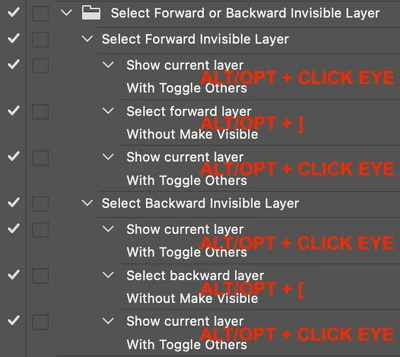
Keep in mind that these keyboard-shortcuts are affected by layer visibility, one has to use extra steps to deal with invisible layers, such as:
 

2 replies

Stephen Marsh
Community Expert
Community Expert
May 29, 2024

Myra has provided a hint for automation... This can be done for all visible layers above the current layer via two keyboard shortcuts and or in an action:


ALT/OPT + ]

ALT/OPT + SHIFT + .


There are better ways, however, the ScriptingListener ExtendScript code for these two action steps:


// Select forward visible layer
var s2t = function (s) {
	return app.stringIDToTypeID(s);
};
var descriptor = new ActionDescriptor();
var descriptor2 = new ActionDescriptor();
var list = new ActionList();
var list2 = new ActionList();
var reference = new ActionReference();
var reference2 = new ActionReference();
reference.putEnumerated( s2t( "layer" ), s2t( "ordinal" ), s2t( "forwardEnum" ));
descriptor.putReference( s2t( "null" ), reference );
descriptor.putBoolean( s2t( "makeVisible" ), false );
list.putInteger( 4 );
descriptor.putList( s2t( "layerID" ), list );
executeAction(s2t( "select" ), descriptor, DialogModes.NO);
// Add continuous visible layers to front layer
reference2.putEnumerated( s2t( "layer" ), s2t( "ordinal" ), s2t( "front" ));
descriptor2.putReference( s2t( "null" ), reference2 );
descriptor2.putEnumerated( s2t( "selectionModifier" ), s2t( "selectionModifierType" ), s2t( "addToSelectionContinuous" ));
descriptor2.putBoolean( s2t( "makeVisible" ), false );
descriptor2.putList( s2t( "layerID" ), list2 );
executeAction( s2t( "select" ), descriptor2, DialogModes.NO );


P.S. Further steps could be added to the action or script to correctly handle invisible layers.


EDIT: The following code will select all visible or invisible layers above the active layer:


// Toggle visibility of active layer
var s2t = function (s) {
	return app.stringIDToTypeID(s);
};
var descriptor = new ActionDescriptor();
var list = new ActionList();
var reference = new ActionReference();
reference.putEnumerated( s2t( "layer" ), s2t( "ordinal" ), s2t( "targetEnum" ));
list.putReference( reference );
descriptor.putList( s2t( "null" ), list );
descriptor.putBoolean( s2t( "toggleOptionsPalette" ), true );
executeAction(s2t("show"), descriptor, DialogModes.NO);

// Select forward layer
var s2t = function (s) {
	return app.stringIDToTypeID(s);
};
var descriptor = new ActionDescriptor();
var list = new ActionList();
var reference = new ActionReference();
reference.putEnumerated( s2t( "layer" ), s2t( "ordinal" ), s2t( "forwardEnum" ));
descriptor.putReference( s2t( "null" ), reference );
descriptor.putBoolean( s2t( "makeVisible" ), false );
list.putInteger( 4 );
descriptor.putList( s2t( "layerID" ), list );
executeAction(s2t( "select" ), descriptor, DialogModes.NO);

// Get the active layer name
var theLayerName = app.activeDocument.activeLayer.name;

// Add continuous visible layers to front layer
var s2t = function (s) {
	return app.stringIDToTypeID(s);
};
var descriptor = new ActionDescriptor();
var list = new ActionList();
var reference = new ActionReference();
reference.putEnumerated( s2t( "layer" ), s2t( "ordinal" ), s2t( "front" ));
descriptor.putReference( s2t( "null" ), reference );
descriptor.putEnumerated( s2t( "selectionModifier" ), s2t( "selectionModifierType" ), s2t( "addToSelectionContinuous" ));
descriptor.putBoolean( s2t( "makeVisible" ), false );
descriptor.putList( s2t( "layerID" ), list );
executeAction(s2t( "select" ), descriptor, DialogModes.NO);

// Toggle the visibility of the base selected layer
var s2t = function (s) {
	return app.stringIDToTypeID(s);
};
var descriptor = new ActionDescriptor();
var list = new ActionList();
var reference = new ActionReference();
reference.putName( s2t( "layer" ), theLayerName );
list.putReference( reference );
descriptor.putList( s2t( "null" ), list );
descriptor.putBoolean( s2t( "toggleOptionsPalette" ), true );
executeAction(s2t( "show" ), descriptor, DialogModes.NO);


Known Participant
May 30, 2024

Thank you very much, sir @Stephen Marsh . . . Alt+Shift+. I didn't know you could use that shortcut

Stephen Marsh
Community Expert
Stephen MarshCommunity ExpertCorrect answer
Community Expert
May 30, 2024
quote

Thank you very much, sir @Stephen Marsh . . . Alt+Shift+. I didn't know you could use that shortcut


By @Thiha31203570tbl0


You're welcome, it's two separate keyboard shortcuts combined:


Select/target front (top) layer =  Option +

Add to continuous selection =  Shift


Selecting layers via the mouse captures their absolute name in the action, which isn't useful when running the action on other images with different layer names. Recording the action with keyboard shortcuts doesn't have this limitation.


Relative Layer Keycuts:


Select/target front (top) layer =  Option + .
Select/target next layer up =  Option ]
Select/target next layer down =  Option [
Select/target back (bottom) layer =  Option ,

Move current target layer to front (top) layer =  Command Shift ]
Move current target layer up =  Command ]
Move current target layer down =  Command [
Move current target layer to back (bottom) layer =  Command Shift [

Windows users would swap the Command key for Ctrl and the Option key for Alt


Keep in mind that these keyboard-shortcuts are affected by layer visibility, one has to use extra steps to deal with invisible layers, such as:


Myra Ferguson
Community Expert
Community Expert
May 29, 2024

I don't have a script for you, but because the layers you want selected are contiguous, you can select them by selecting the bottom layer of what you want, holding down Shift, and selecting the top layer that you want.