Known Participant
February 7, 2012
Answered

Point coordinates using for loop w/o closure problem?

  • February 7, 2012
  • 1 reply
  • 2170 views

Currently I'm working on a script that iterates through all the points in a path and assigns a number value of the current point, and then returns the coordinates of that point. No matter how I structure the scope of the functions I'm not getting the current anchor points coordinates, just the final value. Everything else behaves as expected.. I've read every article I can on closures, but any attempt to make a anonymous function returns the code itself, not a value. I'm rather perplexed and guessing I'm missing something about the architecture of .anchor and how it assigns and returns values. Could someone help me get the correct .anchor coordinates to go with the correct point?

      i=0;
      j=0;
      var currentPath = app.activeDocument.pathItems.getByName("path");
      currentPath.select()
      var totalPoints = currentPath.subPathItems[0].pathPoints.length;
      var currentX = currentPath.subPathItems[0].pathPoints.anchor[0];
      var currentY = currentPath.subPathItems[0].pathPoints.anchor[1];
      currentPoint = Array(currentX, currentY)
//Point Loop  
for(i=0, j=0; i <= totalPoints; i++, j++){
             fileOut.write("\n Point "+i+ "of " +totalPoints+ "Coords: "+currentPoint+ "\n")
             };
        

currentX, currentY and currentPoint are just new attempts to pass the values on. I'm not wedded to any of this script in particular, just trying to wrap my head around how .js functions in these situations. I'm using fileOut.write as a log generator, but will eventually use returns once I get over this problem.

Thanks in advance!
This topic has been closed for replies.
Correct answer c.pfaffenbichler

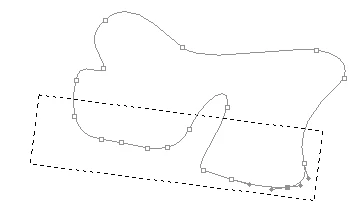
Constraint range will be defined by the lowest points on the path and two or three of it's nearest neighbors, without ascending out of the constraint region. However it may need to be factored against the overall height of the path, and width (lowest, highest x/y ranges) to get these specific areas I need, it's hard for me to say at this time without testing outputs. Shapes are slightly irregular so there is an angle I need to account for at a later stage, that probably is visually closer to this actually.

So the tricky part is to access those points and their values for me. I just have not been able to get anchor capture/iteration to work. Always the last x/y value. I do like the path intersection idea, that or a selection box like this is definitely what I'm going for.


The height of a path is not necessarily determined by its points, alas.

This function should get you the anchors, but in some cases subPathItems will not represent all separate segments.

function collectPathPoints (myDocument, thePath) {

var originalRulerUnits = app.preferences.rulerUnits;

app.preferences.rulerUnits = Units.POINTS;

var theArray = [];

for (var b = 0; b < thePath.subPathItems.length; b++) {

theArray = [];

for (var c = 0; c < thePath.subPathItems.pathPoints.length; c++) {

var pointsNumber = thePath.subPathItems.pathPoints.length;

var theAnchor = thePath.subPathItems.pathPoints.anchor;

theArray = theAnchor;

};

var theClose = thePath.subPathItems.closed;

theArray = theArray.concat(String(theClose))

};

app.preferences.rulerUnits = originalRulerUnits;

return theArray

};

1 reply

c.pfaffenbichler
Community Expert
Community Expert
February 8, 2012

I’m not sure what you want really – could you please explain what you expect to get from a path exactly?

Maybe this can help; it should return an Array of Arrays of Arrays …

Edit:

var pathInfo = collectPathInfoFromDesc(app.activeDocument, getByName("path"));

alert (pathInfo("\n\n"));

////// collect path info from actiondescriptor //////

function collectPathInfoFromDesc (myDocument, thePath) {

//var myDocument = app.activeDocument;

var originalRulerUnits = app.preferences.rulerUnits;

app.preferences.rulerUnits = Units.POINTS;

// based of functions from xbytor’s stdlib;

var ref = new ActionReference();

for (var l = 0; l < myDocument.pathItems.length; l++) {

          var thisPath = myDocument.pathItems;

          if (thisPath == thePath && thisPath.name == "Work Path") {

                    ref.putProperty(cTID("Path"), cTID("WrPt"));

                    };

          if (thisPath == thePath && thisPath.name != "Work Path" && thisPath.kind != PathKind.VECTORMASK) {

                    ref.putIndex(cTID("Path"), l + 1);

                    };

          if (thisPath == thePath && thisPath.kind == PathKind.VECTORMASK) {

        var idPath = charIDToTypeID( "Path" );

        var idPath = charIDToTypeID( "Path" );

        var idvectorMask = stringIDToTypeID( "vectorMask" );

        ref.putEnumerated( idPath, idPath, idvectorMask );

                    };

          };

var desc = app.executeActionGet(ref);

var pname = desc.getString(cTID('PthN'));

// create new array;

var theArray = new Array;

var pathComponents = desc.getObjectValue(cTID("PthC")).getList(sTID('pathComponents'));

// for subpathitems;

for (var m = 0; m < pathComponents.count; m++) {

          var listKey = pathComponents.getObjectValue(m).getList(sTID("subpathListKey"));

      var operation1 = pathComponents.getObjectValue(m).getEnumerationValue(sTID("shapeOperation"));

          switch (operation1) {

                    case 1097098272:

                    var operation = ShapeOperation.SHAPEADD;

                    break;

                    case 1398961266:

                    var operation = ShapeOperation.SHAPESUBTRACT;

                    break;

                    case 1231975538:

                    var operation = ShapeOperation.SHAPEINTERSECT;

                    break;

                    default:

//                    case 1102:

                    var operation = ShapeOperation.SHAPEXOR;

                    break;

                    };

// for subpathitem’s count;

          for (var n = 0; n < listKey.count; n++) {

                    theArray.push(new Array);

                    var points = listKey.getObjectValue(n).getList(sTID('points'));

                    try {var closed = listKey.getObjectValue(n).getBoolean(sTID("closedSubpath"))}

                    catch (e) {var closed = false};

// for subpathitem’s segment’s number of points;

                    for (var o = 0; o < points.count; o++) {

                              var anchorObj = points.getObjectValue(o).getObjectValue(sTID("anchor"));

                              var anchor = [anchorObj.getUnitDoubleValue(sTID('horizontal')), anchorObj.getUnitDoubleValue(sTID('vertical'))];

                              var thisPoint = [anchor];

                              try {

                                        var left = points.getObjectValue(o).getObjectValue(cTID("Fwd "));

                                        var leftDirection = [left.getUnitDoubleValue(sTID('horizontal')), left.getUnitDoubleValue(sTID('vertical'))];

                                        thisPoint.push(leftDirection)

                                        }

                              catch (e) {

                                        thisPoint.push(anchor)

                                        };

                              try {

                                        var right = points.getObjectValue(o).getObjectValue(cTID("Bwd "));

                                        var rightDirection = [right.getUnitDoubleValue(sTID('horizontal')), right.getUnitDoubleValue(sTID('vertical'))]

                                        thisPoint.push(rightDirection)

                                        }

                              catch (e) {

                                        thisPoint.push(anchor)

                                        };

                              theArray[theArray.length - 1].push(thisPoint);

                              };

                    theArray[theArray.length - 1].push(closed);

                    theArray[theArray.length - 1].push(operation);

                    };

          };

// by xbytor, thanks to him;

function cTID (s) { return cTID || cTID = app.charIDToTypeID(s); };

function sTID (s) { return sTID || sTID = app.stringIDToTypeID(s); };

// reset;

app.preferences.rulerUnits = originalRulerUnits;

return theArray;

};

Known Participant
February 8, 2012

Mostly fumbling my way through learning .js better as I move from actions to scripts. What I'm building towards is a final script that counts the points, stores the relative x/y coordinates for that point, and assigns it num value via the array for later access. From there I want to then filter/constrain the points within some different x/y coordinate ranges and either make a selection off of those point values, or duplicate a closed path with only those constrained values constructing it...whichever executes faster and easier.

That's a bit of script to digest, so I'll take a look at it and see if it's what I need. Thanks so much for the response! It's a struggle to learn some of these closure issues in .js off of tutorials built for browser based .js. Just have not been able to figure out how to access and pass .anchor variables in a for loop.

c.pfaffenbichler
Community Expert
Community Expert
February 8, 2012

I may still not follow – could you make it easier and post a sketch (edit: or screenshot) of what the path looks like now and what it is supposed to look like afterwards?

So you don’t want to access the left- and right handles?