Inspiring
February 18, 2020
Answered

Polyganol lasso tool

  • February 18, 2020
  • 3 replies
  • 1008 views

I have raised this before with no success....I am using the Polyganol Lasso tool with a feather of one pixel to make a precise selection. I love this tool...However the thing seems to have developed a mind of it's own. I will start, I will move along and click a point, I will then move along again and click a point again.

After doing this a couple of times and being well away from the finishing and also of course the starting point the tool shoots a line across to the starting point and completes the selection  having taken the shortest point back to it leaving me with half a selection and complete frustration. In the normal way one has to start and finish at the same point to complete the selection but the tool is not allowing me to do this and is completing it's own selection which of course is not mine. I have looked in preferences for some sensitivity selection but there is none and I have used both mouse and Wacom..Oh Boy!!
This topic has been closed for replies.
Correct answer Grant H

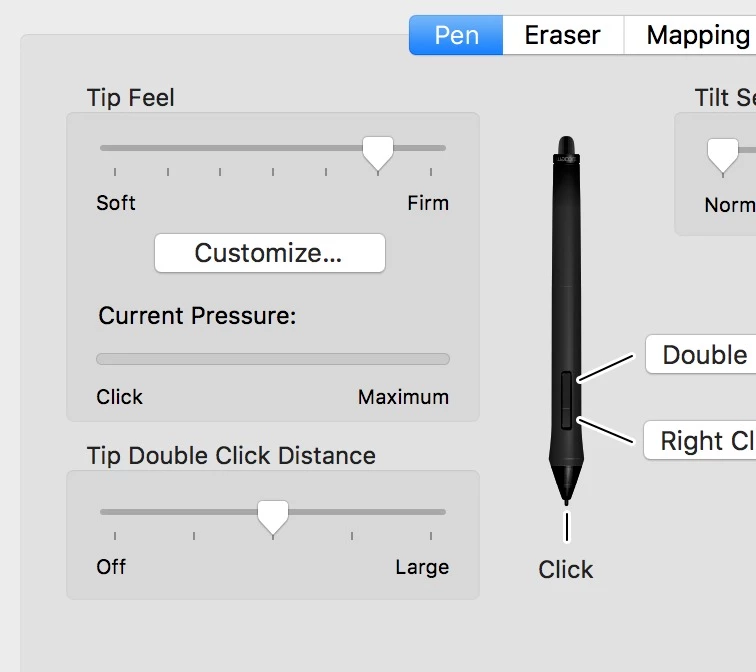
It really sounds like you are double "touching" thus closing the selection. It shouldnt be that easy to do by mistake however. You need to change your double click resistance. Cant you find the Wacom Tablet Device in System settings?

3 replies

michael dAuthor
Inspiring
February 18, 2020

Left the drivers in and just unplugged the thing. I have downloaded the latest driver and now I seem to be on the right track I can check through the settings but upto this point I never suspected the tablet I have been blaming it all on poor old P/S..Thanks

Grant H
Community Expert
Grant HCommunity ExpertCorrect answer
Community Expert
February 18, 2020

It really sounds like you are double "touching" thus closing the selection. It shouldnt be that easy to do by mistake however. You need to change your double click resistance. Cant you find the Wacom Tablet Device in System settings?

PECourtejoie
Community Expert
Community Expert
February 18, 2020

Hello, I would search also in the windows preferences for the mouse double click, if it also happens with that pointing device.

michael dAuthor
Inspiring
February 18, 2020

Thanks.....However I have been searching around and I believe I have found the answer..Some months ago I purchased a Wacom Intuos and thinking about it the problem started around the same time. I have unplugged the tablet from the system and have messed around with the selection tools  for a while with so far no problem..Is it the Wacom Tablet I ask myself?  Seems to be...

c.pfaffenbichler
Community Expert
Community Expert
February 18, 2020

Which versions of Photoshop and OS do you use? 

Are the Rulers visible? 


Until the issue is resolved you might want to use the Pen Tool instead and create Selections off of the resulting Paths (which you might want to save additionally by double-clicking and naming the »Work Path«).