
freew111
Inspiring
August 10, 2019
Question

Poor Photoshop performance on large files - CPU or GPU?

  • August 10, 2019
  • 3 replies
  • 2262 views

Hi there,

I'm currently working with a massive ~650Mb 9300x2600px 72dpi RGB PSD file that has about 300 groups and 3000 layers on a Windows 10 PC equipped with Intel i7-8700 3.20 GHz CPU, integrated Intel UHD 630 GPU, and 32GB RAM, with the following preferences:
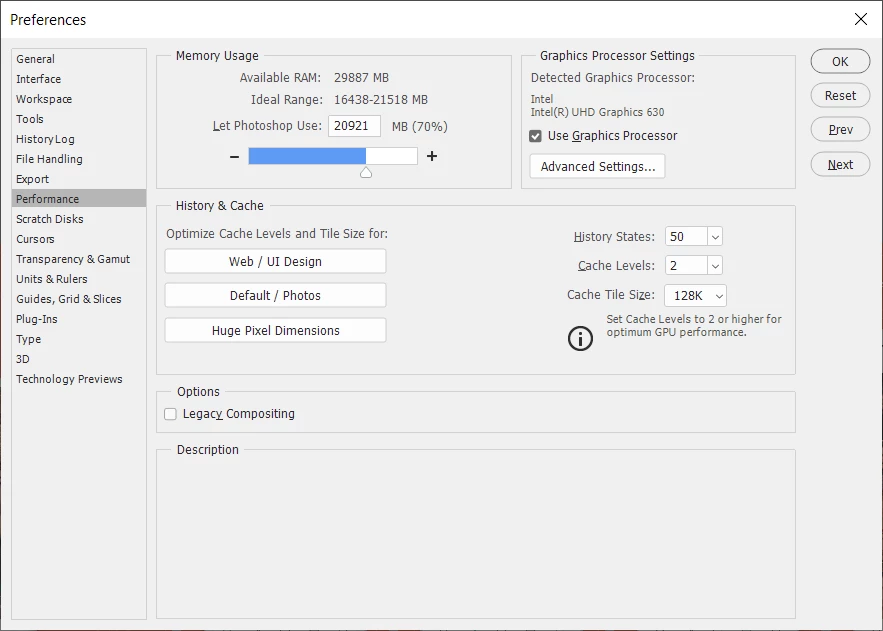
(Adobe Photoshop Version: 20.0.5 20190605.r.83 2019/06/05: 1206907  x64)

It is agonizing to perform almost any action. Whether it is moving layers/groups around, editing text layers, even selecting layers - Photoshop is lagging big time and overall is as slow as an old elephant.

When I was assembling this PC, I decided to invest more in CPU power and memory. I don't do any complicated stuff - no 3D, no video editing, nothing, just pure screen design (no print design either). That's why I don't have any dedicated GPU, and that integrated Intel 630 would be sufficient for Photoshop (or so I thought).

Now the question - is it really a time to buy a decent GPU to help out Photoshop a bit in its calculation efforts? Or am I missing some of the magic settings that would boost Photoshop when dealing with large files having only CPU calculation power at disposal?

Any idea and advice would be much appreciated.

This topic has been closed for replies.

3 replies

Legend
August 10, 2019

Don't try to improve things "blind" - look at the performance meter/task manager. Is the CPU running at 100%? Is the disk running at 100%? There's always a stopper, the trick is to find it. Otherwise you can throw money at a problem without fixing a thing.

32 GB doesn't sound like much memory for this sort of thing...

JJMack
Community Expert
Community Expert
August 10, 2019

freew111  wrote

Hi there,

I'm currently working with a massive ~650Mb 9300x2600px 72dpi RGB PSD file that has about 300 groups and 3000 layers

650MB is the PSD data compressed File size that is not a massive number it is also not the size of the document in Photoshop.   A canvas size layer is 9300px by 2600px. 24.2MP.  If it is being edited in RGB mode 16bit color depth a canvas sized layer would be  145MB, in 8bit color depth 72.5MB, in grayscale mode 24.MB.    However layers can be any size they can be larger or smaller than Canvas size.   Your document you state has 3,000 layers that is a lot or layers to composite together.  Into a 24.mp composite. I'm sure some layers also have Mask channel.   It is hard to estimate how massive your document is.   If all 3000 Layers were canvas size it surly would be massive and require Photoshop to manipulate hundreds of Giga Bites of data.

If you have a massive job the job will require more time then a small job does.

You can configure Photoshop to work better on Large  image than on small images.  You can not change the time its take you hardwate to complete the work that Photoshop gives it to do.  Massive job require more work to be done.  And You machine may also run out of resources for  Photoshop to use to be able to get the job done sooner.  You machine has a limited about of resources.  A lack if a particular resource can slow the whole process.  Check your resources when Photoshop is processing are some resources being fully utilized?

Photoshop crashing maye be Photoshop running out of resouces and not beinag able to handle that.

JJMack
August 10, 2019

Hi

Take a look here, it's worth a read

https://www.pugetsystems.com/recommended/Recommended-Systems-for-Adobe-Photoshop-CC-139/Hardware-Recommendations

What about your scratch disk, do you have an SSD or HDD and how much space to you have available for it, also what does the efficiency show, how big are the files you're working on

also check your Cache Levels and Cache Tile Size

freew111
freew111Author
Inspiring
August 10, 2019

Thanks, Ged,

that article shows pretty much the direction towards the idea of buying a GPU.

The scratch disks are SSD (C) and HDD (E):

The efficiency shows 100%*, sometimes less during saving the file.

Would you recommend increasing the Cache Levels and Cache Tile Size to 4 and 1024K respectively?

freew111
freew111Author
Inspiring
August 10, 2019

P.S. Forgot to mention that Photoshop also crashes on that file pretty often, that makes things even more complicated.