Participant
January 10, 2020
Answered

Pop-up message (sniffer.exe error) when starting photoshop

  • January 10, 2020
  • 3 replies
  • 2144 views

After I changed the GPU (to 1050ti)

I open Photoshop, and the message appears as in the picture.
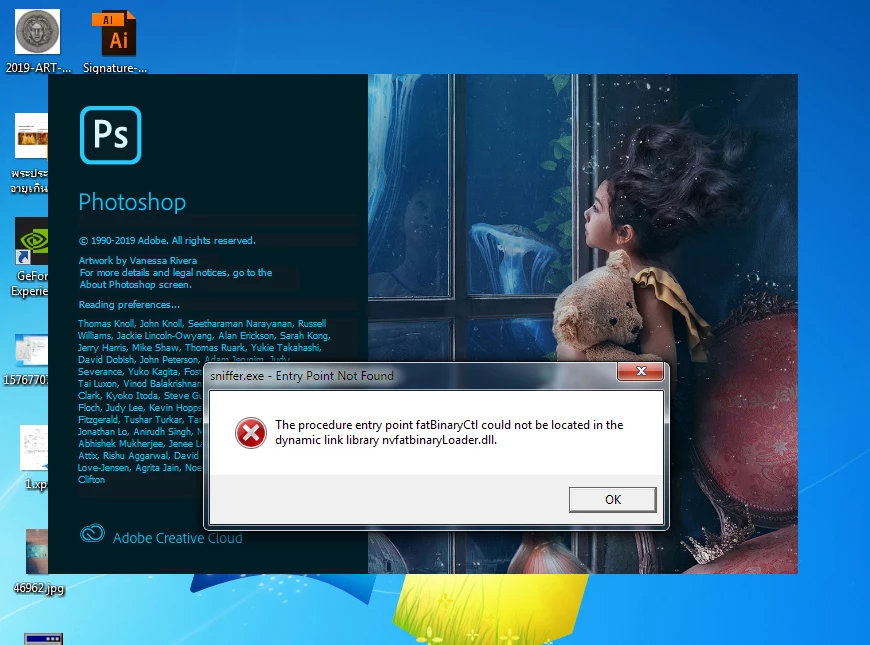


Not sure how to fix this ploblem ?? 

This topic has been closed for replies.
Correct answer

Hi

Did you try doing a clean install of the GPU driver from Nvidia, during the install there's an option for custom install and from there you'll find an option to perform a clean install

3 replies

Participant
April 21, 2024

D Fosse
Community Expert
Community Expert
January 10, 2020

Sniffer.exe is a small program embedded in Photoshop, that tests the video card for available functions and compatibility.


A clean reinstall (following Ged's instruction) over the current driver is possibly enough - but I'd uninstall first for good measure.


When I change video cards I always carefully uninstall the previous driver, including all and any additional components that may have come bundled with it. Then put in the card and install the new driver.


When you install you don't have to install all the components of the driver, unless you think you may need them. Most of it is for gaming purposes. You can uncheck everything except the basic driver.

Participant
January 10, 2020

Thank you.

Correct answer
January 10, 2020

Hi

Did you try doing a clean install of the GPU driver from Nvidia, during the install there's an option for custom install and from there you'll find an option to perform a clean install

Participant
January 10, 2020


I tried clean install and custom install , check perform a clean install. It's worked.

Thank you very much.

January 10, 2020

You're welcome 🙂