
Question
Position of elements in dialog box
How i can define postion of elements in dialog box.
var box = new Window('dialog', "TEST");
box.panel2 = box.add('panel', [0,0,200,150], "Channels");
box.panel2.group1 = box.panel2.add('group', [5,5,100,30]);
box.panel2.group1.orientation='row';
box.panel2.group1.alignment = 'left';
box.panel2.group1 = box.panel2.group1.add("checkbox", [5,5,100,30], "Cyan");
box.panel2.group2 = box.panel2.add('group', [5,45,100,30]);
box.panel2.group2.orientation='row';
box.panel2.group2.alignment = 'left';
box.panel2.group2 = box.panel2.group2.add("checkbox", [5,45,100,30], "Magenta");
box.panel2.group3 = box.panel2.add('group', [5,85,100,30]);
box.panel2.group3.orientation='row';
box.panel2.group3.alignment = 'left';
box.panel2.group3 = box.panel2.group3.add("checkbox", [5,85,100,30], "Yellow");
box.panel2.group4 = box.panel2.add('group', [5,125,100,30]);
box.panel2.group4.orientation='row';
box.panel2.group4.alignment = 'left';
box.panel2.group4 = box.panel2.group4.add("checkbox",  [5,125,100,30], "Black");
var btnGroup = box.add ("group");
btnGroup.orientation = "row";
var btnOk = btnGroup.add("button", undefined, "OK");
var btnCancel = btnGroup.add("button", undefined, "Cancel");
box.center();
btnOk.onClick = function() {
    box.close(1);
};
btnCancel.onClick = function() {
    box.close(0);
};
box.show();
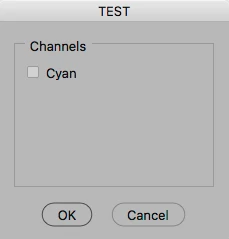
With this script i got this result:
 AdChoices