


Participant
July 29, 2017
Answered

Positioning a layer by its content upper right corner in an action - possible?

  • July 29, 2017
  • 2 replies
  • 375 views

Hi,

I've got an background/layer with 1920x1080 px. The layer on top has a photo as content.

Now I'd like tor create an action, which shifts the photo with it's upper right corner as reference to a defined position within the background.

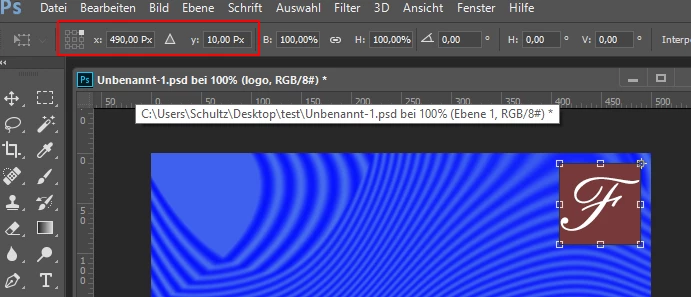
Doing this manually by "transform" is no problem, because I can select which reference-point I like to use. But using "transform" as an action it seems as the reference is always centered on the layer/photo.

(Photoshop CC on Mac)

Thanks for help

Regards Thilo
    This topic has been closed for replies.
    Correct answer

    Try to record it this way:

    First align the photo layer to top and right edge of the background layer.

    Ctrl+A / Layer > Align > ...

    This way the upper right corner of the photo gets the coordinates x=1920 and y=0.

    Then choose the reference point and use the x | y coordinates for positioning the photo.

    Fenja

    2 replies

    Correct answer
    July 29, 2017

    Try to record it this way:

    First align the photo layer to top and right edge of the background layer.

    Ctrl+A / Layer > Align > ...

    This way the upper right corner of the photo gets the coordinates x=1920 and y=0.

    Then choose the reference point and use the x | y coordinates for positioning the photo.

    Fenja

    TVN01Author
    Participant
    July 29, 2017

    Wow Fenja! What a smart solution!!

    It works fine and I'm impressed!

    Thanks a lot! Thilo

    Chuck Uebele
    Community Expert
    Community Expert
    July 29, 2017

    I don't think that's possible with just an action, but it is with scripting.

    TVN01Author
    Participant
    July 29, 2017

    Thanks Chuck,

    I thought so, but I have to learn it from scratch...