Participant
November 15, 2019
Answered

Possible bug: Can't change colors - Photoshop 2020

  • November 15, 2019
  • 2 replies
  • 14621 views

Hi everyone.


I have a very strange bug with photoshop, I am not sure if I am doing something wrong. ( I've updated recently to ver. 2020 ).


Well it's pretty simple, whatever I do, I'm stuck with the grey color. ( see below )

https://media.giphy.com/media/j1zluNRLd1lBOssOx9/giphy.mp4


Tried to open/close and reboot my laptop... no luck there.


Is there a setting that is locked that prevents me from changing the colors ?


Thanks for your help.


P.S. Working on macbook pro 15 from 2013, mojave. 

2,3 GHz Intel Core i7 - 16 Go 1600 MHz DDR3
This topic has been closed for replies.
Correct answer

Hi

It's hard to see the interface because the video you posted is a wee bit small

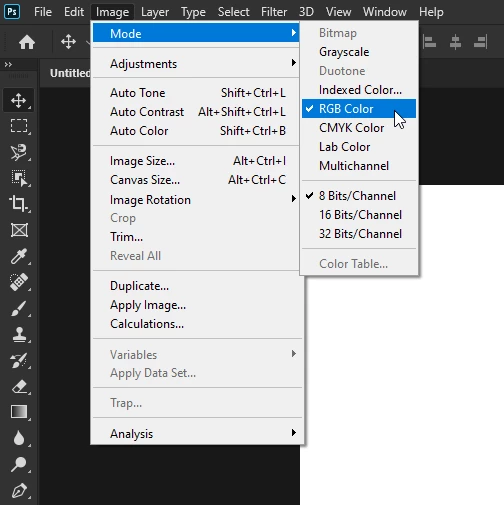
Have to checked the image mode your working in, perhaps you could post screenshot with all the pertinent panels opened

2 replies

Correct answer
November 15, 2019

Hi

It's hard to see the interface because the video you posted is a wee bit small

Have to checked the image mode your working in, perhaps you could post screenshot with all the pertinent panels opened

Kevin Stohlmeyer
Community Expert
Community Expert
November 15, 2019

Its a forum glitch. Use cmd/ctrl and + to zoom in to full res. User was in grayscale mode.

Participant
November 15, 2019

Thanks

Kevin Stohlmeyer
Community Expert
Community Expert
November 15, 2019

You are in grayscale color mode. Go to Image/Mode and change to RGB or CMYK.