Participant
December 28, 2019
Answered

Posteriser

  • December 28, 2019
  • 3 replies
  • 750 views

Bonjour,

comment posteriser une photo sur Photoshop iPad ?

This topic has been closed for replies.
Correct answer jane-e

Bonjour Ricci,

In Photoshop for desktop, you would choose Layer > New Adjustment Layer > Posterize. 

On Photoshop for iPad, here are the Adjustment layers, and Posterize is not a choice.
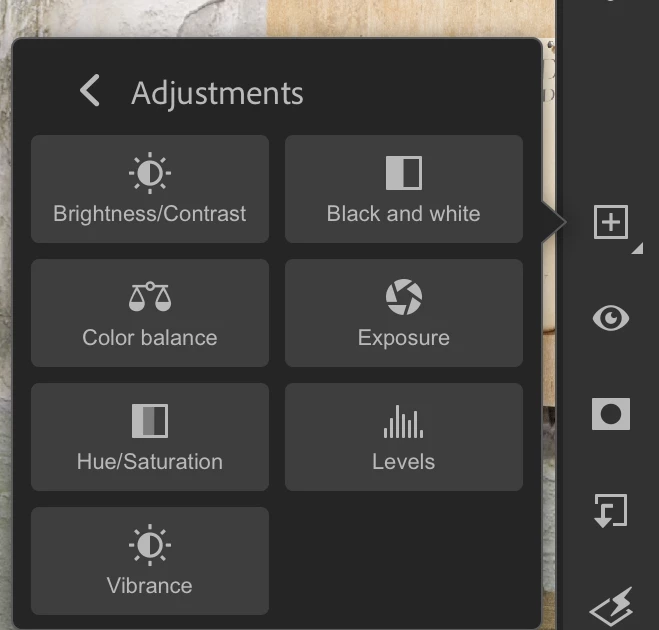
 

With no documents open, you can click "Suggest a Feature" in the upper right corner.

 

~ Jane

3 replies

jane-e
Community Expert
jane-eCommunity ExpertCorrect answer
Community Expert
January 12, 2020

Bonjour Ricci,

In Photoshop for desktop, you would choose Layer > New Adjustment Layer > Posterize. 

On Photoshop for iPad, here are the Adjustment layers, and Posterize is not a choice.


With no documents open, you can click "Suggest a Feature" in the upper right corner.


~ Jane

davescm
Community Expert
Community Expert
December 28, 2019

Hi , I've moved your post from the Photoshop forum to the Photoshop for Mobile forum where you are more likely to get help with your issue.


Dave

RicciAuthor
Participant
December 28, 2019

Posterize