Participant
June 30, 2022
Question

Pressure sensitivity problem while using drawing tablet in Photoshop (Windows)

  • June 30, 2022
  • 1 reply
  • 188 views

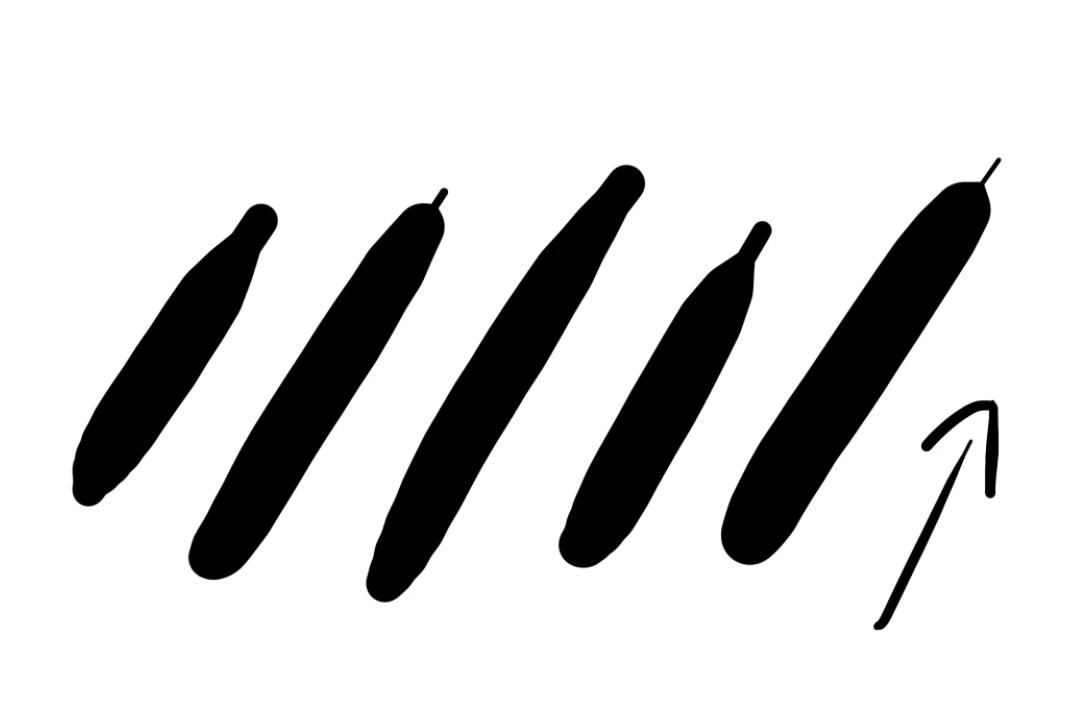
Hey guys i bought an drawing tablet and im having a problem where the end of my strokes are looking weird like this, where the correct would be an more organic apearence. I think its a problem with some sensitivity settings in Photoshop since its working fine in other apps. Can anyone help?


{Title edited by Moderator}

This topic has been closed for replies.

1 reply

Ranjisha Sengupta
Legend
June 30, 2022

Hi there,


Sorry to hear about the trouble with the brush strokes while using your tablet in Photoshop.

Could you please share the version of Photoshop (Help > About Photoshop) and the version of  Windows on your computer? Do you see this behavior only in Photoshop or other applications (e.g., MS Paint)? Would you mind sharing your tablet details? Since when is it happening?

 You can check this article for tablet issues in Photoshop: https://helpx.adobe.com/photoshop/kb/tablet-support-faq-photoshop.html

If this doesn't fix the issue, try resetting the preferences of Photoshop and see if it helps? 

https://helpx.adobe.com/photoshop/using/preferences.html

Note: Make sure you back up all your custom presets, brushes & actions before restoring Photoshop's preferences. https://helpx.adobe.com/photoshop/using/preset-migration.html


Let us know how it goes.


Thanks,

Ranjisha

Participant
July 2, 2022

Hey Ranjisha, thanks for such a quick answer! I'm using the version -23.3.2 Release- ( not sure what the 'release' means).

I tested the tablet in another drawing software called "Krita" and it worked just fine without me tweaking up any configuration.

My tablet is a Wacom  One CTL472 that I bought a week ago and the Wacom's software is currently updated. Heres a last comparison just to be clear. I'm going to try what you suggested right now and reply this post with my feedback. And again, thank you for your attention!


Gilson Azevêdo
Participant
July 2, 2022

Hello how are you? To solve this problem, you can do the following:


Open Notepad, and type:


# Use WinTab
UseSystemStylus 0


Then save the file with the name PSUserConfig.txt and UTF-8 encoding


After that, add the file in the following path: C:\Program Files\Adobe\AdobePhotoshop2022


This will solve your problem.

Notepad text needs to look the same as in the attachment image.