
jaank
Participant
September 5, 2016
Answered

Preventing fill dialog box with scripting

  • September 5, 2016
  • 1 reply
  • 473 views

Hi.

I have an automation script that fills certain pixels on a layer. Everything works, but sometimes it will display the fill dialog box for settings with some (not all) png files. I need to get rid of the dialog box. Is there a possibility to do this with scripting ? for example a default option?
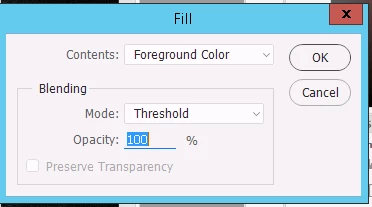
Thanks!

Photoshop CC 2015.5

Windows 8.1

This topic has been closed for replies.
Correct answer jaank

Okay, look's like I solved the problem.

The dialog box showed up on the png files, that have Image->Mode->Indexed Color.

So before the filling, I added the following script, that will ensure the Image Mode will be RGB:

var idCnvM = charIDToTypeID( "CnvM" );
var desc36 = new ActionDescriptor();
var idT = charIDToTypeID( "T  " );
var idRGBM = charIDToTypeID( "RGBM" );
desc36.putClass( idT, idRGBM );
executeAction( idCnvM, desc36, DialogModes.NO );

1 reply

jaank
jaankAuthorCorrect answer
Participant
September 5, 2016

Okay, look's like I solved the problem.

The dialog box showed up on the png files, that have Image->Mode->Indexed Color.

So before the filling, I added the following script, that will ensure the Image Mode will be RGB:

var idCnvM = charIDToTypeID( "CnvM" );
var desc36 = new ActionDescriptor();
var idT = charIDToTypeID( "T  " );
var idRGBM = charIDToTypeID( "RGBM" );
desc36.putClass( idT, idRGBM );
executeAction( idCnvM, desc36, DialogModes.NO );